Connecting to a WebDAV server under Windows

Procédure

Introduction

WebDAV, or Web-based Distributed Authoring and Versioning, is a protocol that extends HTTP for managing files on remote servers. It allows server directories to be mounted on your local system for easy use in a variety of applications.

Connecting via File Explorer

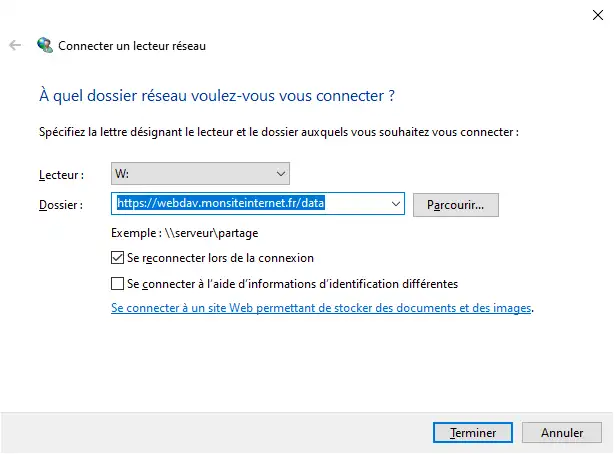
In Windows File Explorer, right-click on "This PC" and select "Add Network Location". Then enter the URL of your WebDAV server, assign a drive letter, and enter your credentials if necessary.

Connecting to a WebDAV server under Windows

Connecting via the command line

You can also use the command line to connect a WebDAV network drive:

Code
net use w: https://webdav.monsiteinternet.fr/data

Once connected, you can manage the files as if it were a local drive. To disconnect the drive, use :

Code
net use w: /delete

help.lws.net/a/1810
Was this article helpful?

Yes

No

Read 19 143 times

Thank you! Feel free to ask questions about our documentation if you would like more information, and help us improve it.

Similar articles

Questions about the article 1

Ask a question
mamylene
4 Jun 2025
Bonjour, je ne connais pas l'URL du serveur Webdav ni la lettre de connexion. Où les trouve-t-on ? merci
Maxence-LWS Official answer
6 Jun 2025

Bonjour,

Je vous remercie pour votre message. 

Afin d'obtenir ces éléments, je vous invite à contacter notre support, cela dépend en effet de la formule détenue (LWS Panel, cPanel...) et d'autres paramètres.

Je vous remercie de votre attention et reste à votre disposition pour toute autre question ou complément d'information.

Vous pouvez nous contacter depuis votre espace client ou sur cette page : https://www.lws.fr/contact

Cordialement, L'équipe LWS 

Was this answer helpful?

A question about this article?

Ask the LWS team and the community. Answers are published after moderation.

Ask the LWS team and its community a question

GDPR: Controller: LWS-Ligne Web Services. Purpose: moderation and public publication of your question, possible notification of an answer. Legal basis: consent (Art. 6(1)(a) GDPR). Email retention: 90 days after notification, 12 months maximum without an answer. To exercise your rights, see the GDPR section of our Terms and Conditions.