How do I change my cb and PayPal direct debit details?

Procédure

Introduction

This help section explains how to change your credit card and PayPal details. This help will also explain how to manage the auto-renewal of your services.

How do I update my CB direct debit details?

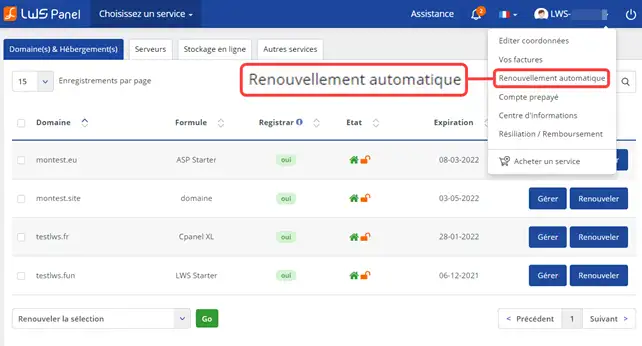
1. log in to your LWS Panel customer area, then click on your login in the top right-hand corner. Then click on"Automatic Renewal".
How do I change my cb and PayPal direct debit details?

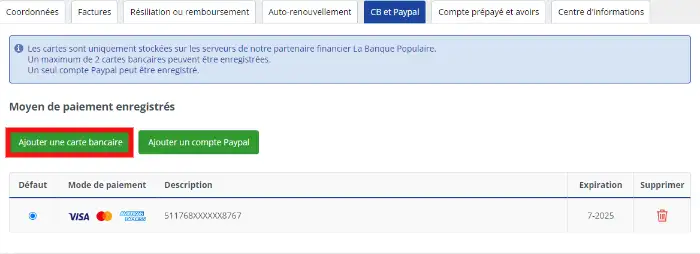
2. Click on the"Credit card and PayPal" tab and then on"Add a credit card".
How do I change my cb and PayPal direct debit details?

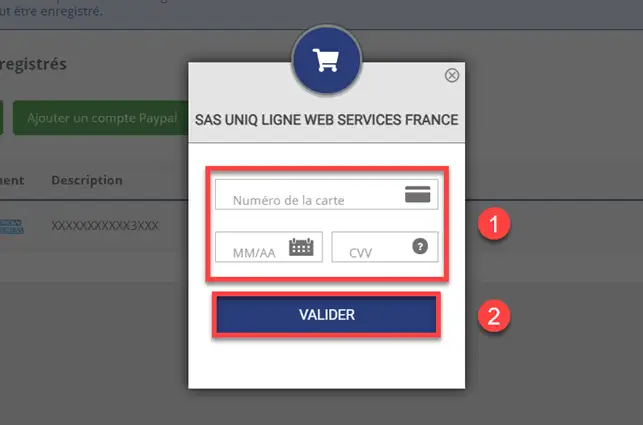
To add a credit card: Enter your credit card details and click on"Submit" to save your changes.
How do I change my cb and PayPal direct debit details?


How do I change my PayPal account?

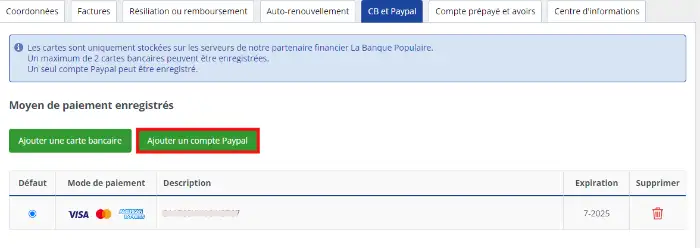
To change your PayPal account, go to the "Credit card and PayPal" tab, then click on"Add a PayPal account".
How do I change my cb and PayPal direct debit details?

Then enter your email address and click"Next".
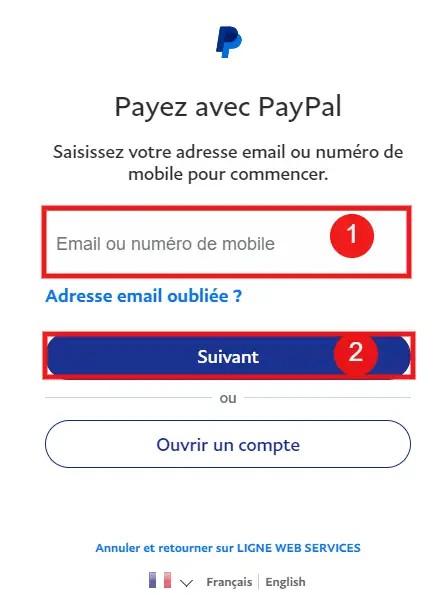
How do I change my cb and PayPal direct debit details?

How do I configure auto-renewal for each service?

Once you have modified your credit card or PayPal account, click on the"Auto-renew" tab.

From here, you can change the type of direct debit. You can choose the payment method you want to configure (Bankcard or PayPal). If you have several bankcards, you will be able to define the card to be used per service.

You can also choose the duration of your commitment.
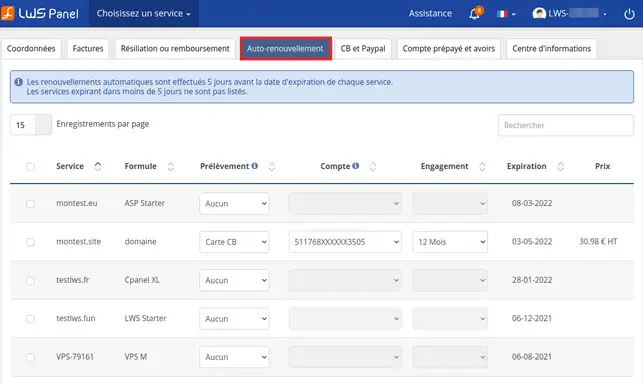
How do I change my cb and PayPal direct debit details?

[Every change is automatically validated[/tips].

Please note that you can register a PayPal account and a maximum of two credit cards in your customer account.

Conclusion

You can now manage the automatic renewal of your hosting with LWS.

Trucs et astuces


You can stop automatic renewal at any time if you wish. Simply change the field to "none" in the"debit" section

.

Don't hesitate to share your comments and questions!

Change your direct debit details and activate automatic renewal in video


Activate and manage automatic renewal

Once you have updated your bank details, you can activate automatic renewal simply from your customer area.

See our help for managing the automatic renewal of your service(s).

Conclusion

You can now manage the automatic renewal of your hosting services with LWS. You can stop automatic renewal at any time if you wish.

Don't hesitate to share your comments and questions!

help.lws.net/a/314
Was this article helpful?

Yes

No

Read 44 090 times

Thank you! Feel free to ask questions about our documentation if you would like more information, and help us improve it.

Similar articles

Questions about the article 2

Ask a question
laure
31 Oct 2022
Bonjour, j'ai déjà changé mes coordonnées bancaire car ma CB arrivait à expiration, pourtant je continue de recevoir des mails de LWS me demandant de la faire... Cordialement Laure
fabrice-LWS Official answer
1 Nov 2022
Bonjour, après vérification, vous semblez avoir supprimé l'ancien mode de paiement hier, de votre espace client. C'est très certainement la raison pour laquelle vous avez continué à recevoir des emails concernant ce moyen de paiement qui arrivait à expiration.
Was this answer helpful?
Gravatar
24 Dec 2023
Bonjour comment changer un ancien carte bancaire vers un nouveau carte bancaire
Benjamin-LWS Official answer
26 Dec 2023

Bonjour,

Merci de votre retour.

Comme vous pouvez le voir sur la documentation et depuis votre espace client, vous pouvez supprimer votre ancienne carte bleu en cliquant sur le bouton Supprimer et puis en ajouter une nouvelle.

Je vous remercie de votre attention et reste à votre disposition pour toute autre question ou complément d'information.

Nous vous invitons à contacter notre service support à travers votre espace client, afin de vous apporter une aide si vous rencontrez des difficultés quelconques. (Contacter le support)

Cordialement, L'équipe LWS 

Was this answer helpful?

A question about this article?

Ask the LWS team and the community. Answers are published after moderation.

Ask the LWS team and its community a question

GDPR: Controller: LWS-Ligne Web Services. Purpose: moderation and public publication of your question, possible notification of an answer. Legal basis: consent (Art. 6(1)(a) GDPR). Email retention: 90 days after notification, 12 months maximum without an answer. To exercise your rights, see the GDPR section of our Terms and Conditions.


