Anonymous Whois: definition, activation, and antispam management
Procédure
What is whois?
Whois tools are directories of domain name owners.
Accessible to everyone from a simple internet browser, whois tools make it possible to find all the declared contact details for each domain name holder: last name, first name, postal address, email address, phone number…
The results of a Whois search appear as in the image below:
What is anonymous whois?
The contact details in Whois can be collected by certain malicious companies to send buyout offers for your domain name, or even unsolicited advertising.
Anonymous whois makes it possible to anonymize the contact details of domain name owners in official whois tools.
Since the GDPR law came into force: the General Data Protection Regulation on May 25, 2018, LWS activates Anonymous Whois for any natural person (individuals..). Legal entities (companies, associations ...) are, however, still required to display their contact details; only the email address is replaced by an alias in Anonymous Whois.
Difference between a legal entity and a natural person with Anonymous Whois:
Legal entity
Natural person
Name
Visible
Hidden
Postal address
Visible
Hidden
Country
Visible
Visible
Email address
Visible or hidden depending on anti-spam protection
Visible or hidden depending on anti-spam protection
Anonymous Whois is applied to domain names managed by ICANN, namely the most common generic extensions (.com, .net, .org, .info, .biz, .co, .cc etc as well as all new extensions such as .photos, .boutique, .maison etc).
Domain names managed by Afnic (.fr, .yt, .re, .pm, .wf) registered in the name of an individual automatically benefit from restricted publication of contact details in Whois tools, at no extra cost. This is not the case for legal entities (companies, associations, institutions)
Many registries (Eurid for domain names in .eu, Dns.lu for domain names in .lu etc) refuse to anonymize the data of domain name holders.
If the data is anonymized, the contact details will then be replaced by the mention Anonymous, as in the image below:
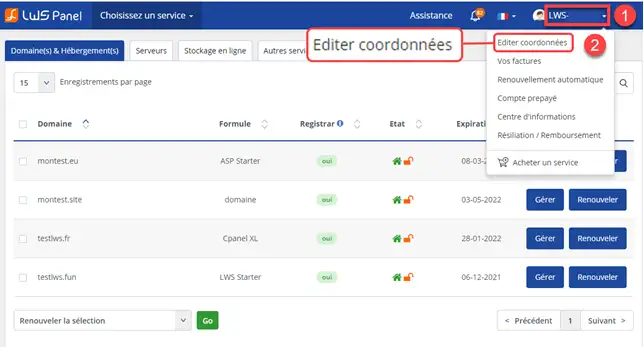
Click on your username at the top right of the page to display the management menu for your customer account and click on "Edit contact details"
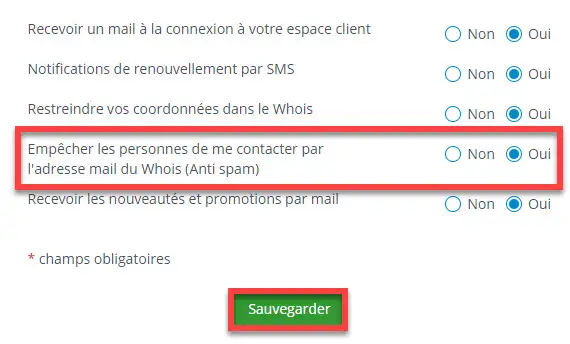
All that remains is to deactivate the option or activate it as you wish
Whois anti-spam management.
What is Whois anti-spam protection?
Since the implementation of the GDPR law, your data is automatically hidden in the Whois directories provided by domain registries. Regarding your contact email address linked to your domains, it is replaced by an alias so as not to disclose your address.
If a regular user tries to contact you via the alias appearing in the WHOIS directories, they will automatically receive an email informing them that protection is active and that they cannot contact you. Only a few organizations such as domain registries can contact you via this alias.
Click on your username at the top right of the page to display the management menu for your customer account and click on "Edit contact details"
All that remains is to deactivate the option or activate it as you wish
What is the difference between enabling and disabling this option?
If you disable this option, your contact email address will always remain hidden and therefore replaced by the alias in the Whois directory.
The difference is that anyone will be able to contact you via this alias, with the email sent arriving directly in your contact mailbox.
How can I remove the alias so that my email address appears?
If you want your email address to appear in the WHOIS directory instead of the alias, you will need to set WHOIS publication to yes on the management page for your contact details.
WARNING: By enabling this option, in addition to disclosing your email address, it will also disclose the rest of your contact details.
Conclusion
You now know how to:
Identify the role of Whois tools in managing the identity of domain name owners.
Understand the importance of Anonymous Whois for protecting your personal data online.
Differentiate between the information displayed for legal entities and natural persons in Whois directories.
Enable or disable Anonymous Whois and Whois anti-spam protection for your domain names at LWS.
Distinguish the effects of enabling or disabling anti-spam protection on your Whois contact details.
🛡️ Thanks to this article, the sometimes complex world of Whois and the protection of your personal data becomes clearer and more accessible. You are now equipped to navigate safely in the world of domain names, while keeping control of your privacy. 🌐
🙏 Thank you for taking the time to read this article. Your feedback is valuable, so feel free to leave a comment to share your experience or ask questions about the service. See you soon for more digital discoveries! 💬
Mon site gîte des lauriers est suspendu depuis 3 semaines, j'ai fait le nécessaire pour mes coordonnées exactes, et il n'est pas encore en ligne, que faire.
F✓
fabrice-LWS Official answer
23 Sept 2022
Bonjour, votre nom de domaine est actuellement suspendu par le registre supérieur pour non vérification d'identité. Vous avez dû recevoir un email vous demandant de confirmer votre identité par un lien se trouvant sur ce dernier. Je vous inviet à relancer la procédure en vous rendant sur votre espace client, cliquez sur "Votre identifiant" puis sur "Editer coordonnées". Revalidez vos informations en cliquant sur le bouton de "Sauvegarde" en bas de page. Cela relancer la procédure et le renvoi de l'email du registre. Je vous invite à vérifier que l'email n'atterrisse pas dans le dossier spam de votre boite email, ce qui peu arriver.
Was this answer helpful?
A
Alex
26 Jan 2023
Bonjour,
J'aimerais savoir comment activer le whois anonyme pour mes sites car je ne trouve pas comment le faire.
Merci d'avance.
N✓
nicolas-LWS Official answer
26 Jan 2023
Bonjour, Pour activer le Whois Anonyme, vous devez vous connecter à votre espace client LWS, sélectionner le produit (nom de domaine) et cliquer sur le bouton "Gérer le produit". Une fois que vous y êtes, vous verrez une section intitulée "Protection Whois Anonyme". Cliquez sur le bouton "Activer" pour activer le Whois Anonyme. Nous espérons avoir répondu à votre question. Si vous avez besoin d'aide supplémentaire, n'hésitez pas à nous contacter. Cordialement, LWS Support Technique
Was this answer helpful?
B✓
Benjamin-LWS Official answer
26 Jan 2023
Bonjour,
Merci de votre retour.
Le Whois Anonyme dépend dans un premier lieu du registre du domaine, ensuite ça dépend aussi si vous avez commandé le domaine sous le nom d'une société ou pas.
Si vous avez enregistré votre nom de domaine en tant que société, le Whois Anonyme n'est pas possible.
Sinon le Whois Anonyme est activé par défaut, et désactivable depuis votre espace client.
Vous avez aussi la possibilité de cacher votre adresse-mail, plus d'informations sur le sujet depuis cette documentation : https://aide.lws.fr/a/1185
Je vous remercie de votre attention et reste à votre disposition pour toute autre question ou complément d'information.
Nous vous invitons à contacter notre service support à travers votre espace client, afin de vous apporter une aide si vous rencontrez des difficultés. (https://aide.lws.fr/a/268)
Cordialement, L'équipe LWS
Was this answer helpful?
T
TC
22 Feb 2023
Bonjour, j'ai bien activé l'option WhoIS anonyme sur le panneau de gestion. Or, sur le site who.is, mes coordonnées sont bien en libre accès - j'ai déjà reçu des courriels non sollicités. Comment faire pour remédier à ce problème svp, Merci.
B✓
Benjamin-LWS Official answer
1 Mar 2023
Bonjour,
Merci de votre retour.
Pour les domaines ayant l'extension ".fr", le registre Afnic propose l'anonymisation complète pour les particuliers.
Pour ce qui est des sociétés l'anonymisation n'est pas proposé par ce registre.
Je vous remercie de votre attention, et nous restons à votre disposition depuis le support disponible depuis votre espace client. (https://aide.lws.fr/a/264)
Cordialement, L'équipe LWS
Was this answer helpful?
A question about this article?
Ask the LWS team and the community. Answers are published after moderation.
Ask the LWS team and its community a question
!
To enable this form, please tick the two consent boxes below.



 Yes
 No
 About
