
Online help
The web host accessible to all
Procédure
The FSO (File System Object) allows you to manipulate files (create, delete and read files) using the ASP programming language.
This module is activated in Plesk, but by default no rights are granted to the user.
Find out below how to change the rights to be able to use the FSO.
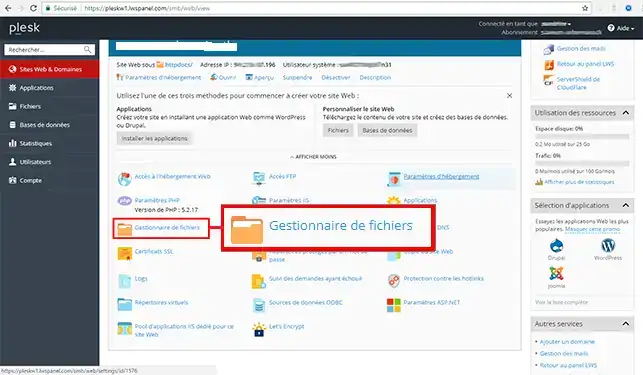
1. Connect to your Plesk panel and click on the"File Manager" tab.
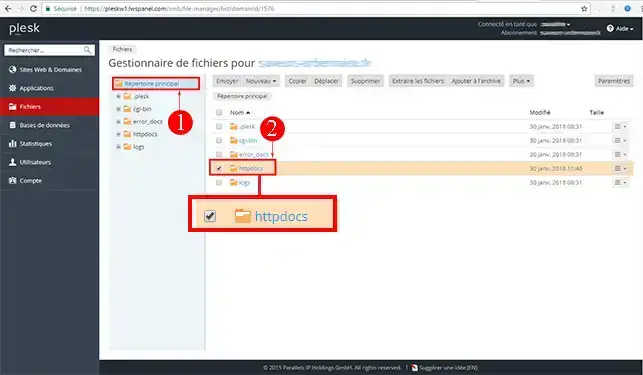
2. This takes you to the file explorer. Go to the root directory and move your mouse over the"httpdocs" directory.
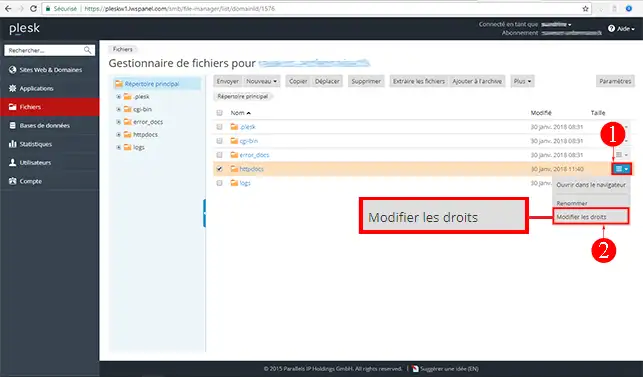
3. Click on the little arrow that appears and click on"Change rights".
On the page that appears, click on the user name"Plesk Domaine User" in the list of users.
On the right-hand side, you can then adjust this user's rights to the"httpdocs" directory to suit the needs of your script.
Once you have modified the rights, click on"Apply" and then on"Ok".
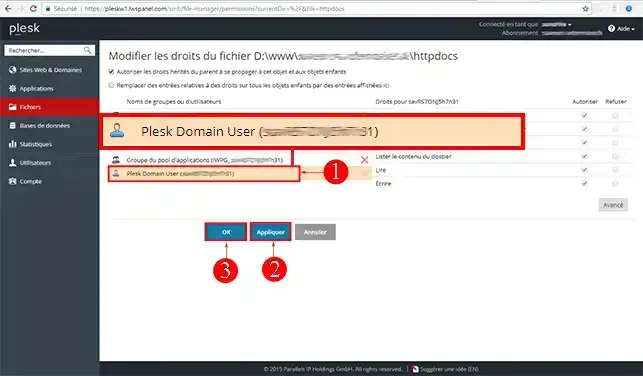
4. Click "Ok" to validate the request.
Ask the LWS team and the community. Answers are published after moderation.
 About LWS :
LWS is a 100% French web hosting company that focuses on quality and innovation and offers a responsive and competent technical service at affordable prices.
About LWS :
LWS is a 100% French web hosting company that focuses on quality and innovation and offers a responsive and competent technical service at affordable prices.



 Yes
Yes No
No