
Online help
The web host accessible to all
Procédure
This feature is useful if you have several domain names and you want these domain names to provide access to a single website.
For example: you have published your website on mydomain.com but you also own mydomain.fr --> you can redirect mydomain.fr so that it allows access to mydomain.com.
Requirement 1: The companion domain name you are going to create must exist in your cPanel account.
Requirement 2: The companion domain name you have created must point to the name servers in your cPanel account (via DNS Servers or DNS Zones).
You can create 2 types of redirection :
The 301 redirect allows you to permanently redirect one URL to another.
Search engines interpret this redirection correctly and automatically update their index by replacing the old URL with the new one.
That said, it can take several weeks before this is taken into account.
The 302 redirect is used to temporarily redirect one URL to another.
Not all search engines interpret this redirection in the same way.
As a general rule, they do not remove the redirected page from their index, but they do associate the characteristics of the original page with the target page.
1. Log in to your cPanel account, scroll down the page and click on the "Additional domains" icon.
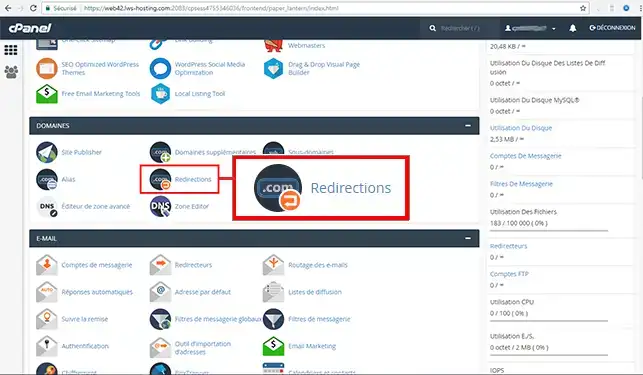
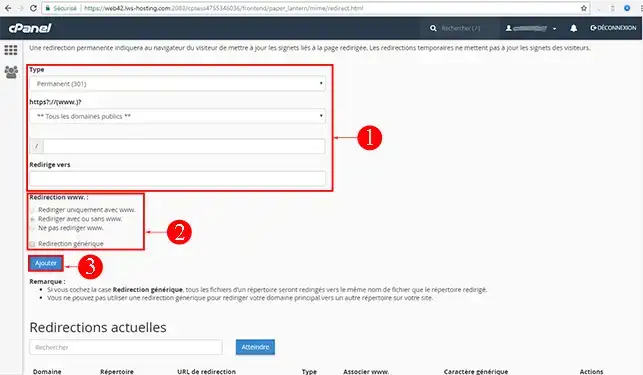
2. Fill in the required fields and click on the"Add" button:
Type: Choose the type of redirection. You can choose between 301 (permanent) or 302 (temporary) redirection.
https://(www): Choose the domain name to be redirected. By default, all domain names linked to your cPanel interface will be redirected.
Redirect to: Indicate the domain name to which this should be redirected.
WWW redirect: cPanel gives you the option of redirecting your domain name with or without the"WWW".
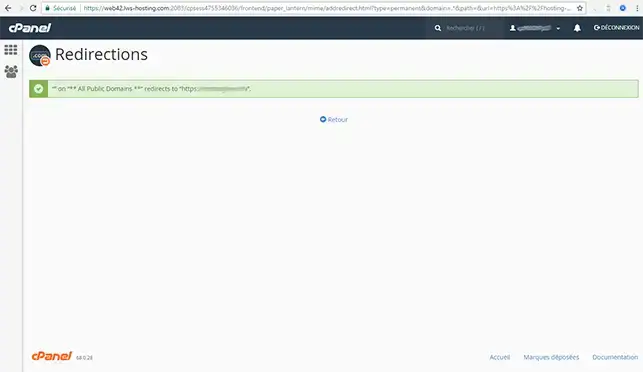
Your web redirection is taken into account immediately: if a visitor types http://www.mondomaine.fr or http://mondomaine.fr, they will access the website published under http://www.mondomaine.com.
Need help using cPanel?
See all our cPanel training videos
You can delete an existing web redirection by going to the"Domains" section and clicking on the"Redirections" tab of your cPanel web hosting. All current redirects are listed on this page.
You can now create a redirect from your domain name to another page or another website on cPanel web hosting. The redirect is very useful if you want to park a domain name.
Don't hesitate to share your comments or questions!
Ask the LWS team and the community. Answers are published after moderation.
 About LWS :
LWS is a 100% French web hosting company that focuses on quality and innovation and offers a responsive and competent technical service at affordable prices.
About LWS :
LWS is a 100% French web hosting company that focuses on quality and innovation and offers a responsive and competent technical service at affordable prices.



 Yes
Yes No
No