


How do I create a sub-domain in cPanel?

Procédure

What is a sub-domain?

A sub-domain is a part of a site address that precedes the domain name. The sub-domain is separated from its domain by a dot. This is used to divide a website into several parts, for example https://aide.lws.fr. The "help" section is a sub-domain of lws.fr.

This feature is very useful when you want to split your site into several parts (help, blog, photos, for example). When you use this feature, a new directory will be created inside your web space so that you can manage your sub-domain.

This tutorial will help youlearn how to configure a sub-domain on your web hosting.

How do I create a sub-domain in cPanel?

Subdomains are very useful for dividing a site into several distinct sections, each with a clearly defined address. They also avoid having to use folder names that are too long.

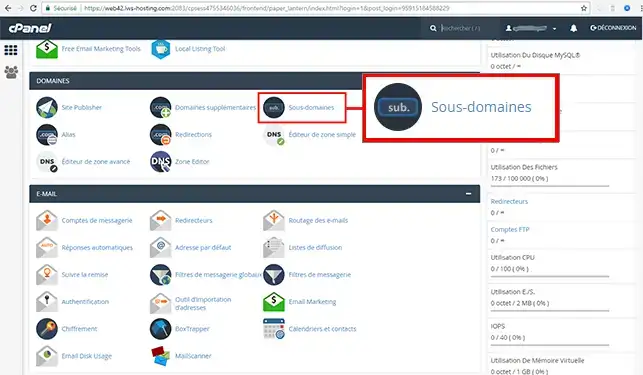
1. Log in to your cPanel account, scroll down the page and click on the "Subdomains" icon.

How do I create a sub-domain in cPanel?

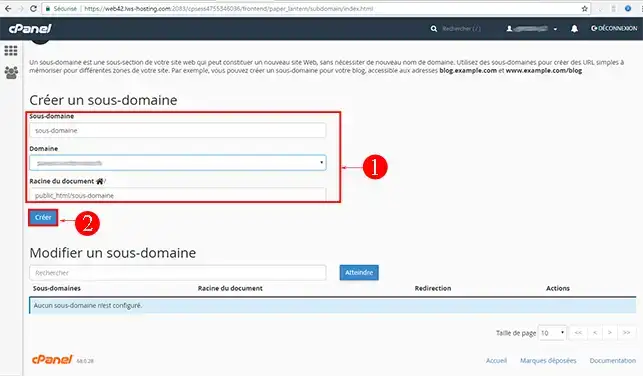
2. Fill in the required fields and click on the "Create" button:

Subdomain: If your domain name is "example.com" and the subdomain is "blog.example.com", enter only "blog" as the subdomain.

Domain: Choose from the list the domain to which the sub-domain will be attached.

Document root: The root is set automatically by cPanel. The folder usually has the same name as the subdomain. The path can be changed. If you set the path to"public_html" or"www", the sub-domain will be redirected to the root of your web space.

How do I create a sub-domain in cPanel?

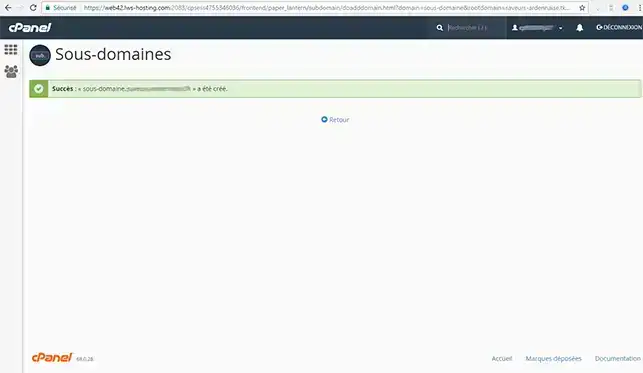
Your sub-domain is created immediately:

How do I create a sub-domain in cPanel?

cPanel video tutorial: How do I create a subdomain in cPanel?


Need help using cPanel?

See all our cPanel training videos

Modifying a sub-domain

You can modify an existing sub-domain by going to the"Domain" section and clicking on the"Sub-domain" tab.

The following actions can be taken:

  • Change the root of your sub-domain so that it points to another directory in your web space
  • Delete the sub-domain
  • Manage the redirection to point your sub-domain to another sub-domain or domain name.


Conclusion

You are now able to add and modify a sub-domain on your cPanel Web hosting offered by LWS. A sub-domain is very useful if you decide to split your site into several themes (photos, help, blogs for example).

Don't hesitate to share your comments and questions!

help.lws.net/a/673
Was this article helpful?

Yes

No

Read 33 946 times

Thank you! Feel free to ask questions about our documentation if you would like more information, and help us improve it.

Similar articles

Questions about the article 3

Ask a question
yannlesaout
14 Nov 2022
Bonjour, Comment intégrer un sous domaine (déjà créé) au site du domaine conçu avec SiteBuilder Pro Cordialement Yann Le Saout
fabrice-LWS Official answer
15 Nov 2022
Bonjour, pour cela, il est nécessaire d'enlever une directive au niveau de votre fichier .htaccess se trouvant à la racine du site afin que cela fonctionne sans problème. Il est toutefois à noter que si vous republier le site principal conçu avec SiteBuilder, la directive supprimée se remettra en place et vous rencontrerez le même problème. La directive "DirectoryIndex index.php index.cgi index.html " a été supprimée par mes soins. Si vous désirez ne pas rencontrer de problème et ne pas être obligé de supprimer à chaque mise à jour de votre site, cette directive, je vous invite à changer de formule pour une formule cPanel. De plus, avec une formule cPanel, il vous sera possible de créer un site pour le domaine mais aussi pour les sous-domaines en utilisant SiteBuilder Pro, ce qui n'est pas possible avec votre formule actuelle.
Was this answer helpful?

manous
8 Jun 2023
Bonjour j'ai crée mon sous-domaine mais je ne sais pas comment l'utiliser ? je ne te trouve pas sur mon tableau de bord ?
Benjamin-LWS Official answer
15 Jun 2023

Bonjour,

Merci de votre retour.

Lors de la création d'un sous-domaine, celui-ci n'a pas de tableau de bord approprié, la gestion se fera sur le même tableau de bord que votre domaine.

Le sous-domaine est affecté à un dossier dans l'espace de fichiers, qui par défaut prendre le nom du sous-domaine.

L'outil Softaculous vous permettra d'installer des CMS, tel que Wordpress. (Utiliser Softaculous)

Je vous remercie de votre attention et reste à votre disposition pour toute autre question ou complément d'information.

Nous vous invitons à contacter notre service support à travers votre espace client, afin de vous apporter une aide si vous rencontrez des difficultés quelconque. (Contacter le support LWS)

Cordialement, L'équipe LWS 

Was this answer helpful?
Hermann
3 Aug 2023
Bonjour la création d'un sous-domaine sur Lws, ça prend combien de temps pour être actif? j'ai cré un sous-domaine depuis 2h je n'arrive pas à y accéder depuis le navigateur
Aurelien-LWS Official answer
8 Aug 2023

Bonjour, 

Je vous remercie pour votre message.

La création d'un sous-domaine est quasiment instantanée. Cependant, l'enregistrement dans la Zone DNS doit être propagé à l'ensemble des acteurs d'internet afin qu'ils le prennent en compte. Cette opération prend en général 2 à 6H mais peut aller jusqu'à 24H pour certains opérateurs télécom.

Cordialement, L'équipe LWS

Was this answer helpful?

A question about this article?

Ask the LWS team and the community. Answers are published after moderation.

Ask the LWS team and its community a question

GDPR: Controller: LWS-Ligne Web Services. Purpose: moderation and public publication of your question, possible notification of an answer. Legal basis: consent (Art. 6(1)(a) GDPR). Email retention: 90 days after notification, 12 months maximum without an answer. To exercise your rights, see the GDPR section of our Terms and Conditions.