
Online help
The web host accessible to all
Procédure
The"disk usage" function will allow you to check the consumption of your web hosting space on your cPanel interface in real time. This function also allows you to check the use of your MySQL database.
If, when adding a file to your web space, you get an error about exceeding the quota, you can use this feature to determine which files you can delete.
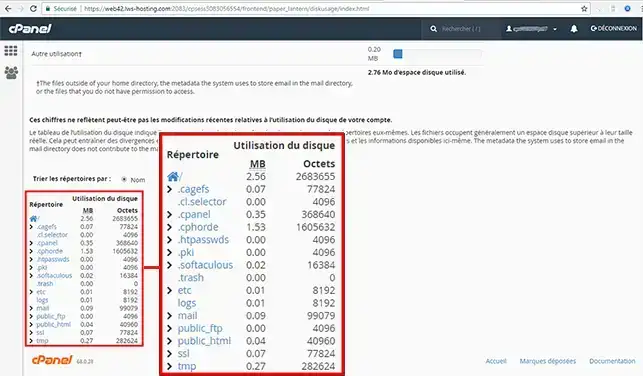
This interface displays the following disk space usage summaries:
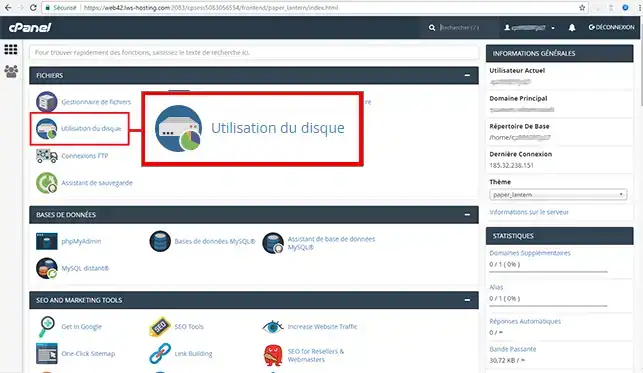
1. Log in to your cPanel account and click on the "Disk usage" icon.
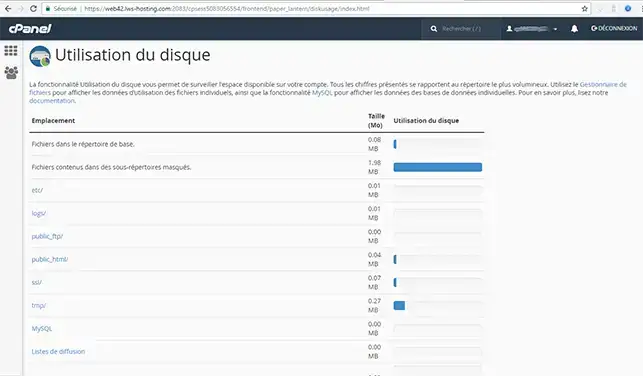
Here you can see all the folders at the root of your FTP account and their size:
Need help using cPanel?
See all our cPanel training videos
You can now check the disk space used on your LWS cPanel web hosting. If you need to, you can change your cPanel package to get more disk space for your website.
Don't hesitate to share your comments or questions!
Ask the LWS team and the community. Answers are published after moderation.
 About LWS :
LWS is a 100% French web hosting company that focuses on quality and innovation and offers a responsive and competent technical service at affordable prices.
About LWS :
LWS is a 100% French web hosting company that focuses on quality and innovation and offers a responsive and competent technical service at affordable prices.



 Yes
Yes No
No