


How to change the site's graphic template from SiteBuilder Pro

Procédure

What is a graphic template?

The graphic model is an essential element that should not be overlooked when creating a website. It is the image that your website will convey to your visitors.

SiteBuilder Pro offers you over 200 graphic templates that can be adapted to all types of website. Whether you decide to set up a showcase site, a blog or an online shop, you're sure to find the graphic theme that suits you on this website creation software.

You can test SiteBuilder Pro as well as the different graphic templates.

How do I change the graphic template for my site from the SiteBuilder Pro interface?

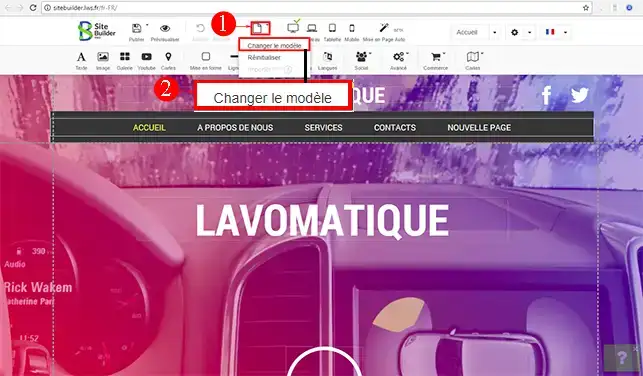
1. Log on to SiteBuilder Pro , click on the"New/Setup" tab and then on"Change template".

How to change the site's graphic template from SiteBuilder Pro


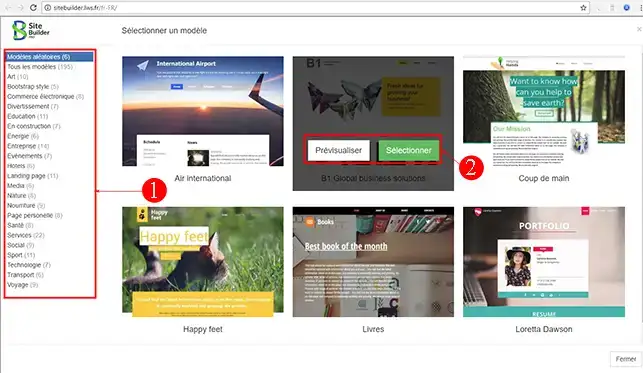
2. Choose the graphic template you want. You can choose a category,"Preview" or"Select" the theme you want.

How to change the site's graphic template from SiteBuilder Pro

Conclusion

You can now change your SiteBuilder Pro graphic template with your LWS shared hosting. When changing your graphic template, you may have to change the configuration of the elements you have already inserted on your website.

Don't hesitate to share your comments and questions!

help.lws.net/a/866
Was this article helpful?

Yes

No

Read 24 459 times

Thank you! Feel free to ask questions about our documentation if you would like more information, and help us improve it.

Similar articles

Questions about the article 2

Ask a question
Donschesca
9 Nov 2023
Bonjour LWS, j aimerai mettre un modèle graphique SITE EN CONSTRUCTION et en arrière plan configurer mon site internet avec mon modèle graphique souhaité. Comment faire cela?
Jordan-LWS Official answer
9 Nov 2023

Bonjour,

Nous tenions à vous remercier pour votre message et vous informer que nous sommes navré que vous n'ayez pas trouvé notre documentation prévue à cet effet

Effectivement, il est totalement possible de modifier votre mot de passe depuis votre interface LWS Panel et pour ce faire, je vous inviterais à suivre notre documentation à cet effet : https://aide.lws.fr/a/770

Je vous remercie pour votre attention et reste à votre disposition pour toute autre question ou complément d'information. Nous sommes là pour vous aider et vous accompagner dans toutes les démarches liées aux adresses de messageries.
Vous pouvez également contacter notre support technique pour obtenir de l'aide. Vous pouvez nous contacter depuis votre espace client ou sur cette page : https://www.lws.fr/contact_formulaire.php

Cordialement, L'équipe LWS 

--------

Hello,

We'd like to thank you for your message and inform you that we're sorry you didn't find our documentation for this purpose.

Indeed, it is entirely possible to change your password from your LWS Panel interface. To do so, please follow the instructions in our documentation: https://aide.lws.fr/a/770

I'd like to thank you for your attention and remain at your disposal should you have any further questions or require additional information. We're here to help and support you in all matters relating to e-mail addresses.
You can also contact our technical support team for assistance. You can contact us from your customer area or on this page: https://www.lws.fr/contact_formulaire.php

Sincerely, The LWS Team

Was this answer helpful?
Dune
5 Feb 2024
Bonjour, je souhaiterais apporter des modifications à mon site que j'ai depuis plus de 10 ans, comment faire? Je ne sais plus comment y accéder pour le modifier. Merci
Jordan-LWS Official answer
12 Feb 2024

Bonjour,

Je vous remercie pour votre message, s'il s'agit de notre ancien créateur de site internet, il suffira de se rendre sur votre site et d'insérer : /admin à la fin de l'adresse URL de votre site internet, suite à cela, il faudra s'authentifier et vous aurais la possibilité d'éditer votre site internet.

Si toutefois vous avez besoins d'assistance supplémentaire, je vous inviterais à ouvrir une demande d'assistance auprès du support technique, directement depuis votre espace client.


Je vous remercie pour votre attention et reste à votre disposition pour toute autre question ou complément d'information. 

Cordialement, L'équipe LWS.

Was this answer helpful?

A question about this article?

Ask the LWS team and the community. Answers are published after moderation.

Ask the LWS team and its community a question

GDPR: Controller: LWS-Ligne Web Services. Purpose: moderation and public publication of your question, possible notification of an answer. Legal basis: consent (Art. 6(1)(a) GDPR). Email retention: 90 days after notification, 12 months maximum without an answer. To exercise your rights, see the GDPR section of our Terms and Conditions.