
Online help
The web host accessible to all
Procédure
An SSL certificate encrypts the data between your customer and your website. Visitors to your website are thus assured that the data transmitted cannot be pirated. LWS offers the Let's Encrypt SSL certificate on all Web hosting packages. This certificate can be installed automatically via your customer area.
In addition to the security it provides for a website, it's good to know that it also influences your website's SEO. For some time now, websites with SSL security have ranked higher on the main search engines such as Google. It is therefore advisable to activate it as soon as the website is published.
Tohave a secure website, you can activate an SSL certificate on your customer account to obtain an https URL.
To do this, you can activate the free "Let's Encrypt" SSL certificate by following this documentation:
https://help.lws-hosting.com/en/Free-Lets-Encrypt-SSL-Certificates
1. Once the certificate has been activated, go toyour site adminsitration under SiteBuilder Pro
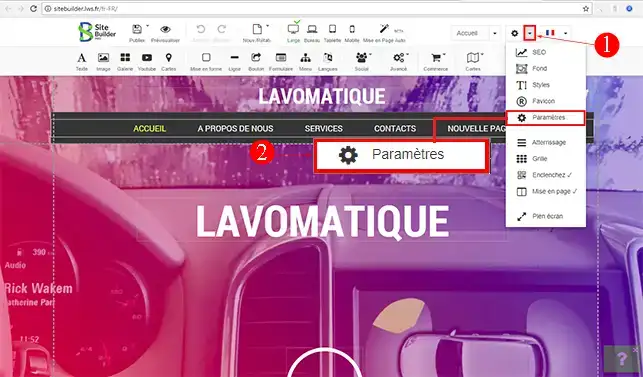
2. Click on the"Settings" tab on your toolbar and then on"Settings" to access your Sitebuilder Pro site configuration.
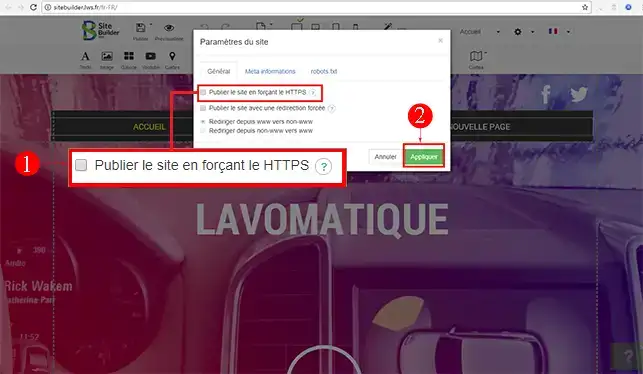
3. Check the"Publish site by forcing HTTPS" box and apply the changes. This box will allow you to set up a redirection from your HTTP site to HTTPS pages.
You are now able to activate and set up SSL security on your SiteBuilder Pro website. Once you have configured the certificate on SiteBuilder Pro, you must publish your website again so that the configuration changes are taken into account.
Don't hesitate to share your comments and questions!
Ask the LWS team and the community. Answers are published after moderation.
 About LWS :
LWS is a 100% French web hosting company that focuses on quality and innovation and offers a responsive and competent technical service at affordable prices.
About LWS :
LWS is a 100% French web hosting company that focuses on quality and innovation and offers a responsive and competent technical service at affordable prices.



 Yes
Yes No
No