How do I create a forced redirect in SiteBuilder Pro?

Procédure

Why create a forced redirect?

Forced redirection allows you to create a redirection for your site based on several principles:

  • Automatic redirection from the domain name without an SSL certificate to the domain name with the certifcat
  • Redirection from the domain name without WWW to the domain name with WWW
  • Redirection from the domain name with WWW to the domain name without WWW

When you create and activate the forced redirection on your website created with SiteBuilder Pro, an .htaccess file will be inserted at the root of your website in order to manage the redirections you have requested.

How do I create a forced redirect on SiteBuilder Pro?

SiteBuilder Pro lets you create a forced redirect. It is possible to redirect the domain name from www to your site without www or vis-versa.

To configure this redirection, you first need to connect to your website administration.


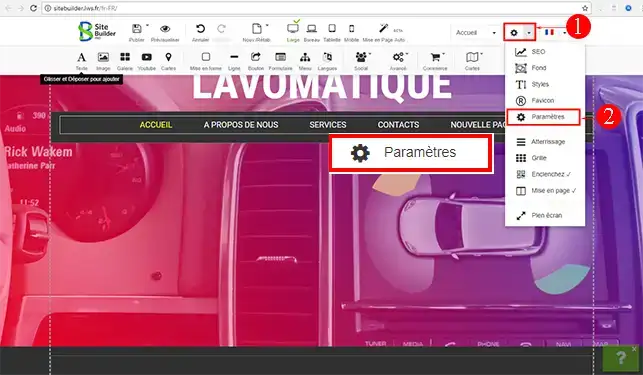
1. Click on the"Settings" tab to access the drop-down window. Click on"Settings" again to open the control panel.

How do I create a forced redirect in SiteBuilder Pro?


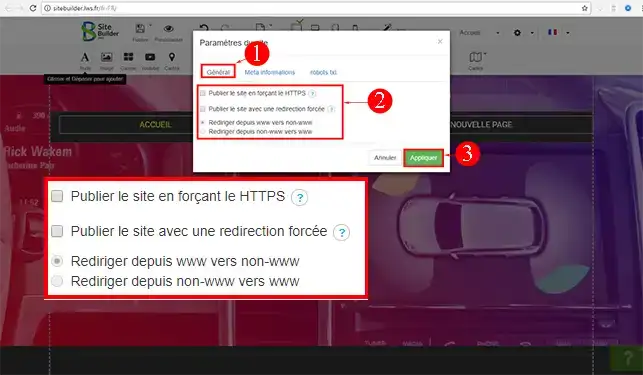
2. In the"General" tab of your control panel, tick the"Publish site with forced redirection" box and then choose one of the two redirections offered. Once you've made your choice, click"Apply" to save it. Don't forget to publish your website again after each change.

How do I create a forced redirect in SiteBuilder Pro?

Conclusion

You can now create a forced redirect for your website created with SiteBuilder Pro. You can remove the forced redirection at any time by going to this module and unchecking the relevant boxes.

Don't hesitate to share your comments and questions!

Rate this article :

This article was useful to you ?

Article utileYes

Article non utileNo

MerciMerci ! N'hésitez pas à poser des questions sur nos documentations si vous souhaitez plus d'informations et nous aider à les améliorer.


Vous avez noté 0 étoile(s)

Similar articles

2mn reading

How do I add a page header to SiteBuilder Pro?

0mn reading

How do I migrate a website to SiteBuilder Pro?

0mn reading

How do I add documents for download in SiteBuilder Pro?


Questions sur l'article (1)

Ask a question
Robin
23 oct. 2022
Bonjour, La redirection forcée ne fonctionne pas: Si je tape "[domaine masqué]" sans le www, j'ai la page du site en cours d'installation. Pas de problème avec un mac, mais depuis un iphone ou PC ça ne fonctionne pas, même en ayant vidé le cache. Merci
fabrice-LWS Reponse officielle
26 oct. 2022

t

Cette reponse vous a aide ?

Ask the LWS team and its community a question

RGPD : Responsable LWS-Ligne Web Services. Finalité : modération et publication publique de votre question, notification éventuelle d'une réponse. Base légale : consentement (art. 6.1.a RGPD). Conservation des emails : 90 jours après notification, 12 mois maximum sans réponse. Vous pouvez exercer vos droits via notre nos CGV - section RGPD.