Procédure
With this feature, visitors to your site arriving over HTTP will be automatically redirected to the site over HTTPS.
Automatic HTTPS redirection will redirect all URLs of the domain to HTTPS: domain, subdomains, etc.
If you do not want your subdomains to be redirected to HTTPS, do not enable automatic HTTPS redirection.
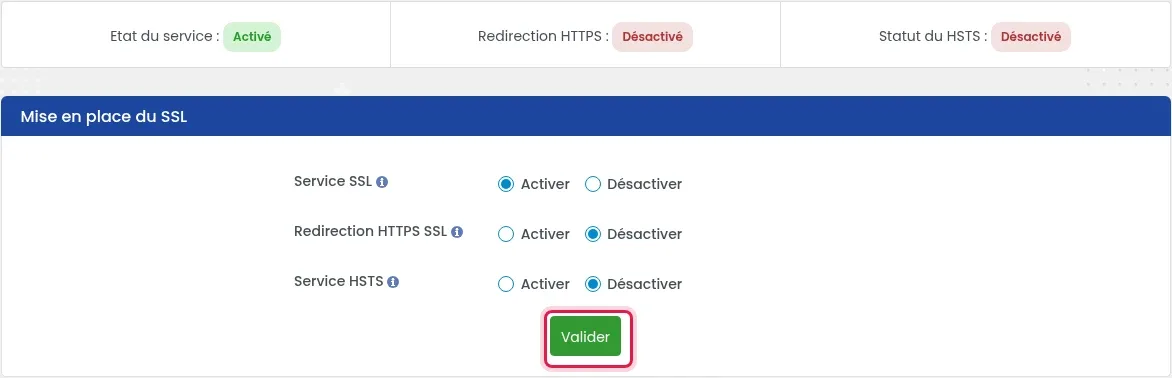
Prerequisite: You must have activated the SSL service via the installation of a free Let's Encrypt SSL certificate. At the top of the « SSL » page, « Service status » must indicate « Activated ».
1. Log in to your hosting account and, in the « Security » section, click « SSL ».
2. In the « SSL setup » block, check that « SSL Service » is set to « Activate », then check « Activate » on the « HTTPS SSL Redirection » line and click « Validate ».

3. The « HTTPS Redirection » status, at the top of the SSL page, indicates whether redirection is enabled.
Automatic HTTPS redirection will be validated within one hour.
If you use CMSs such as WordPress and Prestashop, it is not recommended to use this feature. For these two CMSs, it is preferable to use modules and/or plugins available for this purpose on these two platforms.
You can access our documentation to force the HTTPS protocol on WordPress available via this link: Link
You can access our documentation to force the HTTPS protocol on Prestashop available via this link: https://aide.lws.fr/a/750
You are now able to enable HTTPS Web redirection on your shared hosting with LWS. HTTPS Web redirection allows you to automatically redirect your website to the HTTPS version of the site.
Feel free to share your feedback and questions!
Bonjour,
Merci pour votre message. Le problème de raccordement PayPal peut venir de plusieurs éléments, dont la configuration SSL ou certains réglages de votre boutique.
Cependant, comme l’assistance en webmastering n’est normalement pas prise en charge, je vous invite à contacter le service technique via l’ouverture d’un ticket (ou la Hotline si vous n’avez pas accès).
Un conseiller pourra vérifier votre hébergement et vous indiquer si le souci provient de la configuration côté serveur.
Je vous remercie de votre attention et reste à votre disposition pour toute autre question ou complément d'information.
Cordialement, L'équipe LWS
Bonjour,
Pour ce type de situation, il est préférable de contacter directement le service technique afin qu’ils puissent analyser votre site et identifier précisément l’origine du problème.
Dans la majorité des cas, lorsqu’un site est infecté, il est recommandé d’opter pour une restauration à une date antérieure, lorsque celui-ci était encore sain. Cela permet de repartir sur une base propre plus rapidement.
Le support technique pourra vous accompagner dans cette démarche et vous conseiller également sur les mesures de sécurisation à mettre en place par la suite.
Je vous remercie de votre attention et reste à votre disposition pour toute autre question ou complément d'information.
Cordialement, L'équipe LWS
Ask the LWS team and the community. Answers are published after moderation.