Contact us
 Customer Area


 Visit LWS
Rate this article :
This article was useful to you ?
 Yes
Yes
 No
No
 Article read
10030 once
Article read
10030 once Merci ! N'hésitez pas à
poser des questions sur nos documentations si vous souhaitez plus d'informations et nous aider à les
améliorer.
Merci ! N'hésitez pas à
poser des questions sur nos documentations si vous souhaitez plus d'informations et nous aider à les
améliorer.Vous avez noté 0 étoile(s)



Sommaire
Procédure
WebDAV, or Web-based Distributed Authoring and Versioning, is a protocol that extends HTTP for managing files on remote servers. It allows server directories to be mounted on your local system for easy use in a variety of applications.
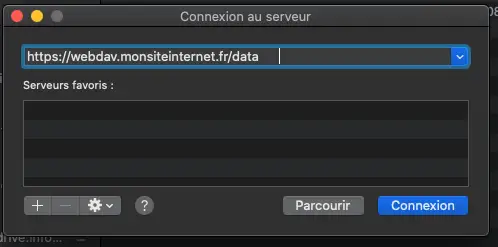
On macOS, you can easily connect to a WebDAV server via the graphical interface :
⌘ + K or go to the Go menu, then Connect to server.A new location will appear in Finder locations, allowing you to manage your files. To disconnect, click on the eject button next to the WebDAV server location.
Rate this article :
This article was useful to you ?
Yes
No
3mn reading
Connecting to a WebDAV server under Linux
2mn reading
Connecting to a WebDAV server under Windows
 About LWS :
LWS is a 100% French web hosting company that focuses on quality and innovation and offers a responsive and competent technical service at affordable prices.
About LWS :
LWS is a 100% French web hosting company that focuses on quality and innovation and offers a responsive and competent technical service at affordable prices.