
Online help
The web host accessible to all
Procédure
WebDAV, or Web-based Distributed Authoring and Versioning, is a protocol that extends HTTP for managing files on remote servers. It allows server directories to be mounted on your local system for easy use in a variety of applications.
Under Linux, you will need a WebDAV client such as cadaver, dav2fs, or davfs2. These clients can be installed via the package manager of your Linux distribution.
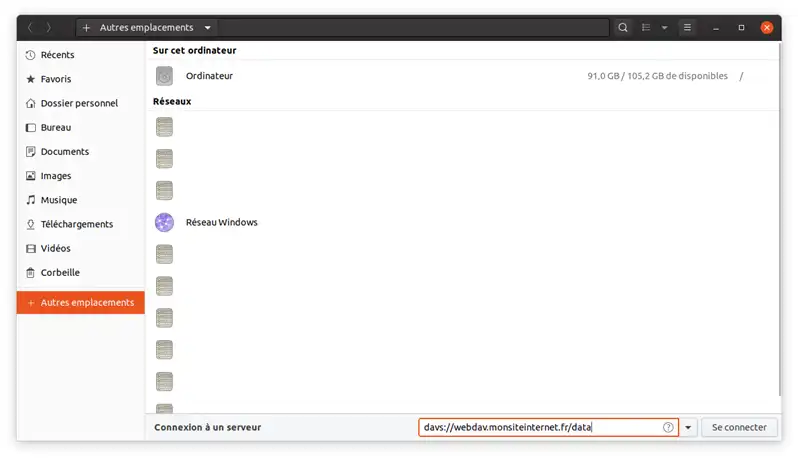
Use Nautilus in the GNOME environment and enter the URL with davs:// instead of https:// to initiate the connection.
You can also use cURL from the command line to manage files on a WebDAV server:
Send a file :
curl -T file.ext https://webdav.monsiteinternet.fr/data -u user:passwordRetrieve a file:
curl https://webdav.monsiteinternet.fr/data/fichier.ext -u user:password -o fichier.extRename a file :
curl -X MOVE --header "destination:https://webdav.monsiteinternet.fr/data/nouveauFichier.ext" "https://webdav.monsiteinternet.fr/data/fichier.ext" -u user:passwordCreate a folder :
curl -X MKCOL https://webdav.monsiteinternet.fr/nouveauDossier -u user:passwordDelete a file/folder :
curl -X DELETE https://webdav.monsiteinternet.fr/data/fichier.ext -u user:password.
Ask the LWS team and the community. Answers are published after moderation.
 About LWS :
LWS is a 100% French web hosting company that focuses on quality and innovation and offers a responsive and competent technical service at affordable prices.
About LWS :
LWS is a 100% French web hosting company that focuses on quality and innovation and offers a responsive and competent technical service at affordable prices.



 Yes
Yes No
No