Connecting to a WebDAV server under Windows

Procédure

Introduction

WebDAV, or Web-based Distributed Authoring and Versioning, is a protocol that extends HTTP for managing files on remote servers. It allows server directories to be mounted on your local system for easy use in a variety of applications.

Connecting via File Explorer

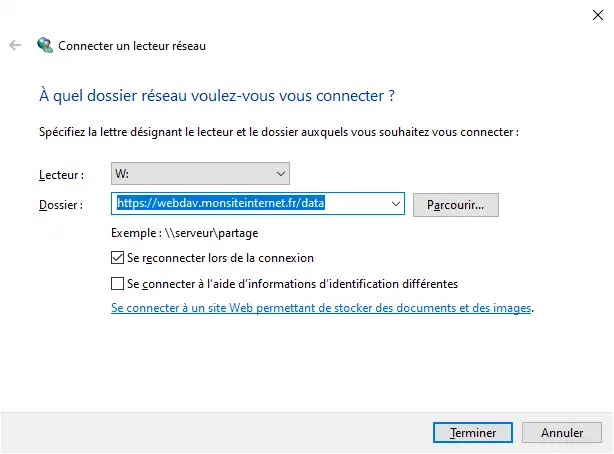
In Windows File Explorer, right-click on "This PC" and select "Add Network Location". Then enter the URL of your WebDAV server, assign a drive letter, and enter your credentials if necessary.

Connecting to a WebDAV server under Windows

Connecting via the command line

You can also use the command line to connect a WebDAV network drive:

net use w: https://webdav.monsiteinternet.fr/data

Once connected, you can manage the files as if it were a local drive. To disconnect the drive, use :

net use w: /delete

Rate this article :

This article was useful to you ?

Article utileYes

Article non utileNo

MerciMerci ! N'hésitez pas à poser des questions sur nos documentations si vous souhaitez plus d'informations et nous aider à les améliorer.


Vous avez noté 0 étoile(s)

Similar articles

3mn reading

Connecting to a WebDAV server under Linux

2mn reading

Connecting to a WebDAV server on macOS


Questions sur l'article (1)

Ask a question
mamylene
4 juin 2025
Bonjour, je ne connais pas l'URL du serveur Webdav ni la lettre de connexion. Où les trouve-t-on ? merci
Maxence-LWS Reponse officielle
6 juin 2025

Bonjour,

Je vous remercie pour votre message. 

Afin d'obtenir ces éléments, je vous invite à contacter notre support, cela dépend en effet de la formule détenue (LWS Panel, cPanel...) et d'autres paramètres.

Je vous remercie de votre attention et reste à votre disposition pour toute autre question ou complément d'information.

Vous pouvez nous contacter depuis votre espace client ou sur cette page : https://www.lws.fr/contact

Cordialement, L'équipe LWS 

Cette reponse vous a aide ?

Ask the LWS team and its community a question

RGPD : Responsable LWS-Ligne Web Services. Finalité : modération et publication publique de votre question, notification éventuelle d'une réponse. Base légale : consentement (art. 6.1.a RGPD). Conservation des emails : 90 jours après notification, 12 mois maximum sans réponse. Vous pouvez exercer vos droits via notre nos CGV - section RGPD.