


How do I add a Favicon to SiteBuilder Pro?

Procédure

What is a Favicon?

Favicons are small 16 x 16 pixel icons generally containing your website logo, the first letter of your brand name or a generic image representing the type of activity of your company. These files are generally called"favicon.ico" and are placed at the root of your website. The results of certain search engines may also display favicons.


Using favicons

As mentioned in the previous paragraph, favicons make it easy to identify your website. If your site does not have a favicon, the web browser will display the empty document by default in a tab in your browser. Users tend to judge online services by the way their website is constructed. Something as insignificant as a favicon can make you lose credibility , especially if the visitor in question is comparing you with one of your competitors.

How do you configure a favicon on your site created with SiteBuilder Pro?

1. Log in to the administration area of your website.


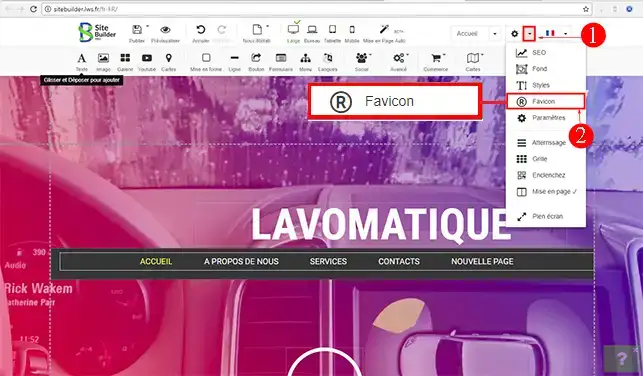
2. Click on the"Settings" tab in the SiteBuilder Pro toolbar. Then click on"Favicon".

How do I add a Favicon to SiteBuilder Pro?


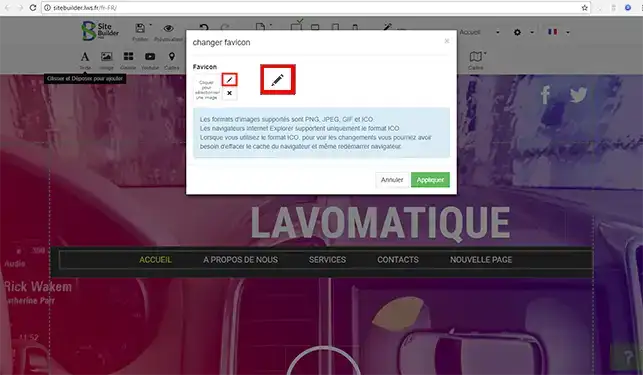
3. Click on the stylus to select your Favicon from the image library or to download it from your computer.

How do I add a Favicon to SiteBuilder Pro?


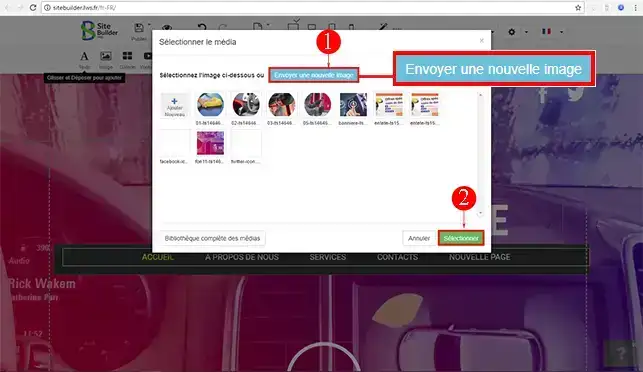
4. Click on the"Send a new image" button if you want to add a Favicon from your computer and/or select the image directly from your SiteBuilder Pro image library. Click on the "Select" button as soon as you have downloaded or selected your Favicon.

How do I add a Favicon to SiteBuilder Pro?


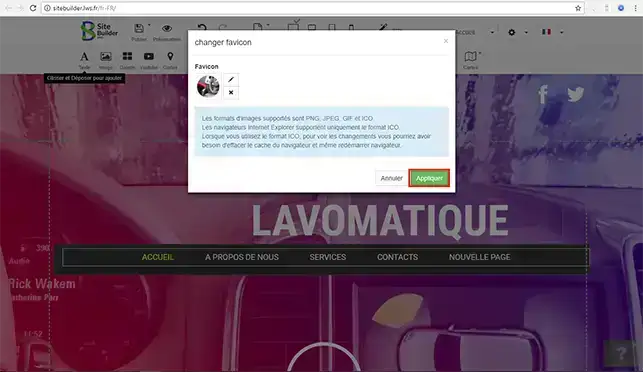
5. Click on the "Apply" button for the changes to take effect on your website created with SiteBuilder Pro.

How do I add a Favicon to SiteBuilder Pro?

Conclusion

You can now configure a Favicon on your SiteBuilder Pro website with LWS. The Favicon will enable your visitors to quickly identify your website.

Don't hesitate to share your comments and questions!

help.lws.net/a/876
Was this article helpful?

Yes

No

Read 25 562 times

Thank you! Feel free to ask questions about our documentation if you would like more information, and help us improve it.

Similar articles

Questions about the article 1

Ask a question
Kissyma
18 Jun 2023
Bonjour, je souhaiterais savoir comment faire pour modifier la couleur du bouton Ajouter au panier, couleur déjà prédéfini dans l'élément commerce.
Benjamin-LWS Official answer
21 Jun 2023

Bonjour,

Malheureusement, cela n'est pas possible.

Je vous remercie de votre attention et reste à votre disposition pour toute autre question ou complément d'information.

Nous vous invitons à contacter notre service support à travers votre espace client, afin de vous apporter une aide si vous rencontrez des difficultés quelconque. (Contacter le support LWS)

Cordialement, L'équipe LWS 

Was this answer helpful?

A question about this article?

Ask the LWS team and the community. Answers are published after moderation.

Ask the LWS team and its community a question

GDPR: Controller: LWS-Ligne Web Services. Purpose: moderation and public publication of your question, possible notification of an answer. Legal basis: consent (Art. 6(1)(a) GDPR). Email retention: 90 days after notification, 12 months maximum without an answer. To exercise your rights, see the GDPR section of our Terms and Conditions.