Procédure
Why create a forced redirect?
Forced redirection allows you to create a redirection for your site based on several principles:
- Automatic redirection from the domain name without an SSL certificate to the domain name with the certifcat
- Redirection from the domain name without WWW to the domain name with WWW
- Redirection from the domain name with WWW to the domain name without WWW
When you create and activate the forced redirection on your website created with SiteBuilder Pro, an .htaccess file will be inserted at the root of your website in order to manage the redirections you have requested.
How do I create a forced redirect on SiteBuilder Pro?
SiteBuilder Pro lets you create a forced redirect. It is possible to redirect the domain name from www to your site without www or vis-versa.
To configure this redirection, you first need to connect to your website administration.
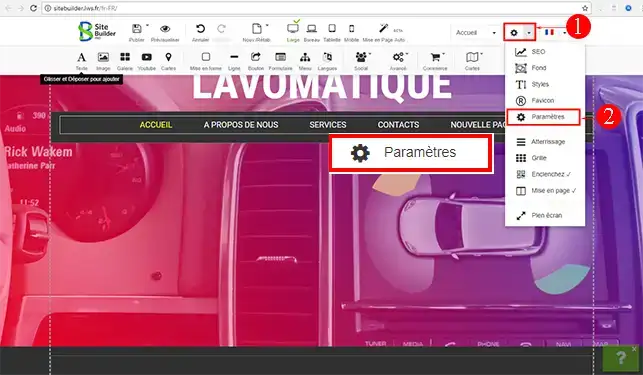
1. Click on the"Settings" tab to access the drop-down window. Click on"Settings" again to open the control panel.
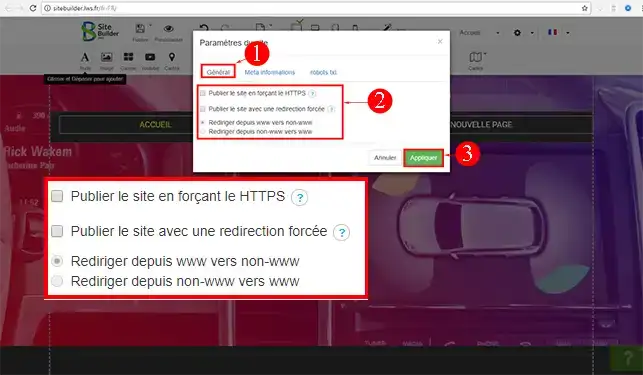
2. In the"General" tab of your control panel, tick the"Publish site with forced redirection" box and then choose one of the two redirections offered. Once you've made your choice, click"Apply" to save it. Don't forget to publish your website again after each change.
Conclusion
You can now create a forced redirect for your website created with SiteBuilder Pro. You can remove the forced redirection at any time by going to this module and unchecking the relevant boxes.
Don't hesitate to share your comments and questions!



 Yes
Yes No
No About
About 