
Online help
The web host accessible to all
Procédure
The restoration tool available in Plesk allows you to restore the data in your Web space to an earlier date. Among the data you can restore are:
In order to be able to restore this data, you must first have performed a backup. Restoring your website and your data only takes a few minutes. You can choose between a partial restoration (certain data only) or a complete restoration of your Web space.
1. Log in to your Plesk management interface.
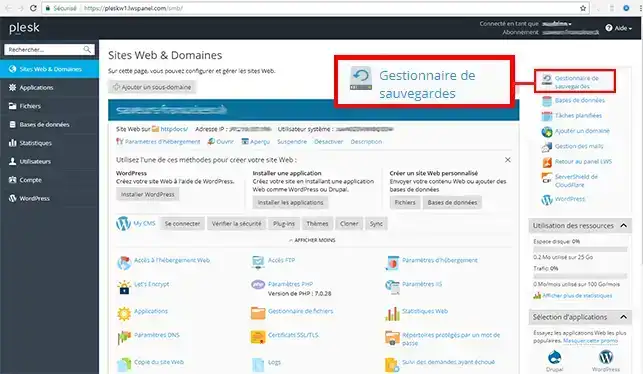
2. Click on the "Backup Managers" tab located at the top right of your screen.
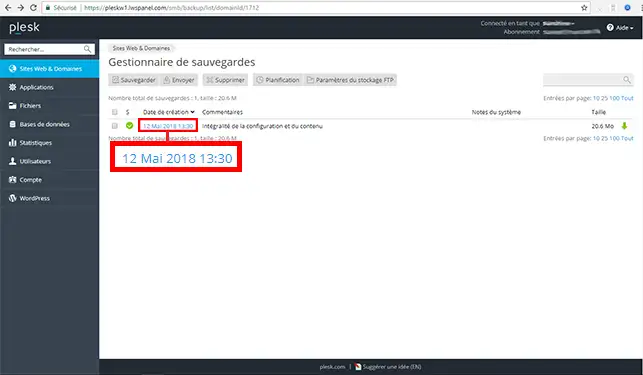
3. Click on the backup you want to restore on your Web space.
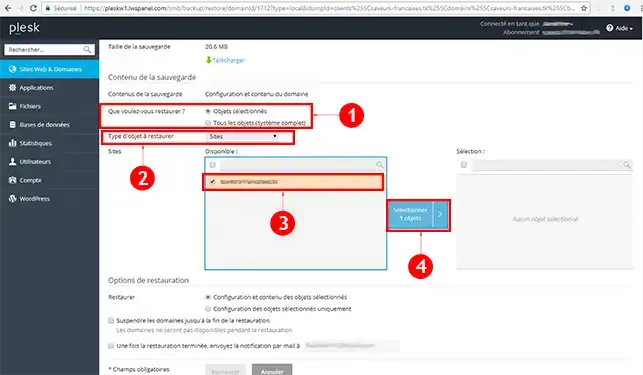
4. Configure the restoration of your Web space:
Check the object you want to restore and click the "Select" button.
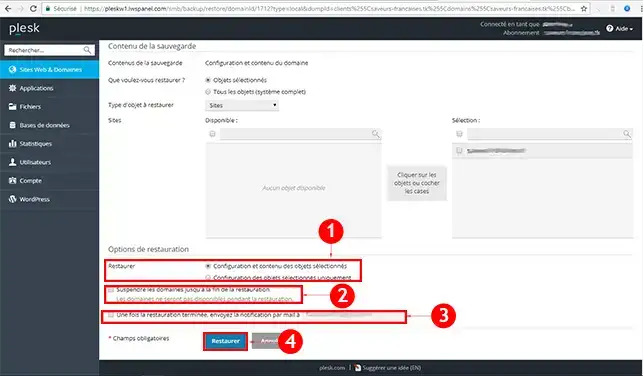
5. Continue configuring your restoration:
As soon as the configuration is complete, click the "Restore" button to start restoring your site under Plesk.
You are now able to restore your site under Plesk on your hosting with LWS. Restoration will allow you to recover your email accounts as well as all emails, but also your site and your databases.
Feel free to share your comments and questions!
Ask the LWS team and the community. Answers are published after moderation.
 About LWS :
LWS is a 100% French web hosting company that focuses on quality and innovation and offers a responsive and competent technical service at affordable prices.
About LWS :
LWS is a 100% French web hosting company that focuses on quality and innovation and offers a responsive and competent technical service at affordable prices.



 Yes
Yes No
No