


How do I back up a website from Plesk?

Procédure

Why create a backup of your site in Plesk?

It is important to create a backup of your site in Plesk when it goes live and to create backups regularly. [PERSON_NAME] allows you to restore your website quickly if needed (for example, in the event of an error during a site update or the installation of an incompatible module). It is advisable to create several backups of your website.

Plesk allows you to back up:

  • The configuration of your domain name
  • The configuration and content of your email accounts
  • The files and database of your website

How do you back up a website from Plesk?

1. Log in to your Plesk management interface.

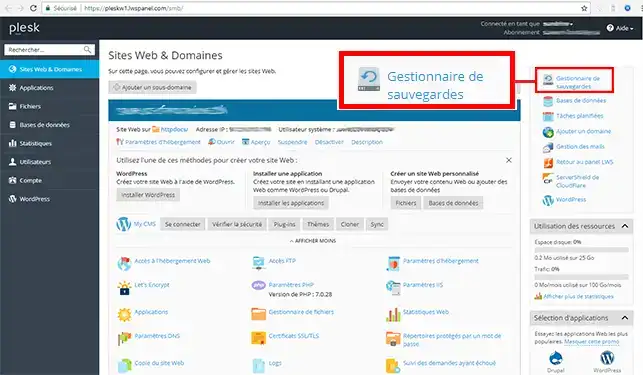
2. Click on the "Backup Management" tab located on the right side of your screen.

How do I back up a website from Plesk?

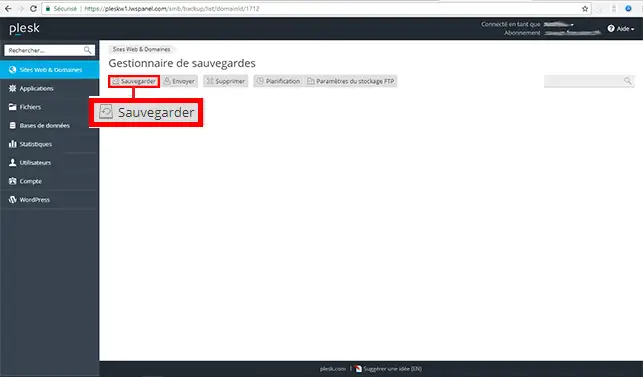
3. Click on the "Back Up" button.

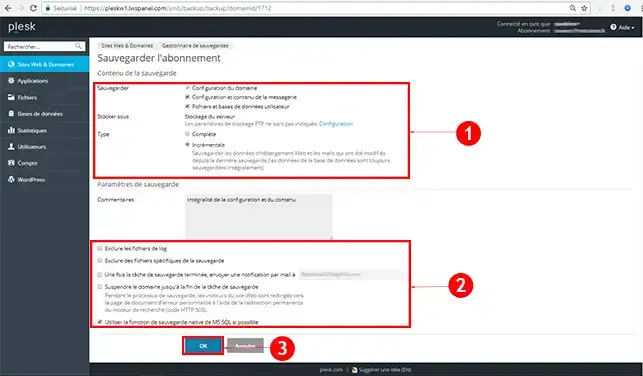
4. You can choose several types of backups:

  • Domain configuration: This is the configuration of the DNS zones of your domain name.
  • Mail configuration and content: This refers to the email addresses and messages found in your various mailboxes
  • [PERSON_NAME] and user databases: [PERSON_NAME] website and your various databases.
  • Full: this is the complete backup of your website
  • Incremental: Backup of files that have been modified since the last full backup of your website

Once you have selected the desired backup type, click the "Ok" button to start backing up your site.

How do I back up a website from Plesk?

Conclusion

You are now able to back up your website through your interface with your Plesk hosting [ADDRESS]. It is advisable to back up your site regularly so that you can [ADDRESS] if needed.

Feel free to share your comments and questions!

Rate this article :

This article was useful to you ?

Article utileYes

Article non utileNo

MerciMerci ! N'hésitez pas à poser des questions sur nos documentations si vous souhaitez plus d'informations et nous aider à les améliorer.


Vous avez noté 0 étoile(s)

Similar articles

2mn reading

How do I restore your website from Plesk?


Questions sur l'article (1)

Ask a question
jjouvet
22 dec. 2023
Lorsque je fais une sauvegarde depuis mon plesk elle se lance bien mais au bout de plusieurs minutes j'ai une erreur qui me dis que la connexion a été interrompu. J'ai essayé à plusieurs reprises mais toujours le même problème. Je ne sais pas qui perd la connexion et surtout je ne vois ni lws ni plesk la perdre.
Benjamin-LWS Reponse officielle
26 dec. 2023

Bonjour,

Merci de votre retour.

Nous vous remercions pour votre question et votre intérêt envers LWS. Malheureusement, nous ne pouvons pas vous aidez via cette plateforme de question.

Nous vous invitons donc à contacter notre système de support client pour obtenir de l'aide spécifique à votre situation. Nous avons une équipe de professionnels qualifiés prêts à vous aider et à répondre à toutes vos questions avec précision et rapidité. (Contacter le support)

Cordialement, L'équipe LWS 

Cette reponse vous a aide ?

Ask the LWS team and its community a question

RGPD : Responsable LWS-Ligne Web Services. Finalité : modération et publication publique de votre question, notification éventuelle d'une réponse. Base légale : consentement (art. 6.1.a RGPD). Conservation des emails : 90 jours après notification, 12 mois maximum sans réponse. Vous pouvez exercer vos droits via notre nos CGV - section RGPD.
