Contact us
 Customer Area


 Visit LWS
Rate this article :
4/5 | 4 opinion
This article was useful to you ?
 Yes
Yes
 No
No
 Article read
28430 once
Article read
28430 once Merci ! N'hésitez pas à
poser des questions sur nos documentations si vous souhaitez plus d'informations et nous aider à les
améliorer.
Merci ! N'hésitez pas à
poser des questions sur nos documentations si vous souhaitez plus d'informations et nous aider à les
améliorer.Vous avez noté 0 étoile(s)



Sommaire
Procédure
Wordpress is one of the content management systems most used in the world. [ADDRESS], it is also one of the most hacked CMSs. In order to avoid any risk of hacking, it is necessary to secure Wordpress. Several extensions are available to allow you to secure your website in just a few minutes.
The first thing that helps secure your site is to keep it up to date. By logging into your dashboard, you can update Wordpress in just a few clicks.
Wordfence is a Wordpress extension that helps secure your Wordpress website.
This extension has the following features:
1. Wordfence, a plugin offering comprehensive security for your site.
To secure your site, we recommend the [PERSON_NAME]> [PERSON_NAME] plugin provides [PERSON_NAME], malware scanning, real-time traffic checks, secures connections to your site, ...
This plugin is regularly updated to remain compatible with the latest versions [PERSON_NAME]>
2. Installing Wordfence
To install [PERSON_NAME] :
- Go to the dashboard of your website under Wordpress
- In the dashboard menu, click on "Extensions" :
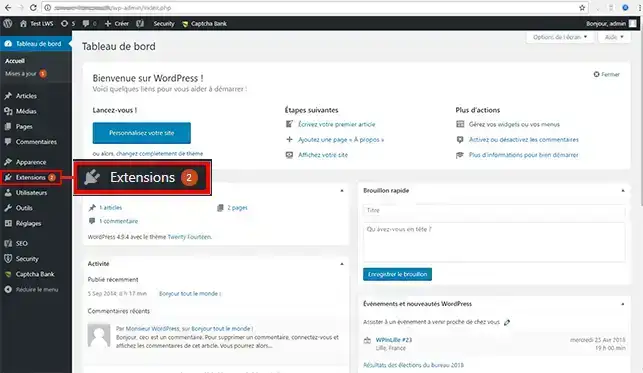
- On the page that appears, click the "Add" link :
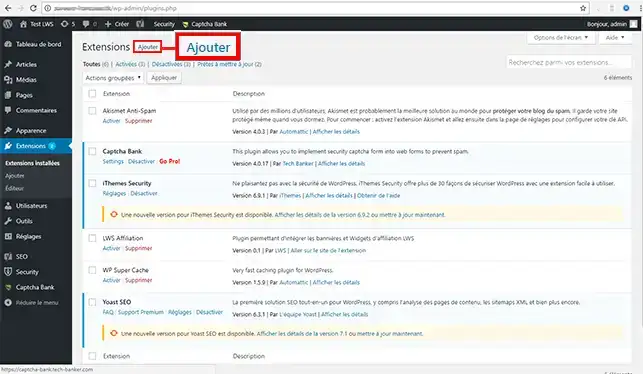
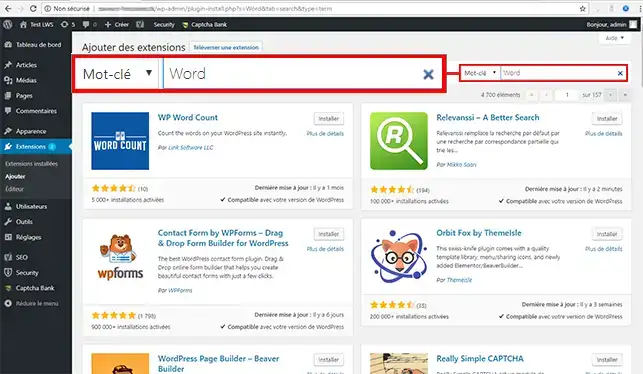
- In the search bar, type Wordfence and confirm :
- Click the "install" button for the [PERSON_NAME] Security plugin :
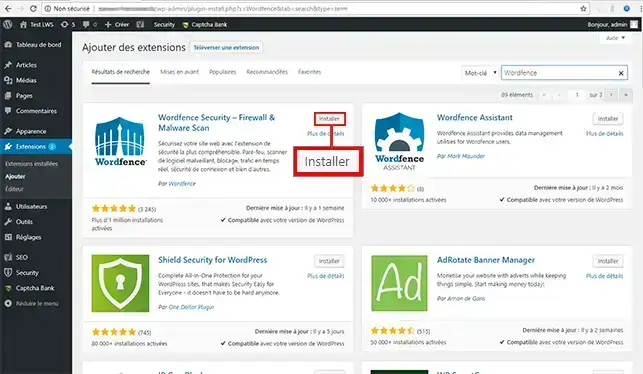
-As soon as the plugin is installed, click the "Activate" button. A message will indicate that activation was successful.
1. Go to the scan menu of the Wordfence tool.
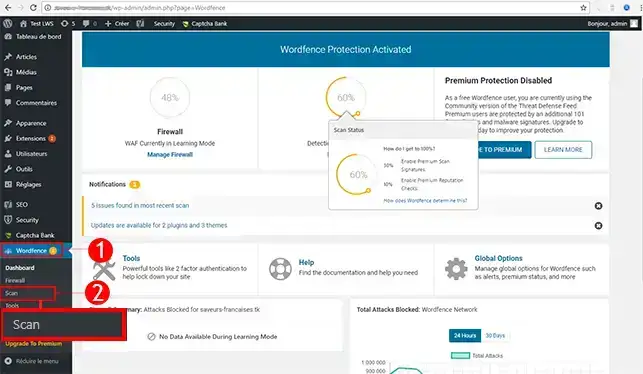
2. Start a scan of your site by clicking the button: "Start New Scan"
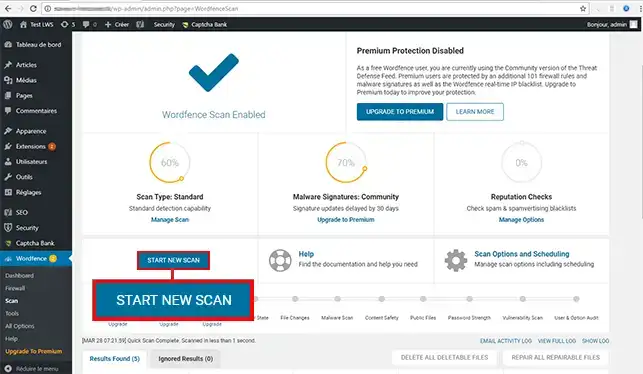
3. Make the recommended changes
Once the scan is complete, you will have a report with the various actions to take. These actions are suggested in order to improve your site. You just need to approve each change.
Be sure to update Wordpress and this extension regularly in order to maintain good security for your site.
You are now able to secure your Wordpress website with Wordfence. Wordfence analyzes your website in real time, looking for the slightest virus, the slightest security flaw, and the slightest hacking attempt. Reports are sent to you regularly by email to inform you of any issues concerning your website.
Feel free to share your comments and questions!
Rate this article :
4/5 | 4 opinion
This article was useful to you ?
Yes
No
2mn reading
How do I activate an https url on Wordpress?
6mn reading
How can you force HTTPS protocol on your Wordpress site?
2mn reading
How do I unblock a blocked IP on Wordpress?
1mn reading
How do I add a Captcha to a Wordpress form?
 About LWS :
LWS is a 100% French web hosting company that focuses on quality and innovation and offers a responsive and competent technical service at affordable prices.
About LWS :
LWS is a 100% French web hosting company that focuses on quality and innovation and offers a responsive and competent technical service at affordable prices.