
Online help
The web host accessible to all
Procédure
A firewall is a computer (and a program) that filters what passes from one network to another. You can block or authorise external connections via IP.
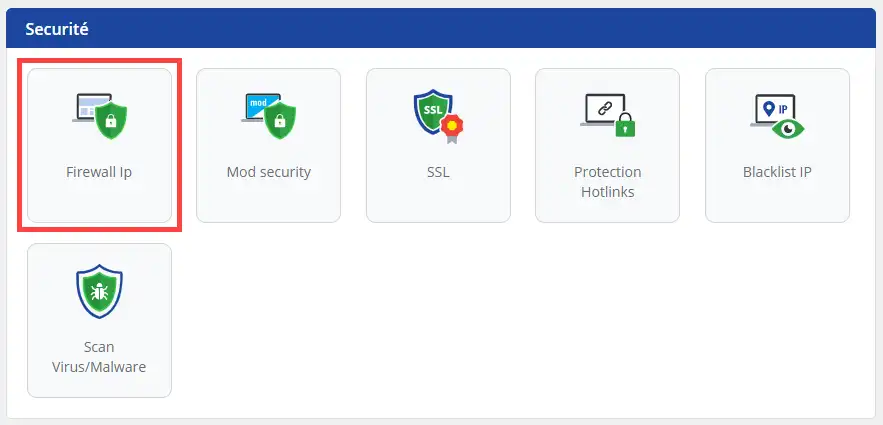
1. Log in to your hosting and click on the "IP Firewall" menu in the "Security" section.
2. Choose the operating mode for your IP Firewall (1) then add an IP address or IP class to the list (2) and click Validate to save.
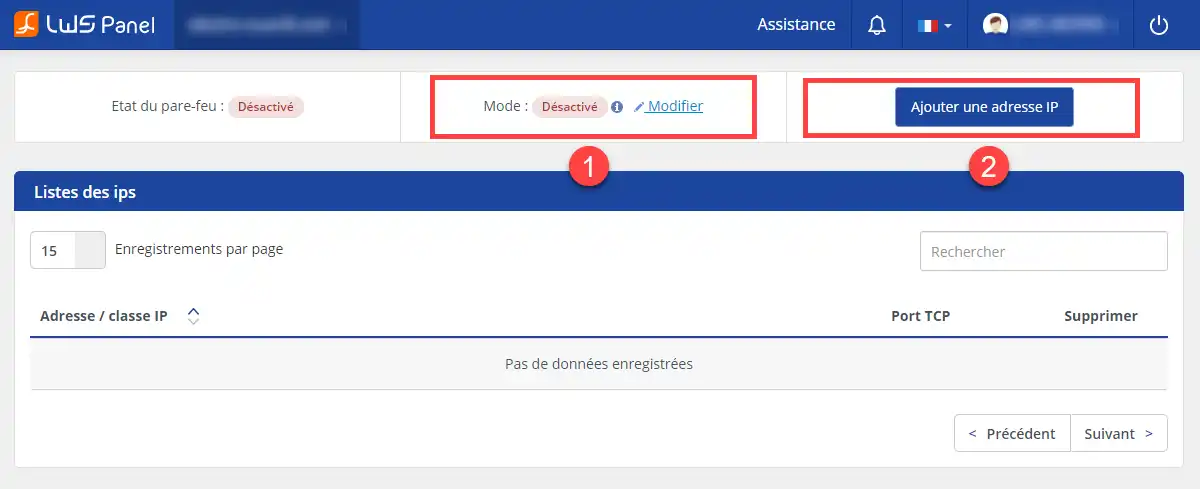
You are now able to set the IP Fire wall on your shared hosting with LWS. The IP Firewall will allow you to authorise or refuse connection from certain IPs.
Don't hesitate to share your comments and questions!
Ask the LWS team and the community. Answers are published after moderation.
 About LWS :
LWS is a 100% French web hosting company that focuses on quality and innovation and offers a responsive and competent technical service at affordable prices.
About LWS :
LWS is a 100% French web hosting company that focuses on quality and innovation and offers a responsive and competent technical service at affordable prices.



 Yes
Yes No
No