


Find the IP address of my LWS hosting or VPS

Procédure

The IP address of your LWS web hosting can be found in your domain's DNS Zone section, while that of a VPS server appears in the Servers tab or in its KVM Overview. Knowing these network details allows you to configure your external DNS records, secure remote access, or connect third-party tools. This guide shows you exactly where to retrieve each address according to the type of plan you have subscribed to.

The steps

  1. Access your web hosting management

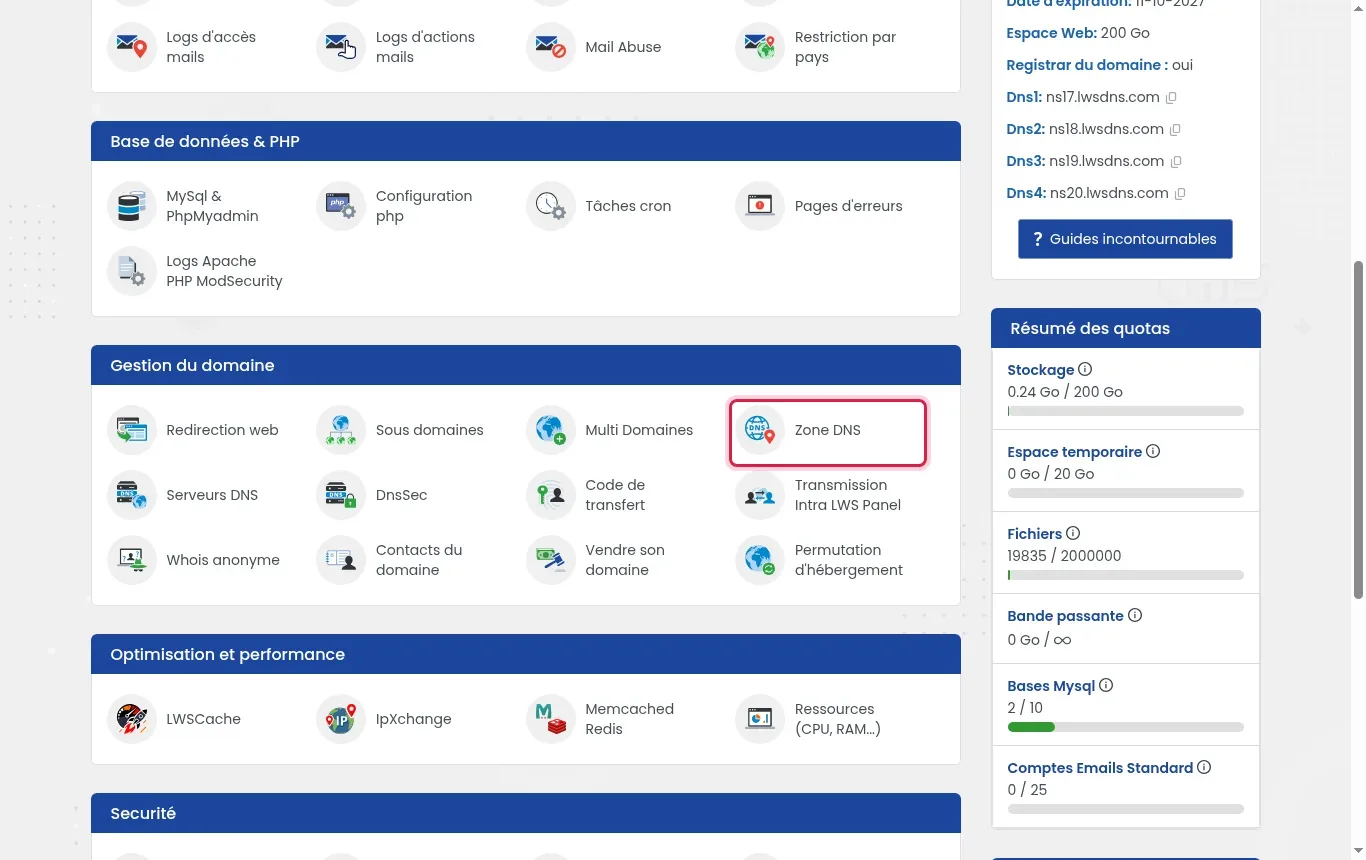
    Log in to your LWS Panel customer area, then select the Domain(s) & Hosting(s) tab. Click the Manage button located opposite the domain name concerned by your search.

  2. Open the DNS Zone tool

    Scroll down the administration page to the Domain Management category. Then click the DNS Zone button to display all of the service's network settings.

    Find the IP address of my LWS hosting or VPS
  3. Check the service's default IP addresses

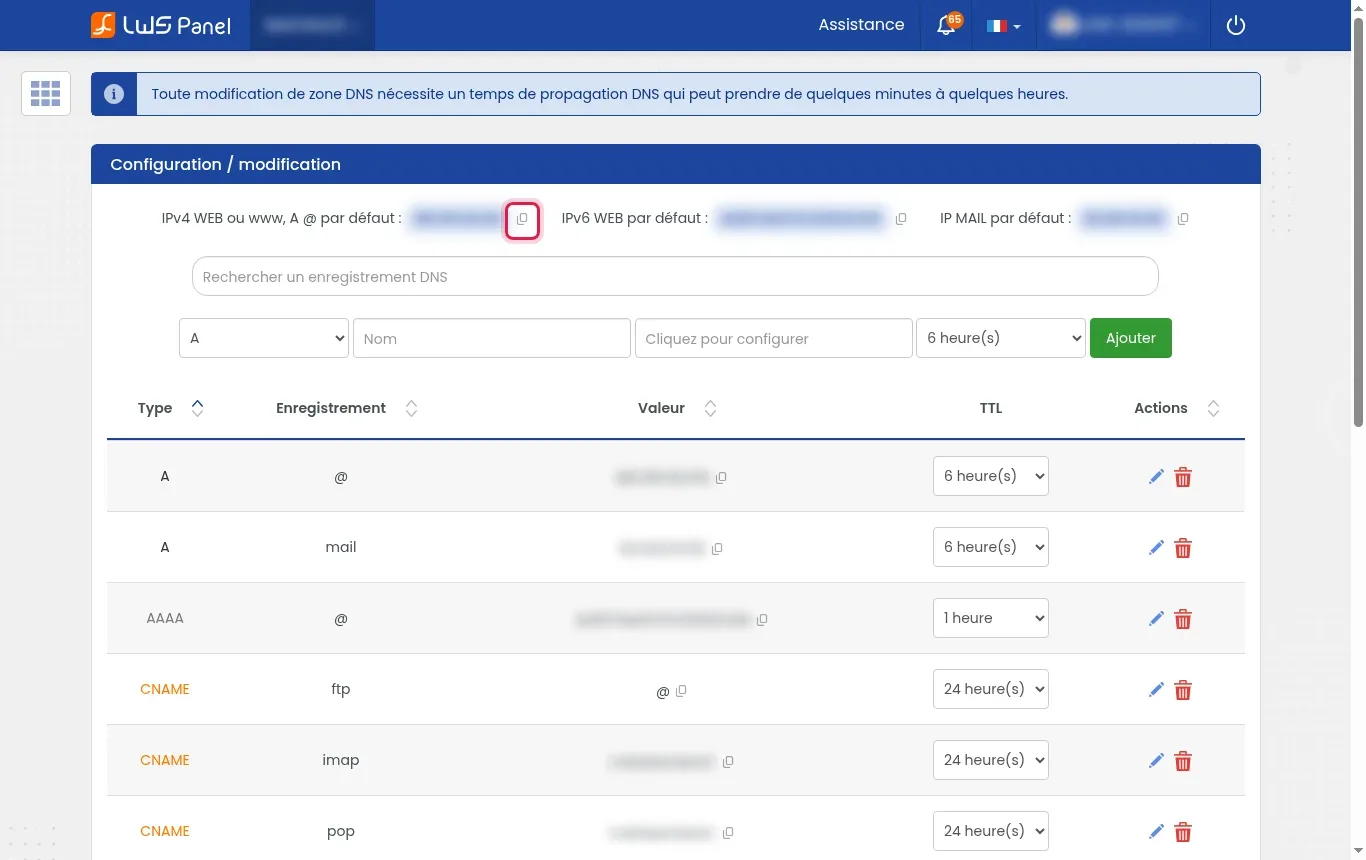
    Look for the IPv4 WEB or www, default A @, and default MAIL IP mentions located at the very top of the table. Click the dedicated copy icon to the right of the field to save the address to your clipboard.

    Find the IP address of my LWS hosting or VPS
  4. Check the active A-type records

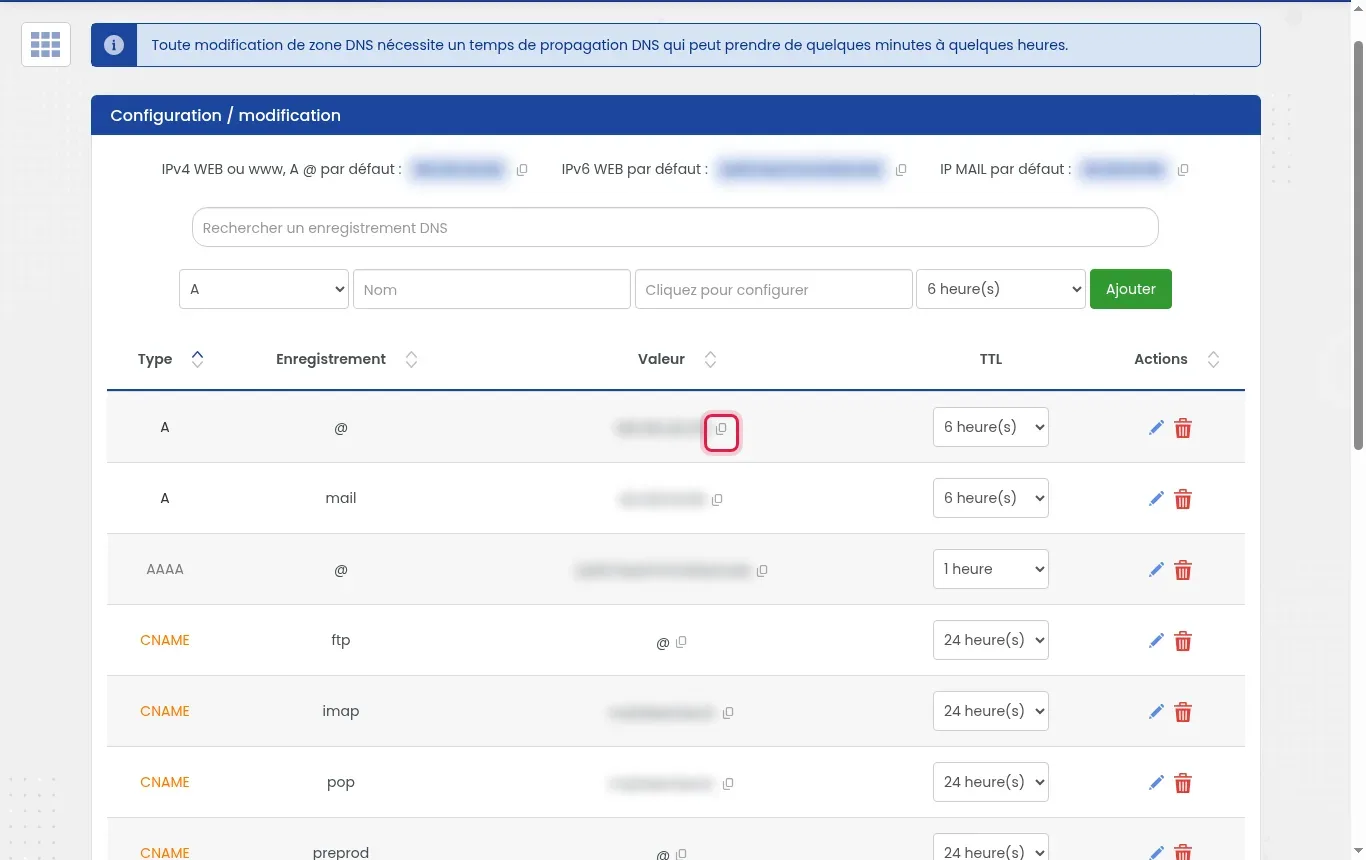
    Look at the summary table just below to identify the A-type lines. The line associated with the @ field corresponds to the site's current IP, while the mail line indicates your email service's IP.

    Find the IP address of my LWS hosting or VPS
  5. Find the IPv4 address of your VPS server

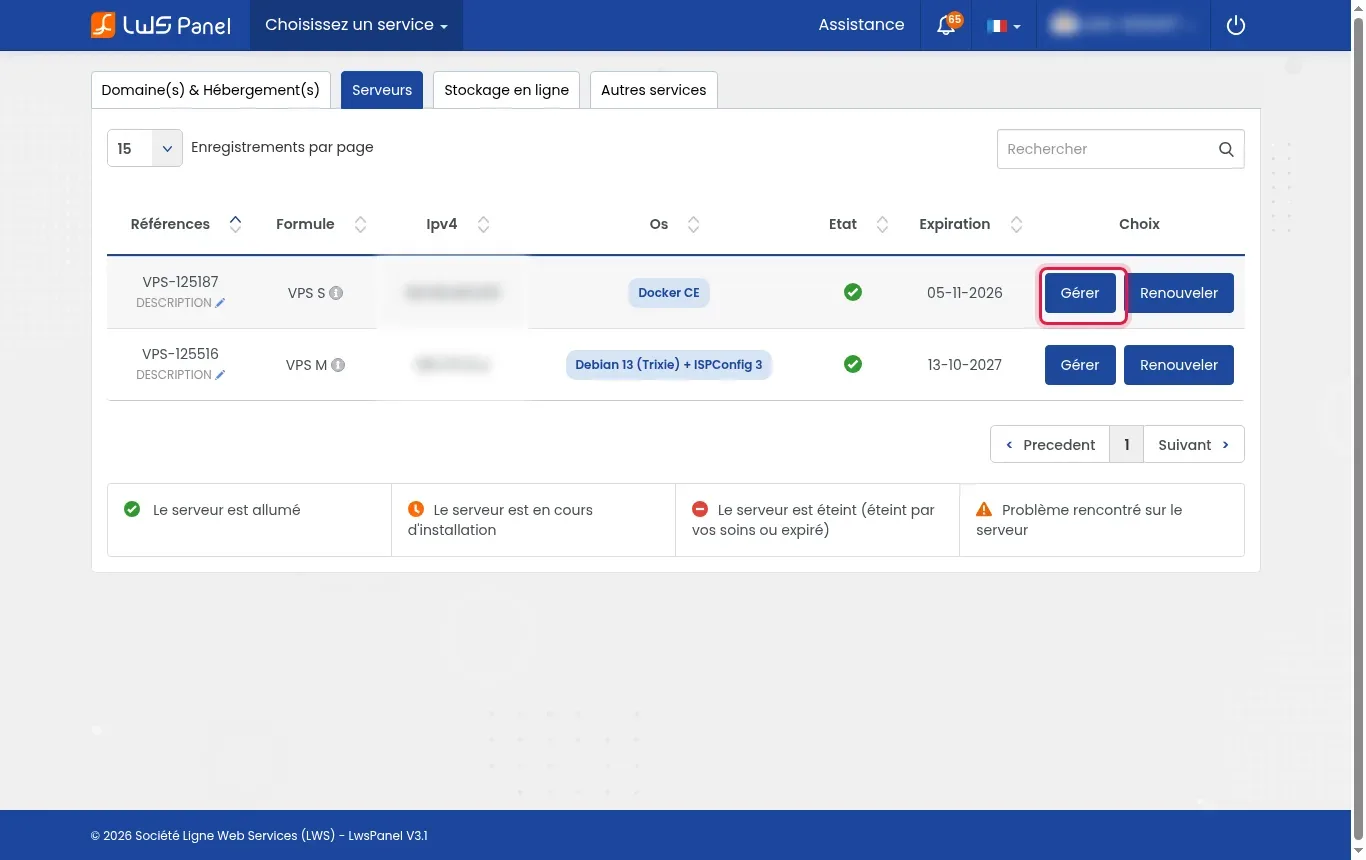
    In the top menu of your LWS Panel customer area, switch to the Servers tab. The IPv4 address of your virtual machine is displayed directly in the IPv4 column of the summary table.

    Find the IP address of my LWS hosting or VPS
  6. Copy IP addresses from the VPS Overview

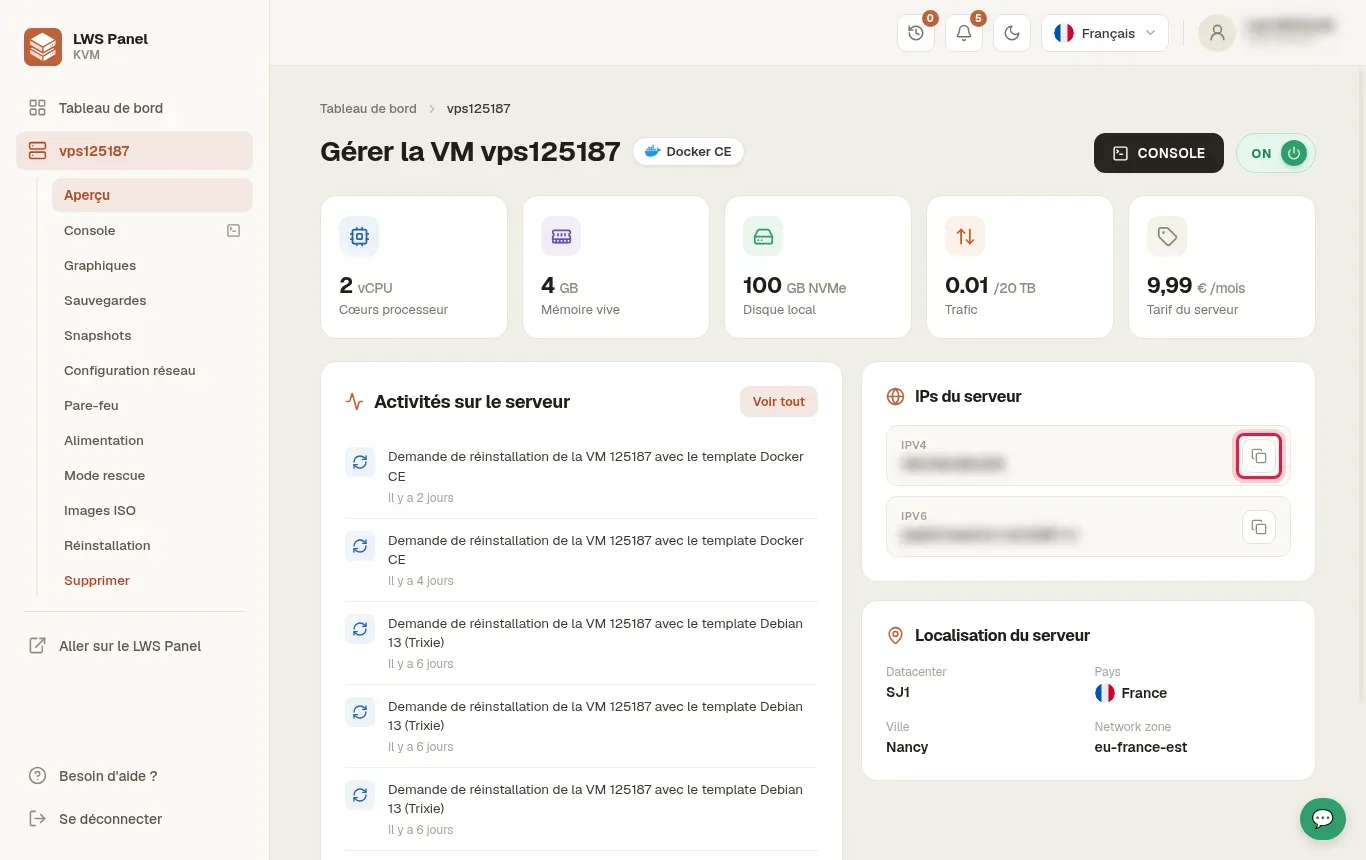
    In the VPS KVM panel, stay in the Overview section of the left-hand menu. Locate the server IPs box, then click the copy button next to the IPV4 or IPV6 line.

    Find the IP address of my LWS hosting or VPS

Frequently asked questions

Why does my web hosting have different WEB and MAIL IPs?

On LWS shared hosting, the site's HTTP traffic and the email sending and receiving servers are distributed across separate infrastructures to optimize performance and deliverability. The associated network addresses are therefore different.

Will my IP address change if I switch to another LWS offer?

Yes, a migration to a different infrastructure, such as moving from a Starter shared hosting plan to a dedicated VPS server, results in the assignment of a new IP address that will need to be updated in your DNS records.

What should I do if a message says my IP address has changed while I am browsing?

This security message appears when your own Internet connection changes address while you are browsing the customer area. Simply click the link prompting you to log in again to continue your steps.

help.lws.net/a/1736
Was this article helpful?

Yes

No

Read 22 029 times

Thank you! Feel free to ask questions about our documentation if you would like more information, and help us improve it.

Similar articles

Questions about the article 1

Ask a question
Alex
5 Jul 2024
Bonjour, j'ai acheté un nom de domaine chez LWS, et un abonnement pour gérer un site web avec le site Hostinger. Je n'arrive pas à comprendre comment faire pour que le site crée sur Hostinger soit affiché à l'adresse [domaine masqué]. Merci
Jordan-LWS Official answer
15 Jul 2024

Bonjour,

Je vous remercie pour votre message.

Je comprends que vous souhaitez lier à votre nom de domaine à l'hébergement chez votre prestataire et pour cela plusieurs possibilités sont à prévoir, majoritairement un enregistrement dans la zone DNS de type A vers l'adresse IP de votre serveur chez le prestataire est suffisant, néanmoins il est également possible d'utiliser leurs serveurs DNS afin de gérer la zone chez eux.

Pour lier votre service web, vous devrez ajouter ou modifier un enregistrement A dans la zone DNS de votre domaine. Cet enregistrement doit pointer vers l'adresse IP de votre hébergement.

Voici un exemple de comment vous pourriez configurer cet enregistrement :

  • Nom : votre-domaine.extension
  • Type : A
  • Valeur : XX.XX.XX.XX (IP du serveur web)
  • TTL : 24 heures

Voici une documentation à propos des enregistrements DNS, mais également concernant le changement de serveur DNS : 

  • Enregistrements DNS : https://aide.lws.fr/a/54
  • Modification des serveurs DNS : https://aide.lws.fr/a/89

Je vous remercie pour votre attention et reste à votre disposition pour toute autre question ou complément d'information. Vous pouvez pareillement contacter notre support technique pour obtenir de l'aide.

Cordialement, L'équipe LWS

Was this answer helpful?

A question about this article?

Ask the LWS team and the community. Answers are published after moderation.

Ask the LWS team and its community a question

GDPR: Controller: LWS-Ligne Web Services. Purpose: moderation and public publication of your question, possible notification of an answer. Legal basis: consent (Art. 6(1)(a) GDPR). Email retention: 90 days after notification, 12 months maximum without an answer. To exercise your rights, see the GDPR section of our Terms and Conditions.