
Online help
The web host accessible to all
Procédure
In the WP Manager of the LWS Panel, each WordPress site profile offers artificial intelligence features: an assistant that answers your questions, a performance audit, reading error logs, or command suggestions. They rely on an external AI service. This help page explains what these features do, what data may be sent, and how to change your choice using the AI Preferences button.
To learn about the WP Manager as a whole (access, tabs, health report), first see the WordPress WP Manager presentation on the LWS Panel.
The WP Manager information window lists the features that use AI:
Depending on the feature used, data from your site may be sent to LWS’s AI provider, OpenRouter. The information window mentions in particular:
Email addresses, IP addresses, passwords, and API keys identified are automatically masked before sending, whether they come from your configuration files, your error logs, or the list of your WordPress accounts:
The window also indicates that the AI models used are hosted in the European Economic Area (EEA) and mentions the “Zero Data Retention” principle. Read it in full the first time it opens: it is the authoritative source.
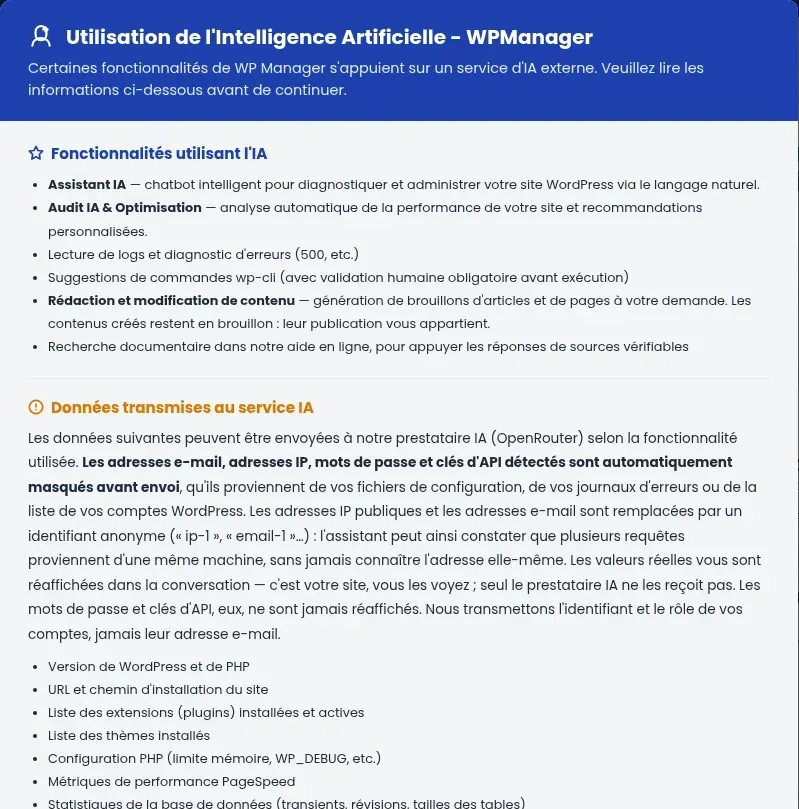
In the WP Manager, click MANAGE next to the relevant site. The first time, the Artificial Intelligence Use - WPManager window appears.
The window also offers you the option to accept the anonymized recording of your conversations, kept for 90 days. Click Accept and continue or Refuse.
Click AI Preferences in the blue bar at the top of the site profile, next to the domain name, to change your response.

On the site profile, click the AI Assistance button in the bottom-right corner of the screen. It opens the conversational assistant: ask your question in plain language, for example about an error displayed by your site or its loading speed.
It appears the first time a site profile is opened. Once you have made your choice, you can change it with the AI Preferences button at the top of the profile.
No. According to the information window, identified passwords and API keys are masked before being sent and are never displayed again.
Ask the LWS team and the community. Answers are published after moderation.
 About LWS :
LWS is a 100% French web hosting company that focuses on quality and innovation and offers a responsive and competent technical service at affordable prices.


 Yes
 No