cPanel shared hosting16 October 2026By romain 4 min read
Fastest Cache: speed up your site with Varnish and NGINX
Procédure
Why speed up your site’s loading speed?
It is good to know that your site’s loading speed is essential to ensure its success. For a business, for example, it gives visitors a first impression. In addition, an excessively long load time can have an impact on your site’s SEO on major search engines and will not allow enough exposure for it to thrive.
There is no threshold that must not be exceeded regarding the loading of your web pages. However, the loading time of most websites is less than three seconds.
What is Fastest Cache and what is it used for?
The Fastest Cache tool is a system designed and developed by LWS that optimizes your website’s loading performance through the use of page caching mechanisms configured at web server level. The tool combines the technologies provided by NGINX and Varnish.
NGINX is a performance-oriented web server that can handle many more requests compared to the traditional Apache HTTPd Server web server (see our blog post titled “Apache VS Nginx: Performance Test”). LWS uses NGINX to be able to receive a high volume of HTTP requests upstream without compromising performance. These requests can then be efficiently filtered to eliminate malicious requests (see LWS Protect) and route HTTP requests to the Varnish or LiteSpeed cache server, depending on the client’s choice from their hosting interface.
Varnish is an HTTP service implementing a page caching mechanism that caches the result of an HTTP request in RAM memory.
With the right configurations in place, NGINX makes it possible to handle more requests on your website, and Varnish both speeds up your page loading time and reduces your CPU and RAM usage.
How does the Fastest Cache service work?
How it works without cache
To better understand how it works, we will first look at how things happen without a caching system so that the visitor can see your site.
Processing an HTTP request without Fastest Cache
The visitor requests the page from the web server. Example: index.php
The web server performs the necessary script executions (PHP, Python, Node.js ...)
The web server receives the result of the execution
The web server sends the HTML page resulting from the script execution
How it works with the Fastest Cache module
When Fastest Cache is enabled, a cache server is introduced between the visitor and the web server.
The goal is to reduce the number of script executions required by keeping the execution result in memory for future requests needing the same response. This means the same script no longer has to be executed multiple times to produce the same result.
As a result, we eliminate the script execution wait time from the page loading time, and at the same time, we save the resources used during script execution.
Processing an HTTP request with Fastest Cache
11. The visitor requests the page from the web server. Example: index.php
2. Fastest Cache checks whether the response can be obtained from the cache:
If yes, the page is returned directly to the visitor without needing to access the web service and without executing the script
If no, the page is generated by the web server, which triggers the execution of the script (PHP, Node.js, Perl, Ruby, ...). Once the page is generated, Fastest Cache determines whether the response can be kept in cache.
If yes, the page is stored in cache memory and returned to the visitor
If no, the page is returned to the visitor without being stored in cache memory
It can be seen that when a page is stored in cache memory, processing by the web server as well as script execution is avoided, which considerably reduces execution time and resource consumption.
Cache system behavior
Fastest Cache relies on multiple signals to decide which caching behavior to adopt:
File extension in the URL
Presence and content of URL parameters (query strings)
Cache-Control response header
Cookies
Fastest Cache also detects certain CMSs and extensions/modules and implements specific caching behaviors related to these tools.
Behavior upon receiving the request
Fastest Cache only caches HTTP GET and HEAD methods.
When a visitor visits a URL, Fastest Cache normalizes the request by removing cookies and URL parameters that do not affect the final rendering of the server-side script (Google Analytics URL parameters, cookies related to JavaScript scripts ...).
Once normalized, the request is checked to see whether it contains HTTP authentication (HTTP Authorization request header) or whether there are still any cookies left (HTTP Cookie request header). If so, the request will be sent back to the web server without passing through the cache system.
Behavior when sending the response
If the request did not bypass the cache when received, Fastest Cache analyzes the HTTP response provided by the web server again and checks whether it is possible to cache the response for future use.
If no-store, no-cache or private is defined there, Fastest Cache returns the response to the visitor without keeping it in the cache.
If s-maxage or max-age is defined there, Fastest Cache immediately uses this value as the page retention period in the cache.
If Cdn-Cache-Control is defined with Set-Cookie, Cdn-Cache-Control will be ignored and the response will not be kept in the cache.
The static files corresponding to WordPress themes, plugins, uploads and core are automatically kept in cache for 30 days.
If the HTTP response comes from the LWS Optimize, WP Fastest Cache, Airlift, W3 Total Cache, WP Rocket, WP Optimize or FastPixel page cache system, it is kept in cache for 7 days. These WordPress plugins will purge the Varnish cache themselves when they clear the page cache.
If the HTTP response comes from the /_next/static folder, it is also kept in cache for 7 days.
If the HTTP response returns a 404 HTTP code, it is kept in cache for 900 seconds. This helps avoid more unnecessary requests to the MySQL database, especially for WordPress.
If the HTTP response returns a 500 HTTP code, the response is never kept in cache.
If the HTTP response contains a cookie (HTTP Set-Cookie response header), the response is never kept in cache.
If the HTTP response provides a Cache-Control or Surrogate-Control HTTP response header, Fastest Cache follows the expected caching behavior for browsers. If these headers are provided with Cdn-Cache-Control, Fastest Cache ignores Cache-Control and Surrogate-Control in favor of Cdn-Cache-Control. This makes it possible, for example, to force the browser to make an HTTP request to view a list of articles on each visit, without the article list being absent from the server cache.
Interface overview and service activation
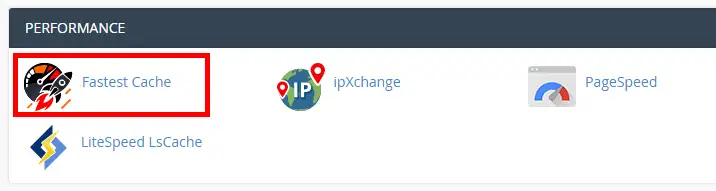
Fastest Cache appears as an icon in cPanel in the “Performance” section.
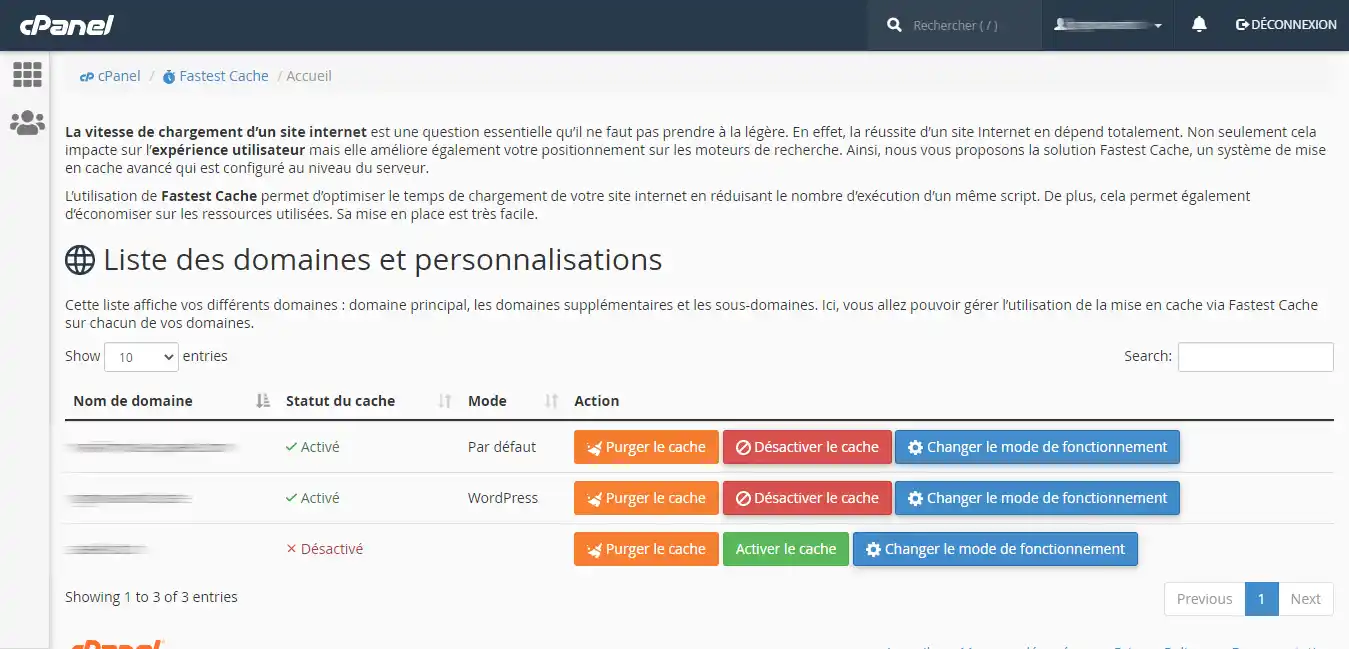
Once in the interface, the main domain, additional domains and subdomains are displayed in the list.
The “Cache status” column shows the cache activation status. If it is set to “Enabled”, then the cache is enabled.
The “Purge cache” button allows you to delete all cached data for that particular domain name.
The “Disable cache” button allows you to disable caching.
The “Enable cache” button allows you to enable caching.
The “Change operating mode” button allows you to modify the behavior of the cache system. These modes will be explained right after.
The different cache modes
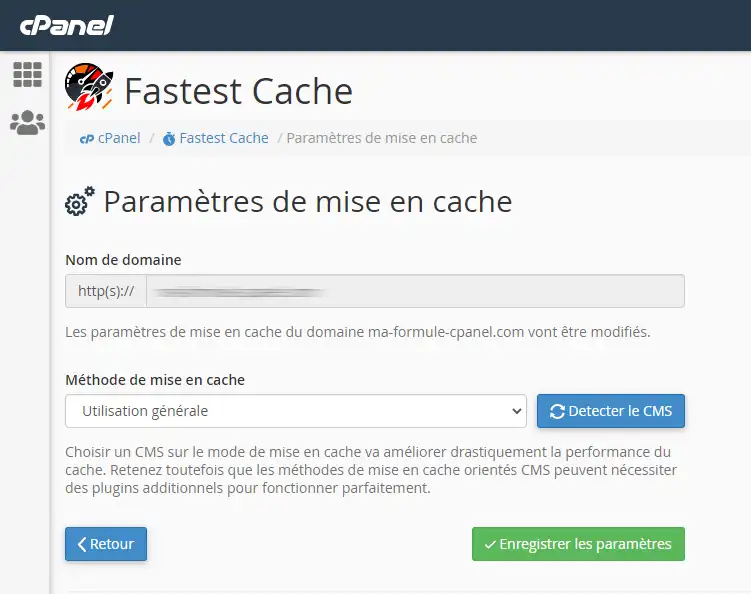
By default, the cache system uses the “General use” mode, which is suitable for general uses. However, there are other modes:
Developer mode: identical to disabling the cache; this allows you to bypass the cache system during your development periods. WordPress: a cache mode better suited to WordPress, where folder management (wp-content, wp-admin, …) and WordPress-specific cookies are improved. Prestashop : a cache mode better suited to Prestashop, where folder and cookie management is improved.
Cache purge
In addition to the cPanel interface allowing cache purging, it is possible to manually purge the cache from the cPanel account’s SSH terminal or from a script hosted on the server.
Launched from your hosting account (your site’s PHP script, Cron task or SSH terminal), these methods require neither an API token nor credentials: Fastest Cache directly accepts the HTTP PURGE method.
Cache purge with cURL
Purge a page’s cache:
⌨ Command
curl -X PURGE https://mon-site-web.com/mapage.php
This will purge the cache for the URL https://mon-site-web.com/mapage.php.
This will purge all caches for URLs beginning with 'https://mon-site-web.com/wp-content/uploads/'
Purge a site’s cache
⌨ Command
curl -X PURGE https://mon-site-web.com/.*
For all three of these commands, three responses are possible:
HTTP code 200: the purge completed successfully without error.
HTTP code 4xx: the purge is not allowed.
HTTP code 5xx: an error occurred.
Automatic purge with a PHP script (Cron task)
The following script clears the cache for the entire site, or for only a few pages. Copy it into a purge-cache.php file on your hosting account, then specify your domain in $site. To purge only certain pages, list them in $pages.
To run it automatically, for example every night, create a Cron task that executes this file with PHP. If you just want to clear all the cache, the Cron task can also directly execute:
The HTTPS status and the ports indicated on Apache are injected into the environment and generally require no additional modification.
However, if HTTPS detection is not functional with Fastest Cache, this can cause infinite redirect loops. Therefore, it will be necessary to modify the detection data.
The trusted HTTP headers for detection are:
X-Forwarded-Proto
X-Forwarded-Port
So, if you use the following HTTPS redirect with a .htaccess:
Code
RewriteEngine On
RewriteCond %{SERVER_PORT} ^80$
RewriteRule ^(.*)$ https://%{SERVER_NAME}%{REQUEST_URI} [L,R]
and it does not work, you can replace the SERVER_PORT variable with X-Forwarded-Proto:
CDNs such as CloudFlare can filter HTTP requests, which may block the “PURGE” requests used by Fastest Cache to purge the cache. It is therefore recommended that you specify the server IP address when purging with curl in order to bypass CDNs during purge operations:
Bonjour
vous indiquez à la fin de votre article, qu’il faut utiliser un seul niveau de cache, donc je ne comprend pas si on peut utiliser cloudflare avec Fastest cache au niveau du serveur ou pas ?
F✓
fabrice-LWS Official answer
20 Sept 2022
Bonjour, il est préférable d'utiliser qu'un système de cache afin de ne pas rencontrer de problème. L'utilisation de plusieurs systèmes de cache différents est souvent contre-productif et peut engendrer différents problèmes comme le blocage de certaines requêtes telles que celles permettant de purger le cache d'une page de votre site ou toutes les pages.
Was this answer helpful?
R
raf
19 Sept 2022
Et au niveau du plug-in wordpress
WP Rocket : est il compatible ?
F✓
fabrice-LWS Official answer
20 Sept 2022
Bonjour, le plugin WP rocket est compatible avec Fastest Cache.
Was this answer helpful?
A question about this article?
Ask the LWS team and the community. Answers are published after moderation.
Ask the LWS team and its community a question
!
To enable this form, please tick the two consent boxes below.





 Yes
Yes No
No About
About 