
Online help
The web host accessible to all
Procédure
When you create an online store, whether it is based on Prestashop 1.7 or Magento, it is recommended to activate the SSL certificate. The SSL certificate makes it possible to encrypt the data between the customer's computer and your website. This is a guarantee of trust between your visitors and your online store.
1.You will first need to activate the SSL certificate from your customer area:
(Warning, you do not have automatic redirection from this interface.)
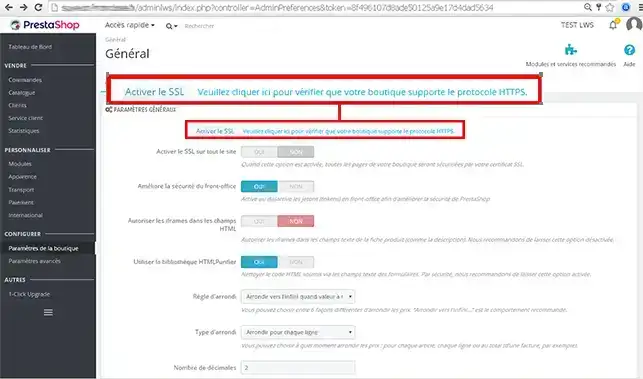
2. Go to your website administration, then to the "configure" section then to "Store settings" then to "General" then you will need to click on "Please click here to check that your store supports the HTTPS protocol"
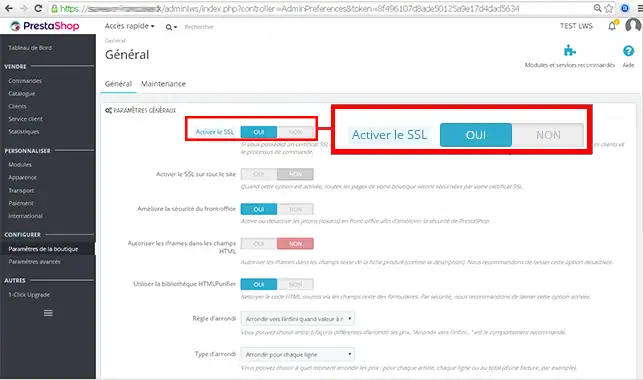
3.Click the "Yes" button for the "Enable SSL" field then click on "Save at the bottom of the page."
4. Click the "Yes" button for the "Enable SSL on all the site" field then click on "Save" at the bottom of the page.
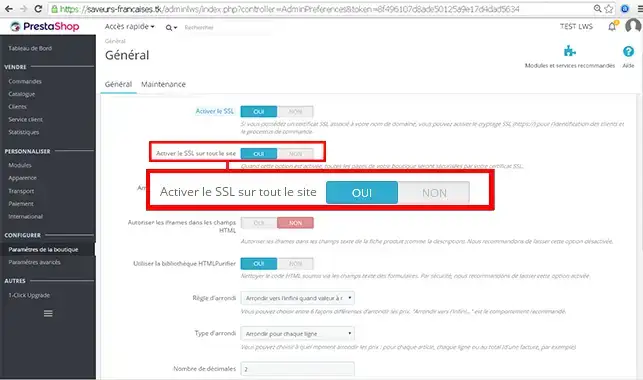
Once these actions have been completed you will indeed have a site with a https url.
You are now able to activate the SSL certificate on your Prestashop online store with LWS. It is important to activate it when it comes to selling articles or products. Indeed, the SSL certificate will inspire confidence in your customers and make it easier to turn visits into sales.
Feel free to share your comments and questions!
Ask the LWS team and the community. Answers are published after moderation.
 About LWS :
LWS is a 100% French web hosting company that focuses on quality and innovation and offers a responsive and competent technical service at affordable prices.
About LWS :
LWS is a 100% French web hosting company that focuses on quality and innovation and offers a responsive and competent technical service at affordable prices.



 Yes
Yes No
No