Service concerned: shared web hosting LWS Linux
Panel concerned: LWS Panel
Level: beginner
An SSL certificate lets you display your site with an address starting with https://. It encrypts the exchanges between your visitors’ browser and your site, for example when a form is submitted or a payment is made.
It is important to understand that an SSL certificate does not secure the site itself : it does not fix vulnerabilities in the code, does not prevent the hacking of a vulnerable site, and does not guarantee that the site owner is legitimate. A fraudulent site can also use a valid SSL certificate.
On LWS Panel hosting, the free Let’s Encrypt SSL certificate is generally activated automatically. This guide explains how to check its status, how to restart it if necessary, and what to check if HTTPS still does not work.
The padlock or the https:// address indicates that exchanges with the site are encrypted. This does not guarantee that the site is trustworthy, or that its owner is who they claim to be.
If you manage a site, keep your applications, themes, extensions, and passwords up to date in order to limit security vulnerabilities.
If you visit a site or an online store, stay vigilant: check the legal notices, the company’s registration, its contact details, the official site address, and its reputation from external sources before providing sensitive information.
This guide applies to hosting managed from LWS Panel.
Are you using another environment?
Before you begin
The Let’s Encrypt SSL certificate can only work if the domain correctly points to the hosting concerned.
Before restarting SSL, check the following points if your site is not yet accessible over HTTPS:
- the domain name must point to the IP address of your LWS hosting;
- the address
www.votredomaine.fr must point to the same hosting if you also want to secure the www version;
- if an IPv6 record is present in your DNS zone, it must point to the correct IPv6 address of the hosting;
- if your DNS zone is not managed at LWS, the corrections must be made through the provider managing your DNS.
If the domain, the www version, or IPv6 points to another hosting account, the SSL certificate may fail to activate or may only work on part of the site.
Check whether the SSL certificate is already active
Before making any changes, test your site in a browser:
- Open a new browsing window.
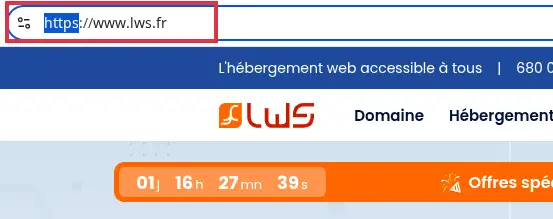
- Enter your site address with
https://, for example:
https://votredomaine.fr
- Also test the address with
www if you use it:
https://www.votredomaine.fr
The SSL certificate is active when your site opens over https:// without a security warning in the browser.
If the site displays correctly over HTTPS, the certificate is already working. You can then enable an automatic redirect to HTTPS if you want all visitors to be directed to the secure version of the site.
Enable or restart the SSL certificate from LWS Panel
If the certificate is not active, you can check its status from your LWS customer area.
- Log in to your LWS customer area.
- Click Manage next to the relevant domain or hosting account.
- In the Domain management section for domain plans or Security for other hosting plans, click SSL.
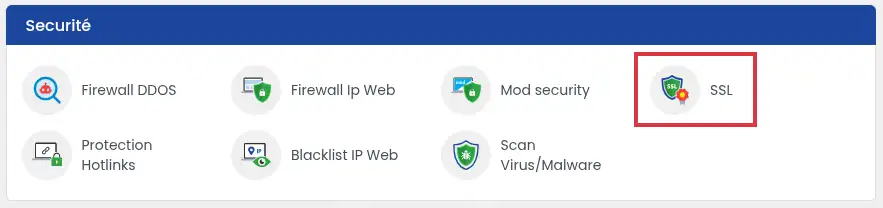
- Select Activate on the first line labeled SSL Service (1).
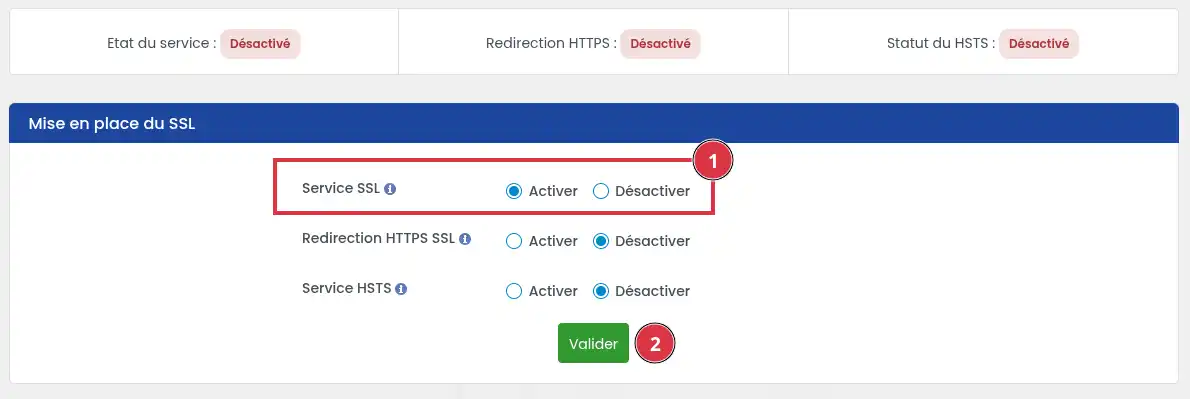
- Then click the Validate button.
Certificate activation may not be immediate. After a DNS change or an SSL restart, a propagation delay may be necessary before HTTPS works correctly.
Check that everything works
Once the certificate has been activated or restarted and after waiting about fifteen minutes for the configuration to propagate, check again:
https://votredomaine.frhttps://www.votredomaine.fr, if you use www
The site should open without a security warning.
If HTTPS works only without www, or only with www, the problem is often due to different DNS pointing between the main domain and the www record.
After activating the certificate
The SSL certificate allows the site to be accessible over HTTPS, but it does not always automatically force visitors to use this secure version.
To complete the setup, you can then:
On LWS Panel, installing a paid SSL certificate is no longer offered. If you need to install a custom paid certificate, you must have a cPanel hosting account or a VPS.
Common issues
My site still shows “Not secure”
First check that you are opening the site with https:// and not http://.
If the site works over HTTPS but visitors still land on the non-secure version, enable the automatic redirect to HTTPS.
If the browser shows a certificate warning, check the DNS pointing for the domain, the www, and IPv6.
The SSL certificate does not activate
The most common case is incorrect domain pointing. Check that the domain points to the IP address of your LWS hosting.
If your domain uses an external DNS zone, the correction must be made through the service currently managing the domain’s DNS.
HTTPS works without www, but not with www
The www record probably does not point to the same hosting account as the main domain.
In the domain’s DNS zone, check that www points to the relevant LWS hosting account. After correcting it, wait for DNS propagation and then test the HTTPS address again.
The domain points correctly, but SSL still does not work
If you have just modified the DNS zone, wait for propagation to finish. The certificate can only be generated correctly when the domain truly points to the LWS hosting account.
You can then return to the SSL section of LWS Panel and restart certificate activation.
I want to install a paid SSL certificate
Installing a paid certificate is no longer offered on LWS Panel.
To use a custom paid SSL certificate, you must use a cPanel hosting account or a VPS, then follow the procedure suited to that environment.



 Yes
Yes No
No About
About 