


How can I change the theme and layout of the elements?

Procédure

How do I change the theme of my Roundcube Webmail?

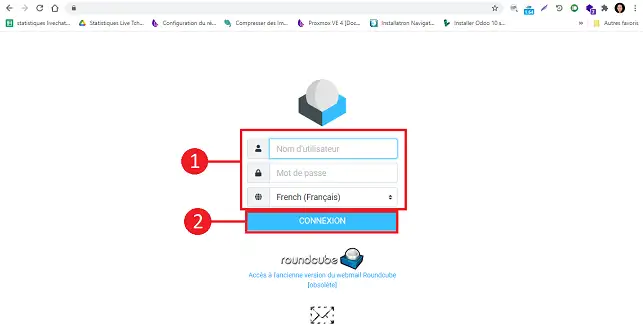
1. Connect to your Webmail by going to the URL http://mail.domaine.com (domain.com must be replaced by your domain name).

How can I change the theme and layout of the elements?

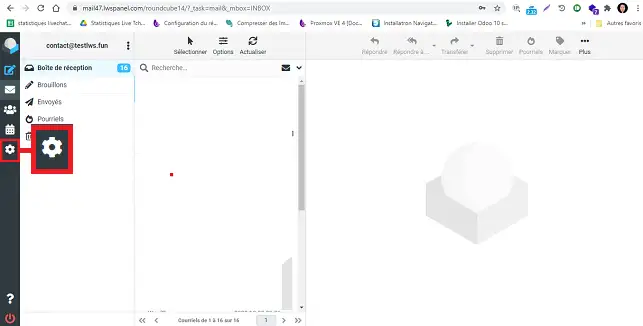
2. Click on the"Settings" gear on the right-hand side of your screen.

How can I change the theme and layout of the elements?

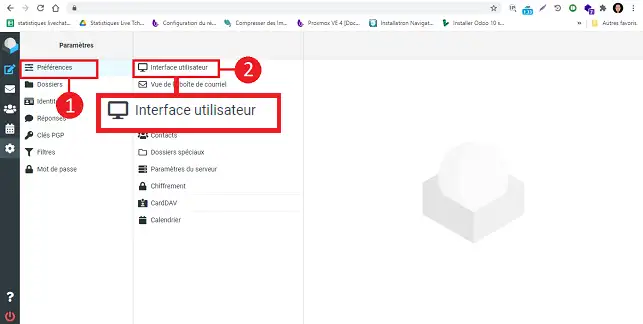
3. Go to"Preferences" and click on the"User Interface" tab.

How can I change the theme and layout of the elements?

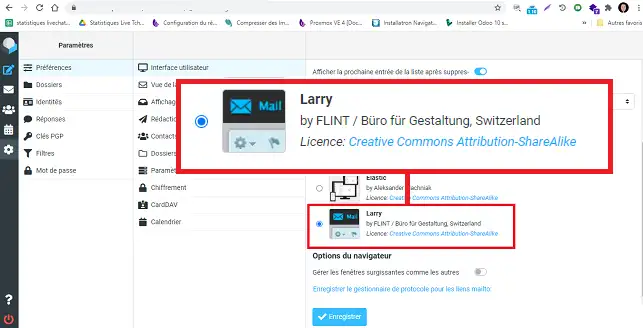
4. Go to the"Interface skin" section and change the theme used from"Elastic" to"Larry" and click on the"Save" button.

How can I change the theme and layout of the elements?

How do I change the layout of elements in Webmail?

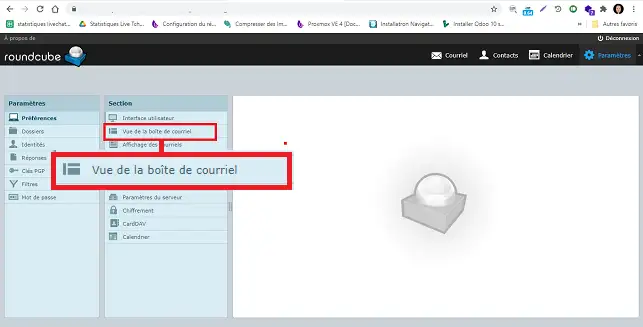
1. Go to the"Mailbox view" tab in the"Preferences/Section" section of your Webmail.

How can I change the theme and layout of the elements?

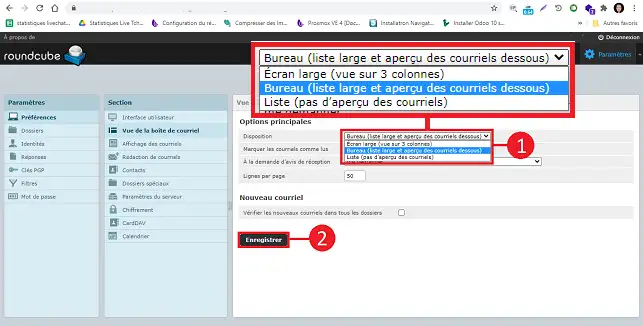
2. Change the layout in the"Main Option" section from"Widescreen" to"Desktop". Finally, click on the"Save" button to save your request.

How can I change the theme and layout of the elements?

Conclusion

You can now modify the theme and layout of the elements on the new version of Roundcube Webmail attached to your Web hosting package with LWS.

Don't hesitate to share your comments and questions with us.

help.lws.net/a/1520
Was this article helpful?

Yes

No

Read 134 768 times

Thank you! Feel free to ask questions about our documentation if you would like more information, and help us improve it.

Similar articles

Questions about the article 2

Ask a question
Et
24 Jan 2023
Comment modifier la photo de profile de la boîte mail dans rouncube?
Benjamin-LWS Official answer
24 Jan 2023

Bonjour, merci de nous avoir contactés au sujet de votre boîte mail dans Roundcube.

Malheureusement, il n'est pas possible de modifier la photo de profil dans Roundcube.

Nous comprenons que cela peut être frustrant, mais cette fonctionnalité n'est pas actuellement disponible dans notre système de messagerie.

Si vous avez des questions ou des préoccupations supplémentaires, n'hésitez pas à nous contacter à nouveau via notre service de support disponible depuis votre espace client. (https://aide.lws.fr/a/268)

Nous vous remercions pour votre compréhension.

Was this answer helpful?

sabijuba
il y a 8 mois
Bonjour comment puis je modifier la signature de mes mails
Maxence-LWS Official answer
il y a 8 mois

Bonjour,

Je vous remercie pour votre message et vous présente nos excuses pour le délai de réponse.

Voici un tutoriel détaillant la création / édition d'une signature sur notre outil Roundcube :

https://tutoriels.lws.fr/e-mail/creer-une-signature-lws-professionnelle-avec-images-logo-et-icones-de-reseaux-sociaux

Je vous remercie de votre attention et reste à votre disposition pour toute autre question ou complément d'information.

Vous pouvez nous contacter depuis votre espace client ou sur cette page : https://www.lws.fr/contact

Cordialement, L'équipe LWS 

Was this answer helpful?

A question about this article?

Ask the LWS team and the community. Answers are published after moderation.

Ask the LWS team and its community a question

GDPR: Controller: LWS-Ligne Web Services. Purpose: moderation and public publication of your question, possible notification of an answer. Legal basis: consent (Art. 6(1)(a) GDPR). Email retention: 90 days after notification, 12 months maximum without an answer. To exercise your rights, see the GDPR section of our Terms and Conditions.