Procédure
Introduction
Email addresses suspended for inactivity can cause problems for LWS users. This documentation aims to explain the reasons behind this suspension, the procedure for unblocking it, and best practices for avoiding any further blocking. Maintaining an active email address is crucial to ensuring smooth communication and preventing problems related to inactivity.
I. Why is your LWS email address suspended?
We consider that an address that has not had any connection during the last 90 days from a user to consult its content is a dormant email address.
In the vast majority of cases, these addresses have been created for testing purposes or for an employee who does not use it or who is no longer with the company.
An email address that is created but not used consumes resources that could be put to better use. An email address that is not consulted can continue to receive or redirect emails that will monopolise storage space on the server, on our daily back-up system for our customers' data, and also generate bandwidth flow generated by incoming emails. In addition, this type of email address, which sometimes receives spam emails, can automatically redirect these emails and therefore impact the reputation of the IPs of the LWS servers. It is therefore important not to allow email addresses to operate autonomously without anyone being concerned.
II. How can I check whether my email address has been suspended for inactivity?
When an email address is unused, our system detects it and sends an email to the customer account contact email address and to the email address concerned 7 days before the suspension so that the user can take the necessary steps before the suspension takes effect.

A second email is sent when the email address is suspended by the system to notify the account owner of the suspension.
If, despite our warning and notification, the email address is suspended, the User can check the suspension status of an email address by following these steps from their LWS customer account:
Step 1: You must first log in to your LWS customer area to access the management of your hosting or Pro mail service.
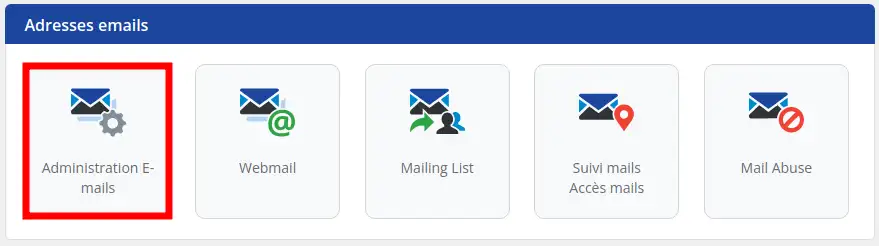
Step 2: Once in the management of your hosting, locate the "Email addresses" section. Then click on "Email Administration".
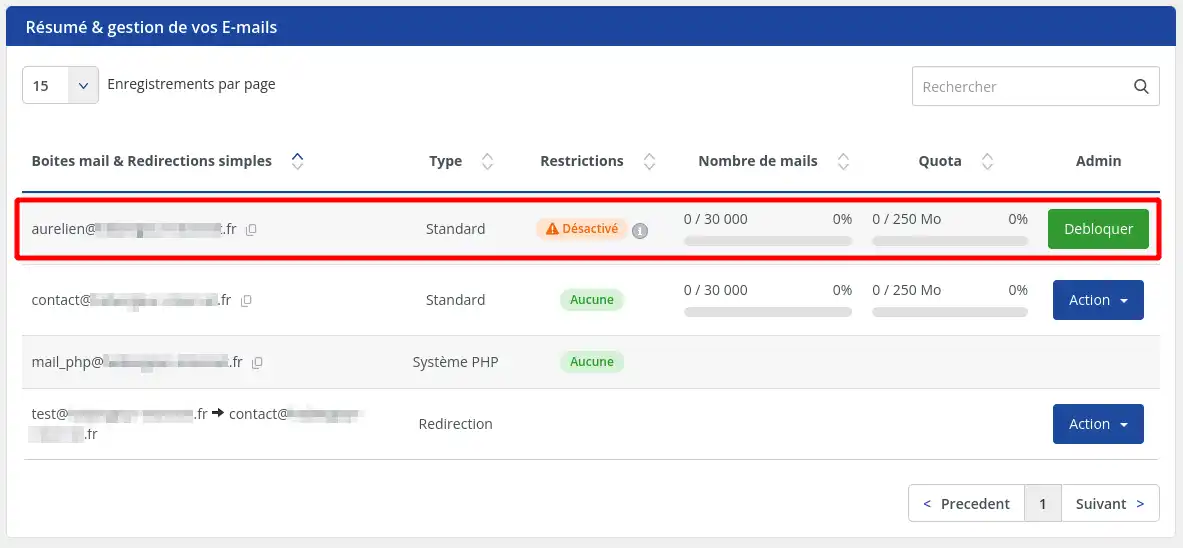
Step 3: View the list of email addresses. The suspended address should have the status"deactivated" if it is affected by this suspension procedure.
III. Procedure for unblocking an inactive LWS email address
To quickly reactivate a suspended email address, you can follow these steps:
Step 1: You must first log in to your LWS customer space to access the management of your hosting or Pro mail service.
Step 2: Once in the management of your hosting, locate the "Email addresses" section. Then click on "Email Administration".
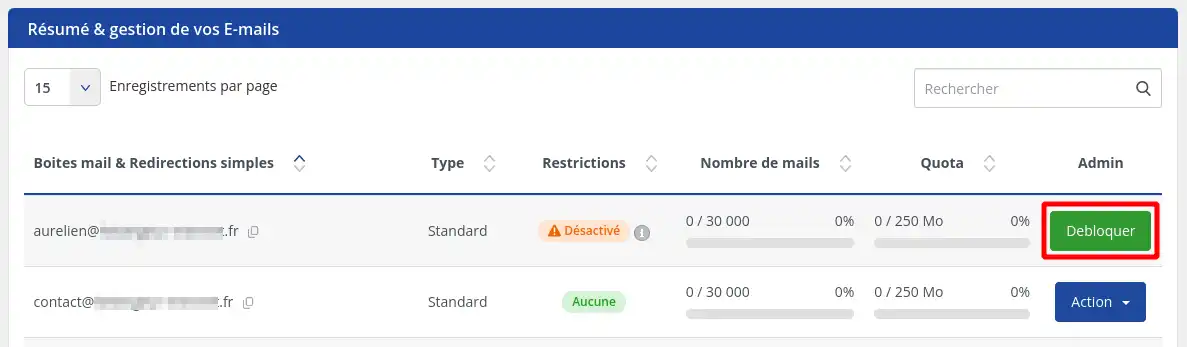
Step 3: View the list of email addresses and click on the "Unblock" button for the address concerned.
A second solution is to simply connect to the email address in question to reactivate it for at least 90 days.
The reactivation operation may take around 5 minutes before you are fully operational. If you have to reconnect to reactivate it, remember to manage its content at the same time
.
IV. Some solutions to avoid suspension
Redirect your emails to one or more other email addresses.
If this email address is unused, but its only purpose is to redirect emails to another address, then there are several solutions:
You have a dedicated email address for sending emails from your site with SMTP authentication
In this case, there are several tips you can use to avoid a suspension problem:
- Use the "mail()" function in the PHP programming language to send emails from your website. For CMS such as WordPress or Prestashop, there are free extensions that make this operation easy.
- Authenticate your site in SMTP with an email address that you use every day to communicate with your prospects, customers, communities, etc.
In any case, don't forget that sometimes the recipients of your site's emails may reply to them, so it's worth checking this email address regularly to make sure you don't miss out on any important information.
Conclusion
By keeping your LWS email address active and following the best security practices, you will avoid suspensions for inactivity. Make sure you use your email address regularly and take advantage of the security features offered by LWS for a smooth and reliable communication experience. If you encounter any problems, please do not hesitate to contact LWS Customer Support for further assistance.



 Yes
Yes No
No About
About 