
Online help
The web host accessible to all
Procédure
The purpose of this documentation is to help you view the access and connection logs for the email addresses of your LWS panel service.
We will show you step by step how to access and view the logs.
To do this, log in to your customer area. When you are logged in, click on "manage" behind your domain name.
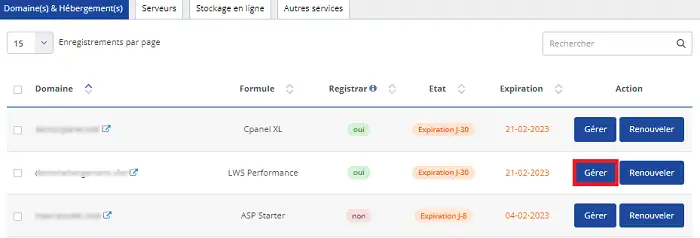
This will take you to the administration area for your package.
Go to "email addresses" and click on "email tracking, email access".
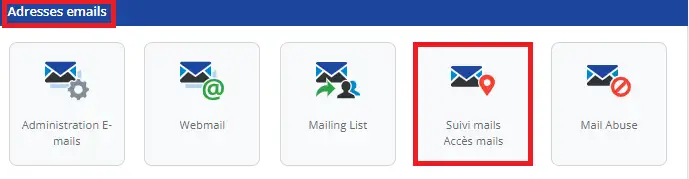
You're on the "mail tracking" window, which lets you check the delivery status of the emails you've sent or received.
Click on "Access Logs":
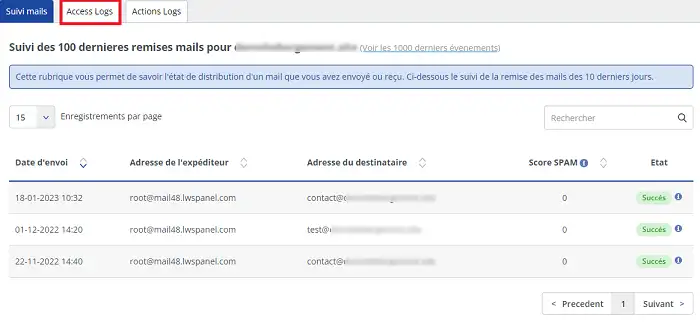
The latest information may take up to 5 minutes to be displayed.
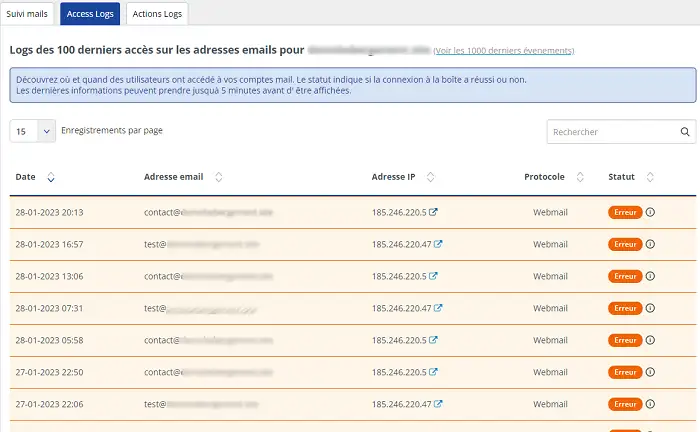
Find out when and where users have accessed your email accounts. The status also shows whether or not the connection to the mailbox was successful. You'll find the date, email address, IP address, protocol and status.
In the section where you see "error", click on the small information point and you can read the nature of the error.
You can now view the access and connection logs for your email service.
Ask the LWS team and the community. Answers are published after moderation.
 About LWS :
LWS is a 100% French web hosting company that focuses on quality and innovation and offers a responsive and competent technical service at affordable prices.
About LWS :
LWS is a 100% French web hosting company that focuses on quality and innovation and offers a responsive and competent technical service at affordable prices.



 Yes
Yes No
No