
Online help
The web host accessible to all
Procédure
This documentation will help you view the history of actions performed on your mail service from your customer account. We will go through step by step how to view the history of actions performed.
To do this, log in to your customer area. Once you are logged in, click on "manage" next to your domain name.
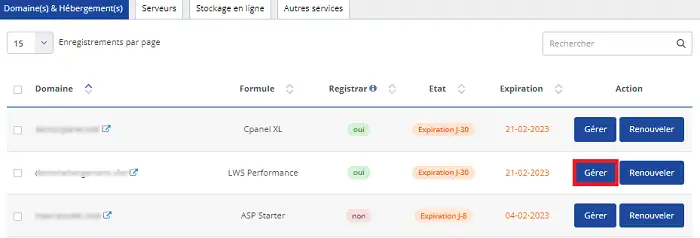
You will be taken to the administration of your plan.
Go to "email addresses" and click on "mail tracking, mail access"
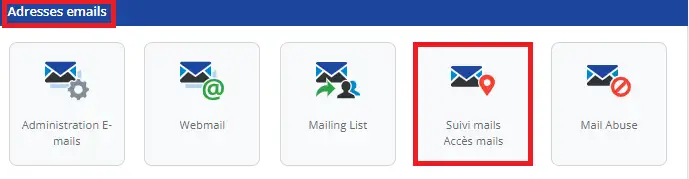
You are on the "mail tracking" window, which allows you to check the delivery status of your emails that you have sent or received.
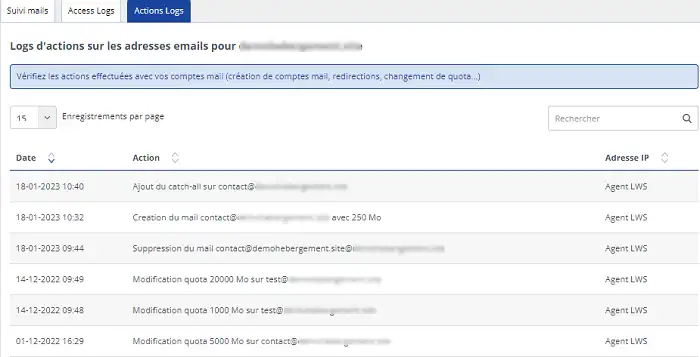
Click on "action logs":
There, you can see all the actions performed with your email accounts. Whether for your quotas, redirects, or email creation.
You will also see the IPs and dates on which the actions were performed.
From now on, you are able to view the actions performed on your mail service.
Ask the LWS team and the community. Answers are published after moderation.
 About LWS :
LWS is a 100% French web hosting company that focuses on quality and innovation and offers a responsive and competent technical service at affordable prices.
About LWS :
LWS is a 100% French web hosting company that focuses on quality and innovation and offers a responsive and competent technical service at affordable prices.



 Yes
Yes No
No