


How can you change the display language in your customer account?

Procédure

Introduction

This documentation aims to explain how you can change the display language on your panel at LWS

How to change the language on your customer area?

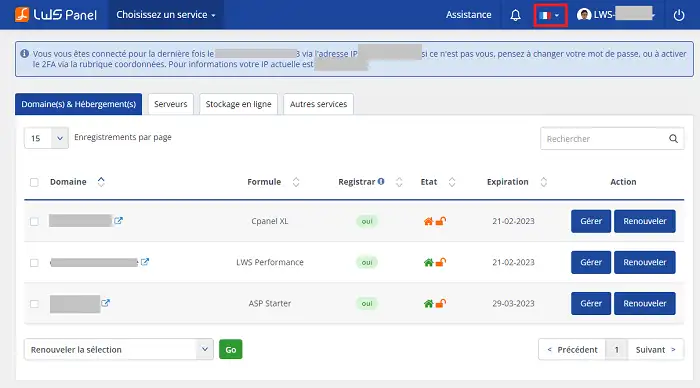
To change the language on your customer area, log in to your LWS Panel.

Then, click on the flag at the top right of your customer area :

How can you change the display language in your customer account?

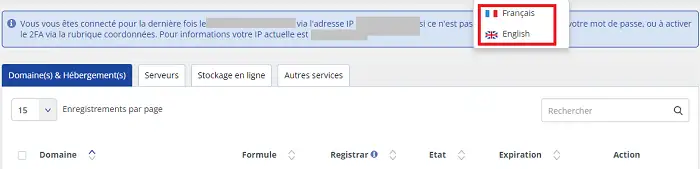
Then, you can choose to change the language: either in French or in English

How can you change the display language in your customer account?

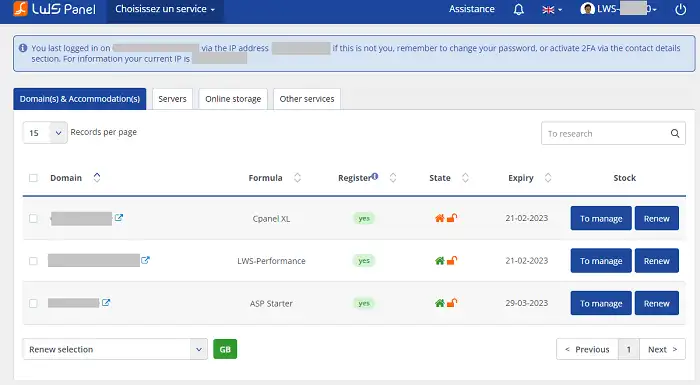
The translation will be done automatically :

How can you change the display language in your customer account?

Conclusion

Now, you know how to change the language on your customer area.

help.lws.net/a/1654
Was this article helpful?

Yes

No

Read 17 137 times

Thank you! Feel free to ask questions about our documentation if you would like more information, and help us improve it.

Similar articles

Questions about the article (1)

Ask a question
LWS-775499 LWS team
il y a 11 mois
bonsoir j'ai hébergé mon site web en html sur votre héberger et je veux configurer en plusieurs langues anglais chinois espagnole portugais quelle conduite à tenir?
Jordan-LWS Official answer
il y a 11 mois

Bonsoir,
Merci pour votre message.

La configuration d’un site en plusieurs langues (anglais, chinois, espagnol, portugais, etc.) relève de la partie création et développement du site web, ce dont nous ne nous occupons pas.
Notre rôle se limite à la gestion de l’hébergement et du nom de domaine.

Je vous recommande de vous rapprocher :

  • d’un webmaster ou développeur web,

  • ou d’utiliser un outil de traduction multilingue si vous travaillez avec un CMS (par exemple WordPress Multilingual – WPML, Polylang, etc.).

Si votre site est en HTML pur, il faudra créer une version du site par langue (ex. : /en/, /es/, /pt/, /zh/) et adapter les liens de navigation entre elles.

N’hésitez pas à revenir vers nous si vous avez besoin d’aide pour la partie hébergement (mise en ligne, fichiers, DNS, etc.).

Je vous remercie pour votre attention et reste à votre disposition pour toute autre question ou complément d'information.

Cordialement, L'équipe LWS 

Was this answer helpful?

A question about this article?

Ask the LWS team and the community. Answers are published after moderation.

Ask the LWS team and its community a question

RGPD : Responsable LWS-Ligne Web Services. Finalité : modération et publication publique de votre question, notification éventuelle d'une réponse. Base légale : consentement (art. 6.1.a RGPD). Conservation des emails : 90 jours après notification, 12 mois maximum sans réponse. Vous pouvez exercer vos droits via notre nos CGV - section RGPD.