
Online help
The web host accessible to all
Procédure
The creation of automatic redirection will enable you to classify your emails automatically according to the criteria you define. To do this, you will need to :
The procedure differs slightly depending on the graphic theme used in Roundcube. This documentation explains the two procedures depending on the theme you are using.
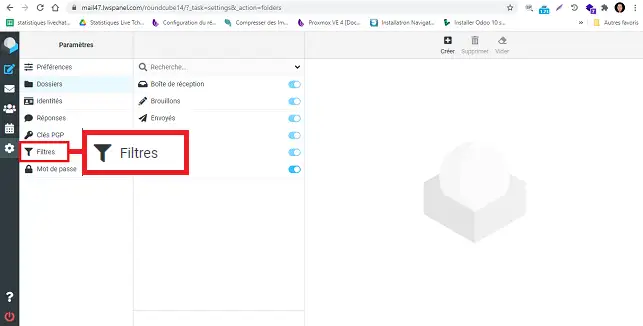
Click on"Filter" on the left-hand side of your Roundcube Webmail.
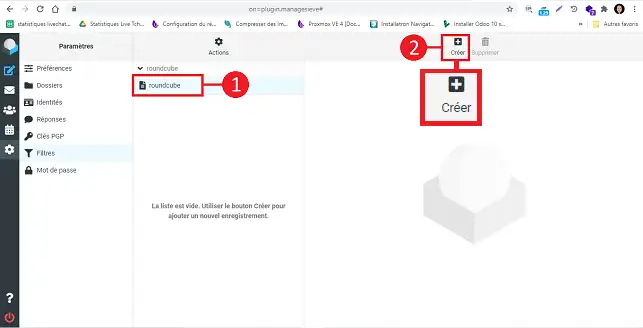
Click on the filter set you want to add and then on the"Create" button.
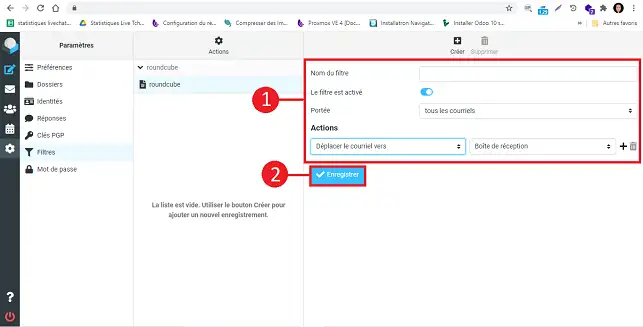
Fill in the fields as follows:
Click on the"Save" button to save your filter.
You are now able to classify your emails in specific folders as soon as they are received and automatically with your LWS web hosting package.
Don't hesitate to share your questions and comments.
Ask the LWS team and the community. Answers are published after moderation.
 About LWS :
LWS is a 100% French web hosting company that focuses on quality and innovation and offers a responsive and competent technical service at affordable prices.
About LWS :
LWS is a 100% French web hosting company that focuses on quality and innovation and offers a responsive and competent technical service at affordable prices.



 Yes
Yes No
No