How do I add a website to a dedicated VPS Hestia CP server?

Procédure

Prerequisites for installing a new site on your dedicated VPS HestiaCP server

To be able to add a website, you first need a domain name. A domain name is like the postal address of a house, but for finding a website on the Internet. Instead of giving complicated coordinates, such as a series of numbers (called an IP address, for example 142.250.185.164 for Google), we use names that are easy to remember and type, like google.com. The domain name therefore serves as a shortcut to access a set of services on the Internet, such as websites, email services, or even online storage spaces.

How to order a domain name?

Follow this documentation to find out how to order a domain name.

How to add a website under HestiaCP?

We assume that your domain is active and that your domain name is correctly pointing to the VPS server IP address. If this is not the case, you can do so by following the "How to modify the A record of a domain name?" section of this documentation.
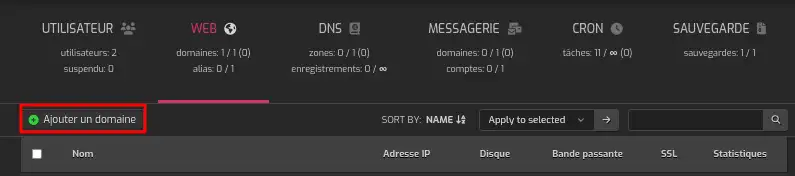
How do I add a website to a dedicated VPS Hestia CP server?

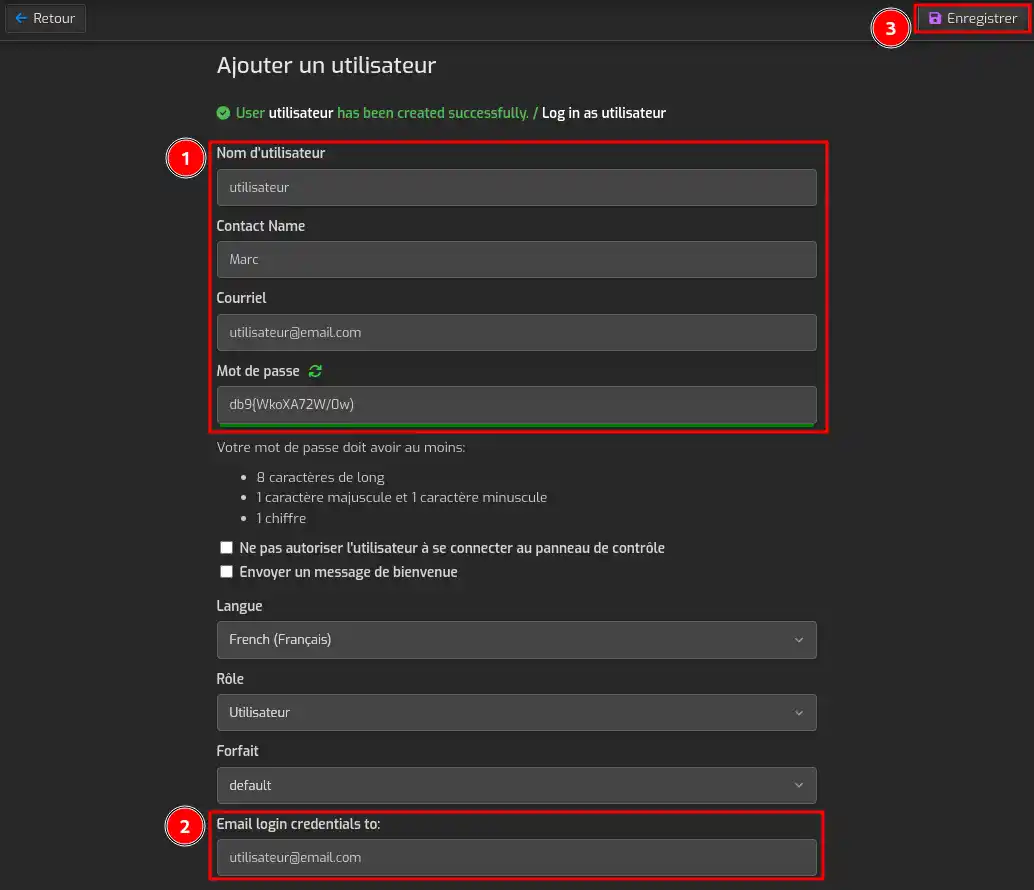
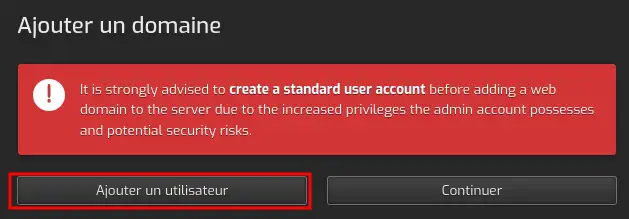
  • If you are using the "Admin" user, HestiaCP will prompt you to create one. Simply click on "Add User". Then fill in the various fields and click Save.

How do I add a website to a dedicated VPS Hestia CP server?

How do I add a website to a dedicated VPS Hestia CP server?

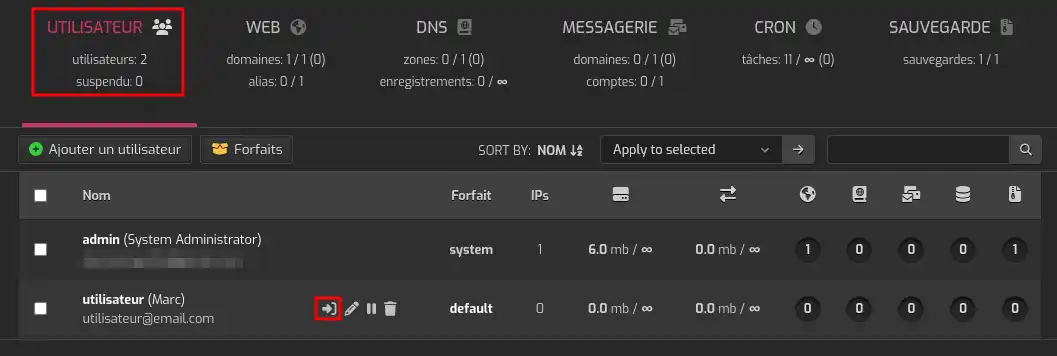
  • Once the user is saved, you can log in directly with it by clicking on the "Users" tab, then on the icon with an arrow, as shown in the screenshot.

How do I add a website to a dedicated VPS Hestia CP server?

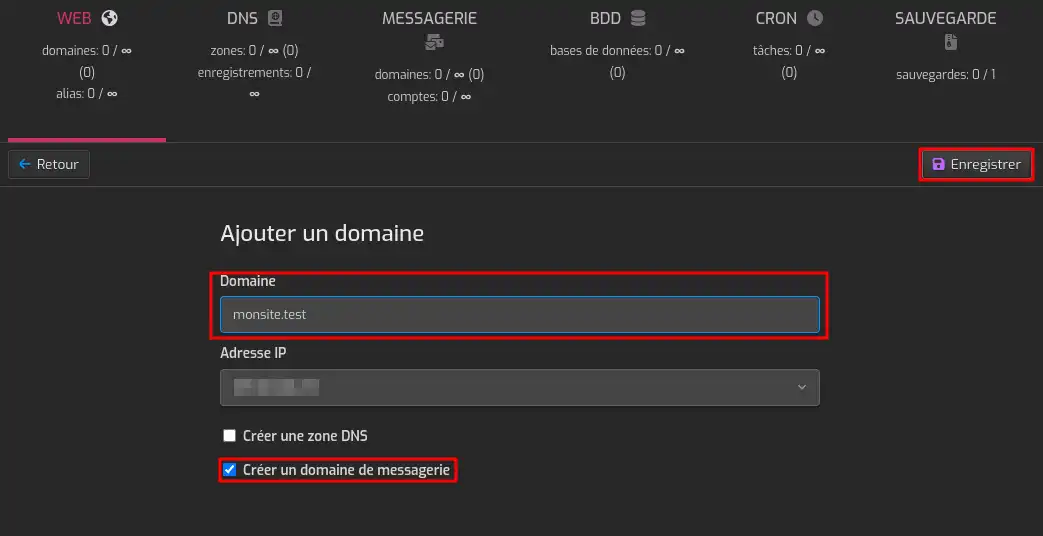
  • Go back to the Web tab and click again on "Add Domain". Enter the domain name. If you want to use your VPS mail service, you must also check "Create mail domain". You can find more information on managing mailboxes by following this documentation. Click finally on "Save.

How do I add a website to a dedicated VPS Hestia CP server?

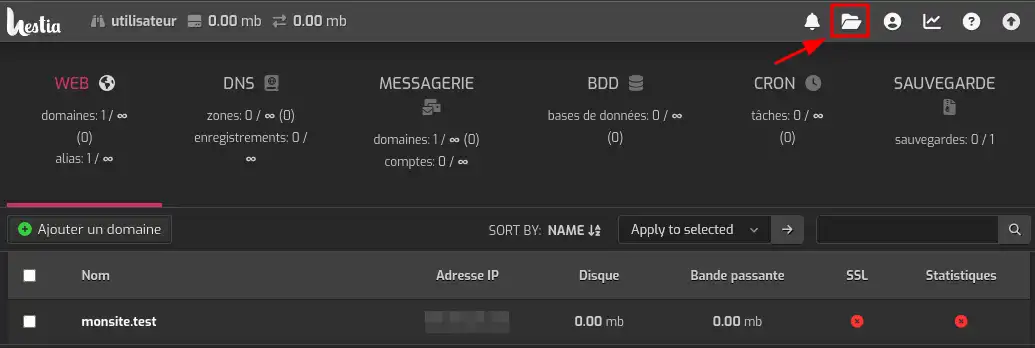
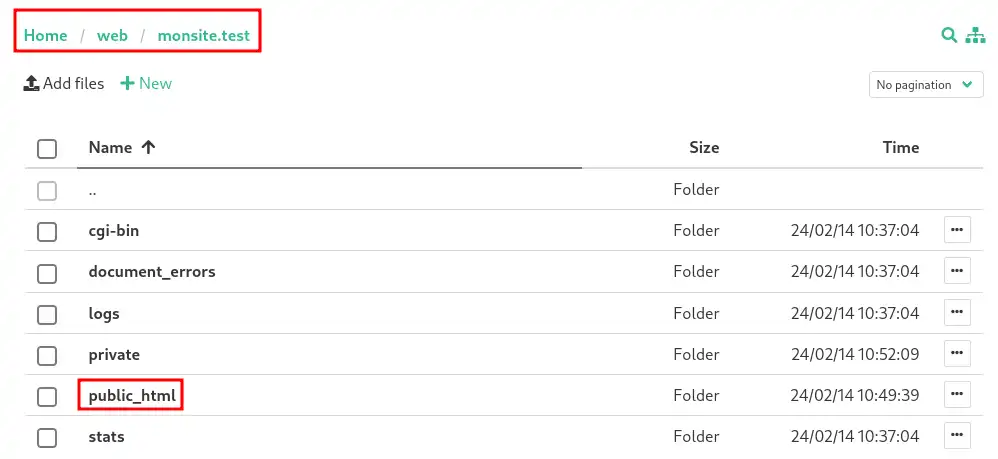
  • To upload your Web files, you can go to the file manager and then to the web/monsite.test/public_html/ folder.
     

How do I add a website to a dedicated VPS Hestia CP server?

How do I add a website to a dedicated VPS Hestia CP server?

Conclusion

You now know how to:

  • Identify the prerequisites needed before installing a new site on your dedicated VPS server with HestiaCP.
  • Order a domain name to establish your website's address.
  • Proceed with adding a website on HestiaCP by pointing your domain name to the VPS server IP address.
  • Create a new user if necessary and navigate the HestiaCP panel to configure your domain.
  • Manage the addition of a mail domain associated with your site and upload your Web files to the appropriate folder.

🚀 Thanks to these clear and concise steps, you are now ready to take off into the world of web hosting with HestiaCP! 🌐

Thank you very much for reading! 🙏 Feel free to leave a comment to share your experience or ask your questions about the service. We are here to help and exchange ideas! 💬

To discover powerful, ready-to-use hosting solutions, check out our turnkey VPS server offers equipped with HestiaCP. Click here 👉 Discover our HestiaCP offers.

help.lws.net/a/1841
Was this article helpful?

Yes

No

Read 8 226 times

Thank you! Feel free to ask questions about our documentation if you would like more information, and help us improve it.

Similar articles

A question about this article?

Ask the LWS team and the community. Answers are published after moderation.

Ask the LWS team and its community a question

GDPR: Controller: LWS-Ligne Web Services. Purpose: moderation and public publication of your question, possible notification of an answer. Legal basis: consent (Art. 6(1)(a) GDPR). Email retention: 90 days after notification, 12 months maximum without an answer. To exercise your rights, see the GDPR section of our Terms and Conditions.