


Getting started with Wordpress

Procédure

What is Wordpress?

Wordpress is an open source website creation tool written in PHP. It is probably the simplest and most powerful content management system (CMS) available today.

Wordpress allows you to easily create a blog or an online shop via a showcase site. It comes with thousands of different themes and extensions and can be adapted to suit any Web project.

Wordpress packages offer everything you need to make your mark on the Web:

  • FREE domain name (for .FR, .BE, .EU, .COM, .NET and .ORG domains)
  • Professional e-mail addresses

Access the Worpress CMS via LWS Panel

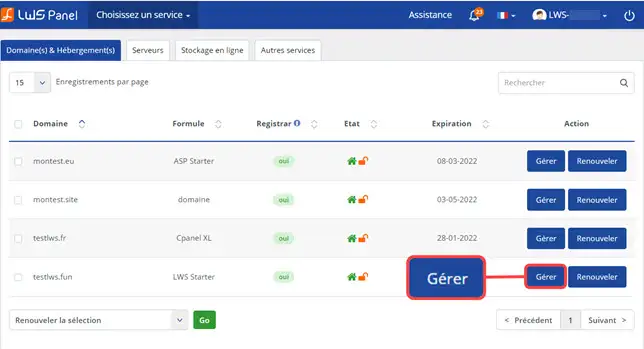
1. Log in to your LWS customer area

2. Click on the"Manage" button behind the domain name in question

Getting started with Wordpress


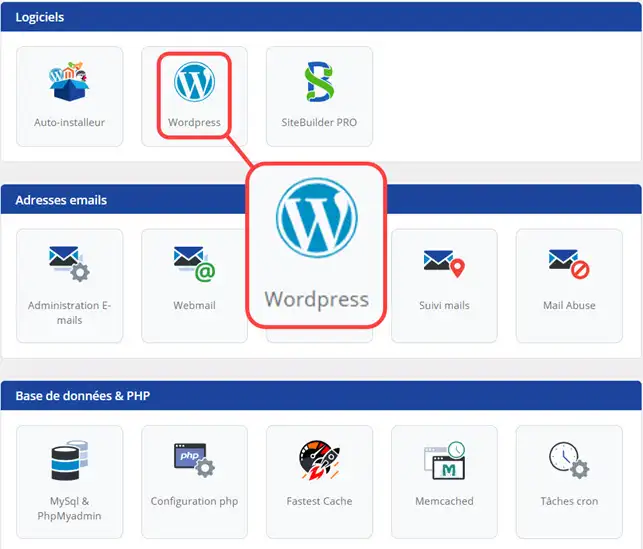
3. In the"Software" section, click on the"Wordpress" button

Getting started with Wordpress


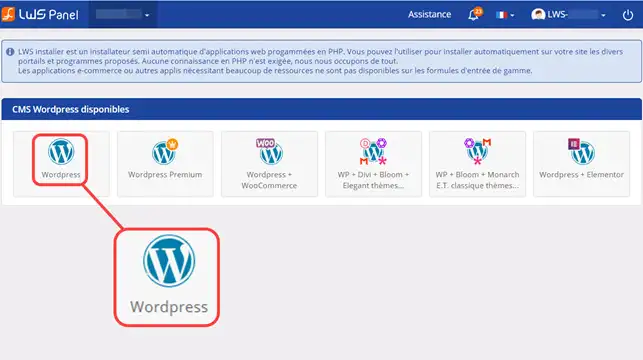
4. Choose Wordpress

Getting started with Wordpress


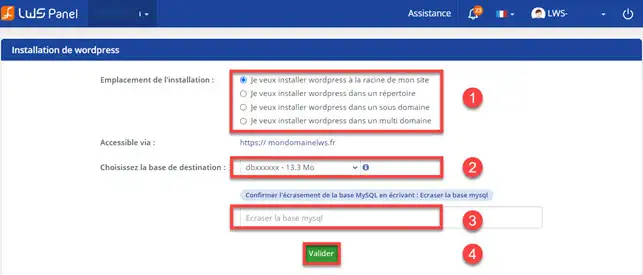
5. Choose a directory and a database attached to your Wordpress site. Click on the"Confirm" button as soon as you have made your choice.

Getting started with Wordpress

Accessing the Wordpress CMS dashboard

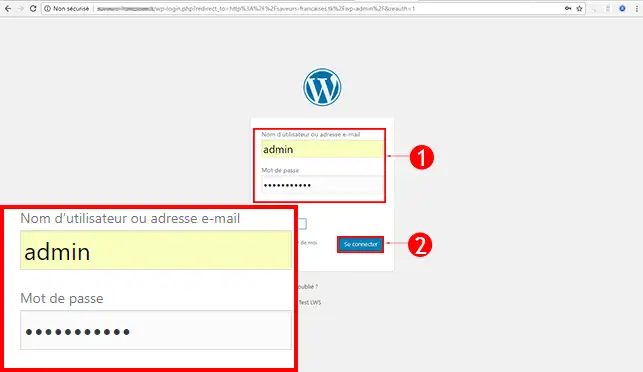
Once the Wordpress CMS has been installed, you can connect to it using the information received by email. The Wordpress dashboard can be found at the following address http://mondomaine.com/wp-admin (mondomaine.com must be replaced by your domain name)

Getting started with Wordpress

Creating a WordPress site: How to do it with WordPress?

To find out how to create a WordPress site quickly and easily, consult our Guide: Creating a WordPress site | Guide to creating a site with WordPress

Conclusion

You can nowinstall the WordPress content management system and connect to the dashboard to manage it with LWS. You caninstall different themes and extensions in just a few clicks on Wordpress. You don't need any special knowledge to create your website.

Don't hesitate to share your comments and questions!

help.lws.net/a/842
Was this article helpful?

Yes

No

Read 28 827 times

Thank you! Feel free to ask questions about our documentation if you would like more information, and help us improve it.

Similar articles

Questions about the article 3

Ask a question
regine
19 Sept 2022
Bonsoir je me permets de venir vers vous, je ne comprends pas pourquoi je ne vois pas les extensions sur mon site ainsi que les pages elle n'apparaissent pas sauf une dans l'attente de votre retour, restant à votre disposition cordialement Régine
fabrice-LWS Official answer
23 Sept 2022
Bonjour, vous pouvez visualiser les extensions installées sur Wordpress en vous rendant sur votre Tableau de bord Wordpress et en cliquant sur "Extensions". Concernant vos pages, je vus invite à vérifier que ces dernières soient bien publiés et bien en mode public et non privée. JE vous invite également à vérifier que ces dernières aient bien été ajouté à votre menu Wordpress se trouvant dans "Apparence" de votre tableau de bord Wordpress.
Was this answer helpful?

Doom29
16 Nov 2022
Ok, mais quand on prend un deuxième domaine avec la formule Starter, faut il créer plusieurs noms d'utilisateur et comment faire ?
fabrice-LWS Official answer
19 Nov 2022
Bonjour, une fois le second domaine souscrit, il vous sera possible de le lier à votre formule LWS Starter en suivant la procédure suivante: https://aide.lws.fr/a/334 . Si vous le désirez, il vous sera possible de créer un utilisateur FTP supplémentaire pour ce domaine en suivant la procédure suivante: https://aide.lws.fr/a/572 . Le répertoire FTP à indiquer est votre nom de domaine.
Was this answer helpful?
Doom29
23 Nov 2022
Ok, mais comment fait on pour accéder à son deuxième blog wordpress en passant par LWS ? Je ne connais pas mes identifiants du deuxième site wordpress et je ne sais pas où les trouver ?
fabrice-LWS Official answer
26 Nov 2022
Bonjour, si vous ne vous souvenez plus des informations de connexion WordPress, vous pouvez modifier le mot de passe en suivant la procédure suivante:https://aide.lws.fr/a/614 .
Was this answer helpful?

A question about this article?

Ask the LWS team and the community. Answers are published after moderation.

Ask the LWS team and its community a question

GDPR: Controller: LWS-Ligne Web Services. Purpose: moderation and public publication of your question, possible notification of an answer. Legal basis: consent (Art. 6(1)(a) GDPR). Email retention: 90 days after notification, 12 months maximum without an answer. To exercise your rights, see the GDPR section of our Terms and Conditions.