Procédure
What is Wordpress?
Wordpress is a content management system, CMS; it gives you the basic functions to edit text, modify it, and add images. It is possible to install extensions to add new features to the site such as:
- Content editor with insertion of links and media
- Agenda / Calendar
- Sending and downloading files
- Photo, video, music galleries
- Online store
- Project management
- Internal messaging
- Forum
- Chat
- etc.
Is Wordpress included in all plans?
Wordpress is included in all Linux hosting plans.
How do I install Wordpress with the auto-installer?
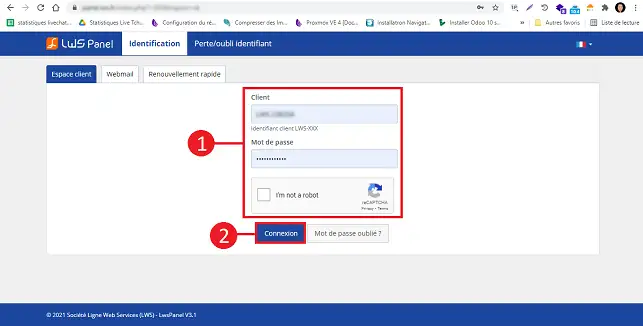
11. Log in to the administration area of your web hosting
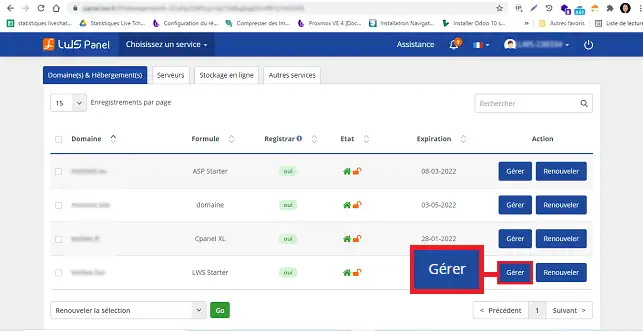
22. Click on the "Manage" button located behind the domain for which you want to perform the installation.
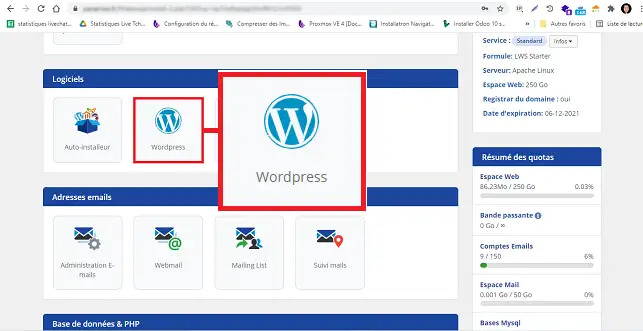
33. Click on the "Wordpress" button located in the "Software" section.
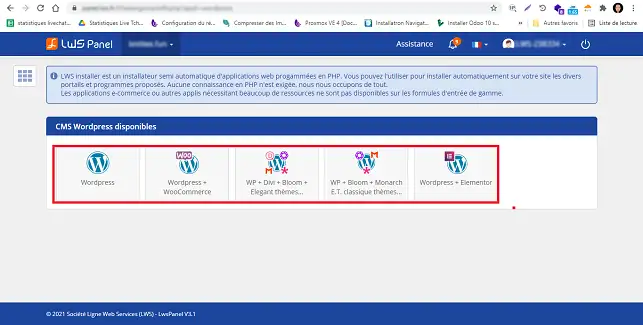
44. Choose the type of Wordpress CMS you want:
- Wordpress: This is the basic CMS
- Wordpress + Woocommerce: This is the Wordpress CMS with the Woocommerce plugin (online store)
- Wordpress + Divi
- Wordpress + Elegant Themes themes
- Wordpress + Elementor
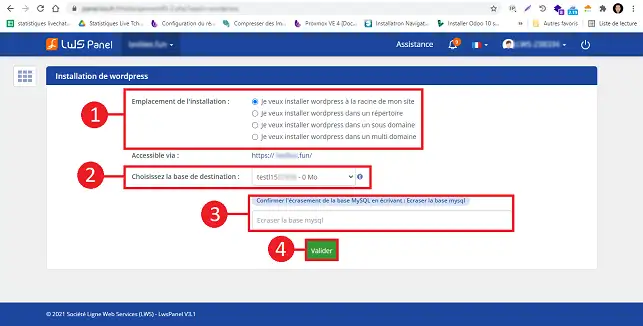
5. First, you will be asked to choose whether you want to install the software at the root of your website, in a specific directory, or on a subdomain. If you have a Starter, Standard, or Performance Web Hosting plan, you will also have the option to choose a domain linked to your plan through the "Multi-domain" option. Once this choice has been made, choose the database you want to link to your installation. Confirm your choice by typing "Yes" in the relevant field and click the "Validate" button to start the installation.
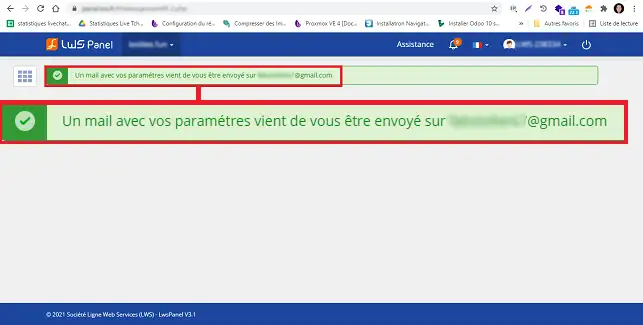
6. Once the installation is complete, the login information for the Wordpress Dashboard will be sent to you by email so that you can log in.
How do I change my password and username in Wordpress?
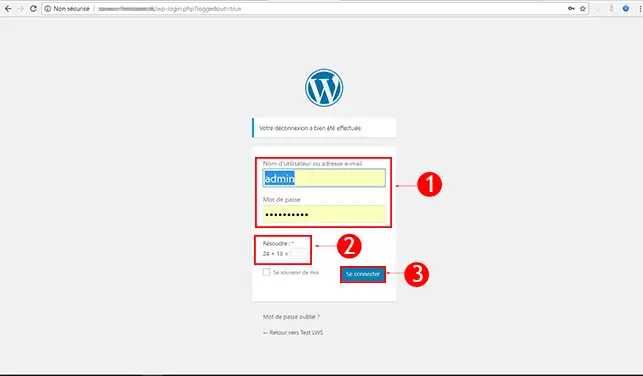
11. Go to the administration area of your Wordpress. (In this form example.com/wp-admin/) It is possible that your Wordpress is in a subdomain. (More explanations about subdomains here)
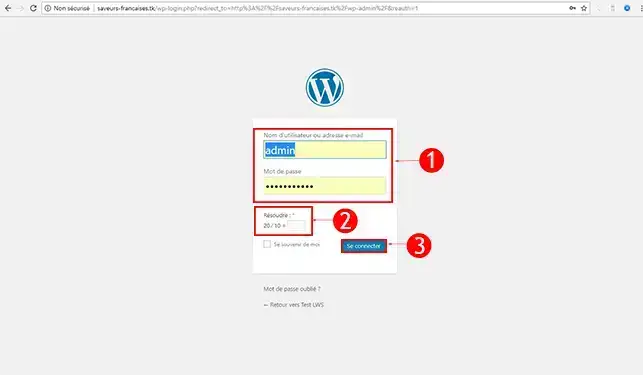
22. Enter your login details to sign in (The settings were sent to the email address associated with your LWS customer account). The login details may end up in your email inbox's SPAM folder. If, however, you have not received the login information, it is possible to reset the Wordpress password.
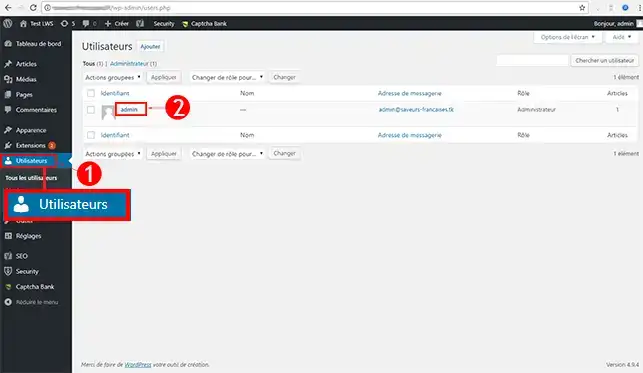
3. In the left-hand menu, click on the Users tab then click on the user you want to modify. For security reasons, it is recommended to change the username "admin". Indeed, this is the default name used when installing Wordpress.
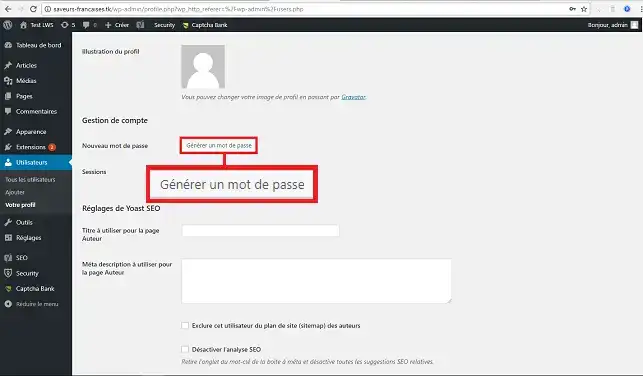
4. Click on the "Generate password" button. The password generator allows you to benefit from a strong password that is difficult for a hacker to find.
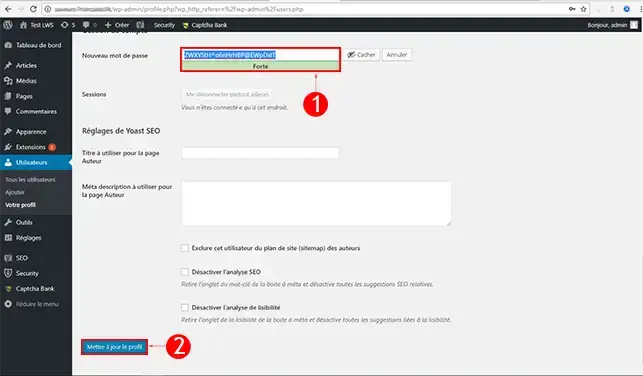
5. Choose your new Nickname as well as your new Password then click Save to save. For the password, it is preferable to use a strong password of 8 to 10 characters.
How do I add a post in Wordpress?
11. Go to the administration area of your Wordpress. (In this form example.com/wp-admin/) It is possible that your Wordpress is in a subdomain. (More explanations about subdomains here)
22. Enter your login details to sign in (The administration settings were sent to the email address associated with your LWS account)
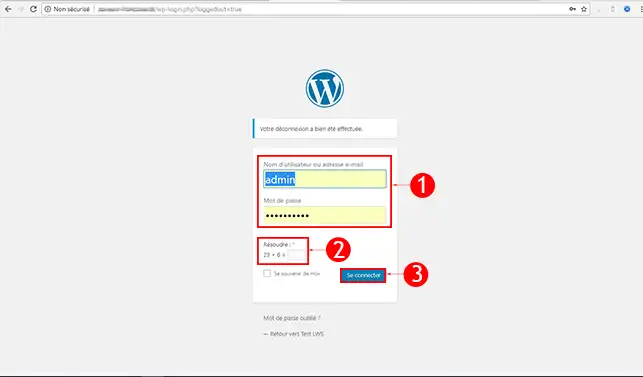
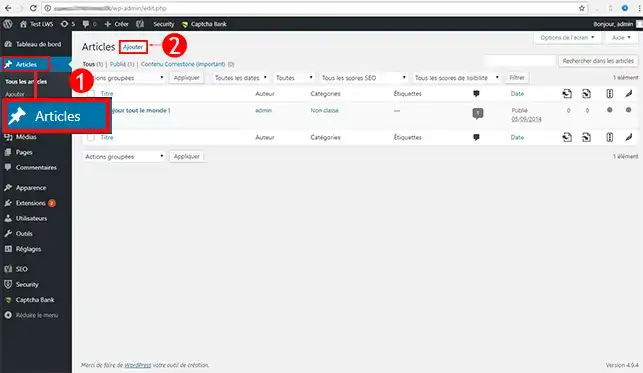
3. In the left-hand menu, click on the Posts tab then click on Add New
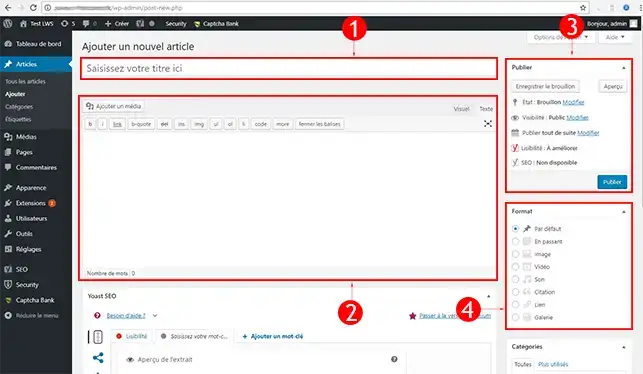
- Enter the Title of your post (It will be displayed at the top of your page and on your home page, so it is important to target the keywords you will use carefully)
- Write the Content of your post (You can add images, change text size, make it bold, italic, underlined...)
- Choose the Status of your post (Be sure to check this part; if it is set to unpublished it will not be visible on your site. Choose "Public" if you want it to be visible to everyone)
- Choose the Format of your post (If you are talking about a trip, for example, it is more interesting to use the "Gallery" format than "Standard")
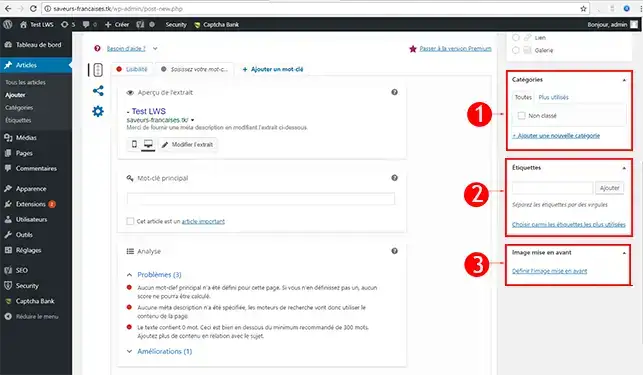
- Add the Keywords for your post (So that the post is indexed for certain terms. The keywords will be used to find your post more easily in search engines, such as Google)
- Add a Featured Image for your post (An image will be present on your site’s home page; it helps highlight your post.)
- Choose the Category of your post (It will be classified on the site in this category. For example, if you are talking about a dog, you will put the post in the "animals" category)
How do I install an extension in Wordpress?
11. Please go to the administration area of your Wordpress. (In this form example.com/wp-admin/) It is possible that your Wordpress is in a subdomain. (More explanations about subdomains here)
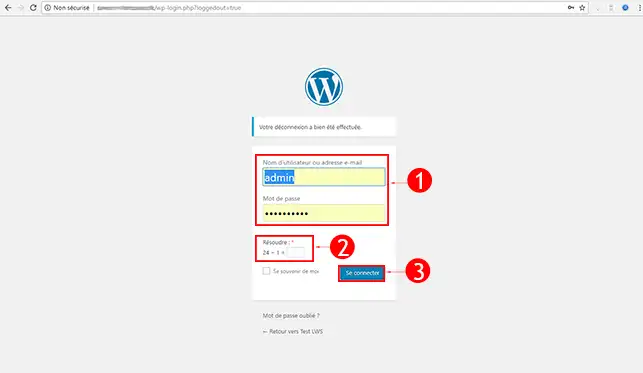
22. Enter your login details to sign in (By default Username : admin)
3. In the left-hand menu, click on the Extensions tab then click on Add New, do a Search for the plugin you want to install.
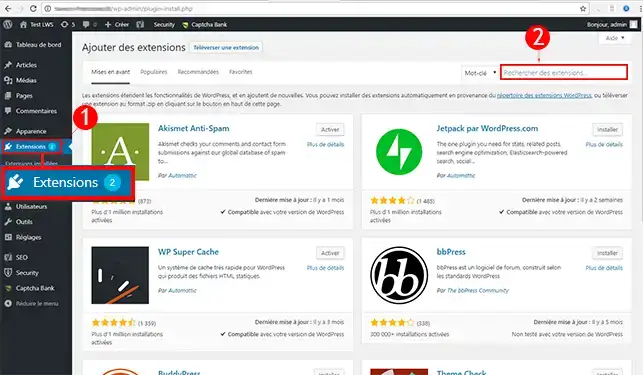
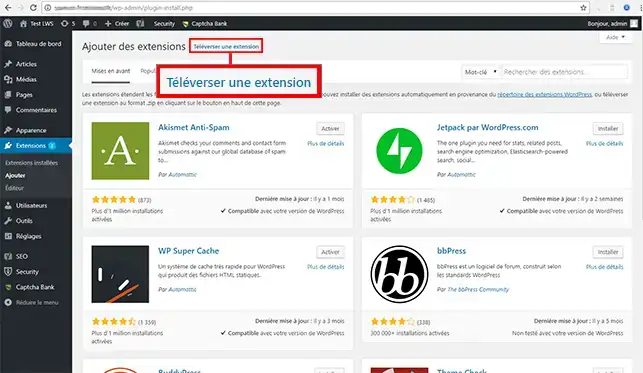
4. You can also Upload a plugin manually via a compressed file (Zip). Click on Upload Plugin.
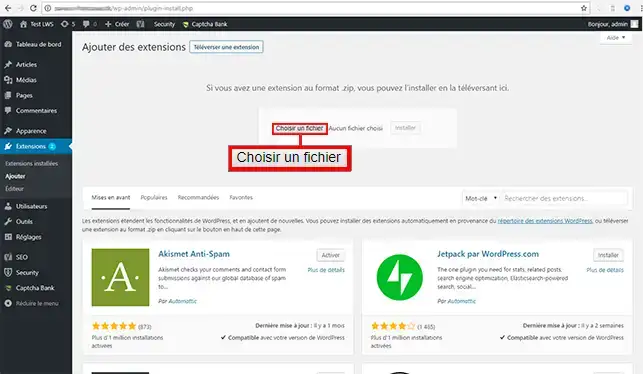
5. Select your .zip file then click on Install
How do I change the graphic template in Wordpress?
Discover thousands of graphic templates suited to any activity with our partner Themeforest
1. Please go to the administration area of your Wordpress. (In this form example.com/wp-admin/) It is possible that your Wordpress is in a subdomain. (More explanations about subdomains here)
22. Enter your login details to sign in. (The administration settings were sent to the email address associated with your LWS account)
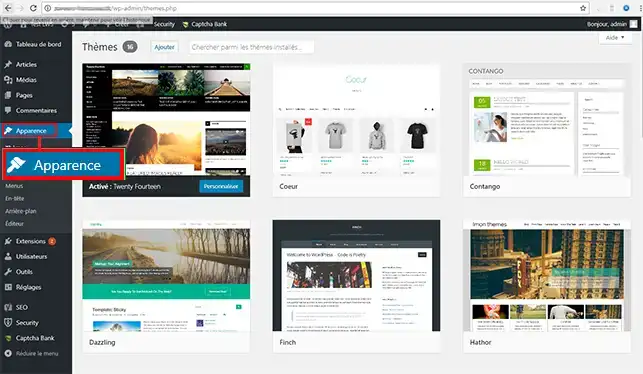
3. In the left-hand menu, click on the Appearance tab then choose your theme, then click on the Activate button.
Create a Wordpress site easily, 30 minutes is enough! Complete Wordpress Tutorial
How do I install Wordpress with the auto installer?
Wordpress themes
Discover thousands of graphic templates suited to any activity with our partner Themeforest
Wordpress online store
Discover the WooCommerce extension to easily create an online store with Wordpress
Improve your Wordpress site speed
Is your Wordpress site too slow? Discover our tips to improve your Wordpress site speed
How do I get help regarding Wordpress?
To learn more about Wordpress you can consult the official resources:
Conclusion
You are now able to automatically install your website on Wordpress. Wordpress allows you to create a blog or a showcase website without any particular coding knowledge. It has several thousand themes and extensions allowing you to create your website.
Do not hesitate to share your feedback and questions!



 Yes
Yes No
No About
About 