Payment & Invoicing6 November 2026By Aurélien T. 12 min read
How do I renew a Mail Pro service?
Procédure
A Mail Pro service is renewed from your LWS customer area: “Other services” tab, “Renew” button next to the service, then payment of the quote. This is also where a Mail Pro purchased on its own, without hosting (reference starting with SVC-), is found. If automatic renewal is enabled, payment is made automatically before the due date.
Operating principles for Mail Pro service renewals
When paying for your Mail Pro service, when ordering by credit card or PayPal, your account is automatically set to automatic renewal, which can be disabled in 1 click from your customer area.
You will therefore be charged every month, every 1, 3, 6 or 12 months depending on the commitment period you chose when subscribing. The commitment period can be configured in 1 click from your customer area.
If you did not pay by credit card, or if your card has expired, it is possible to renew your services manually from your customer area.
Renewal reminders - tacit renewal
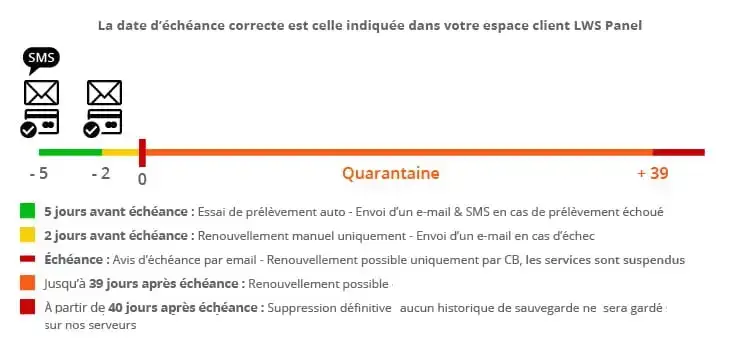
If you have activated automatic renewal on your Mail Pro service, you will receive several notices by e-mail and SMS to inform you of the scheduled renewal as well as in the event that we are unable to carry out the automatic debit.
If 2 days before the due date the debit has not been made, then you will need to renew manually from your LWS Panel customer area.
At the due date, if the service has not been renewed, it is suspended: you can still renew it up to 39 days after the due date. From the 40th day, it is permanently deleted, with no backup kept on our servers.
Unpaid invoice management
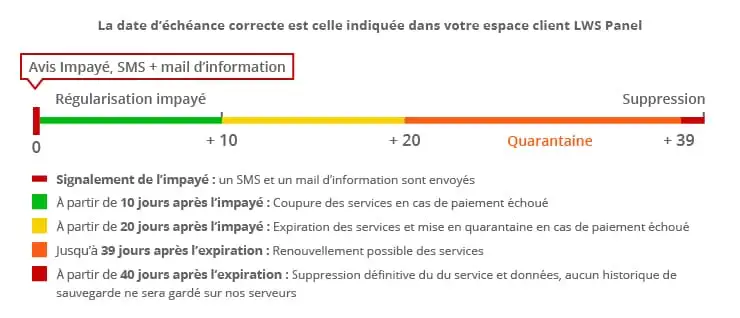
If we receive a notice of non-payment on a manual or automatic renewal, an SMS is sent to you when it is received, to inform you of this. We will also tell you the steps to follow to regularize the situation.
If no action is taken within 10 days after receipt of this unpaid notice, all services associated with your Mail Pro service will be stopped.
Within 20 days after this notice, the services are quarantined; you have up to 39 days after receipt of this notice to take the necessary steps to regularize this unpaid invoice.
40 days after receipt of this notice, your service is deleted.
Abuse management
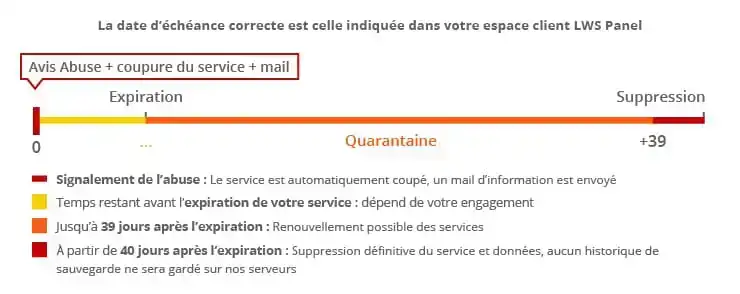
If we receive a report (abuse) against your Mail Pro service, for example for sending malicious files, or sending that impersonates the name of a banking institution (bank, PayPal...), we immediately stop the service concerned.
An e-mail is sent to explain the reason for the interruption of your service.
How do I manually renew a Mail Pro service from the customer area?
It is recommended to renew the Mail Pro service a few days before its due date in order to avoid service suspension.
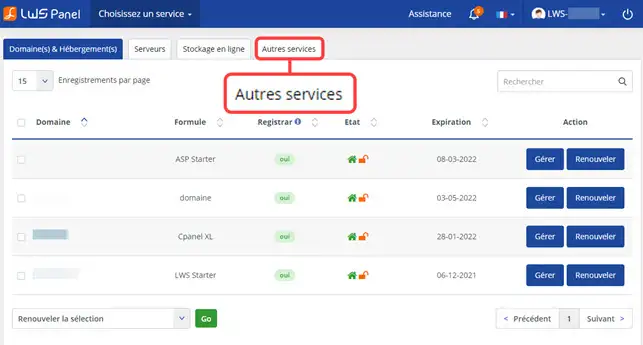
Open the “Other services” tab
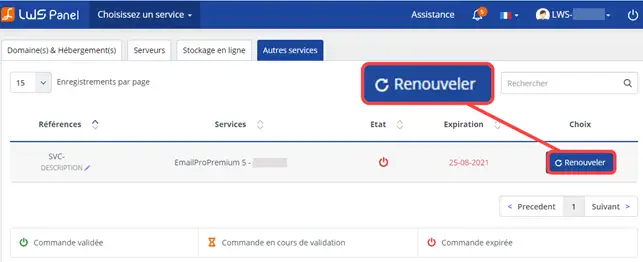
Go to your customer area and click on the “Other services” tab: your Mail Pro services are listed there with their reference (SVC-…), their name and their expiration date.
Click on “Renew”
Select the “Renew” button located to the right of the service concerned.
Choose the duration and pay the quote
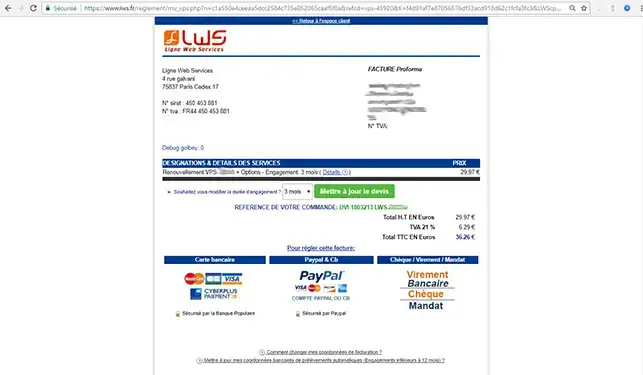
The quote appears on your screen: choose the period for which you want to renew and complete the payment using the available methods.
Your Mail Pro service will be renewed within one hour after payment is received. If your Mail Pro service has expired, it will then be reactivated within 6 hours (with no data loss).
Compare Mail Pro offers or change offers
To see other Mail Pro offers and their prices, for example to upgrade to a larger mailbox, use the “Change my mail offer” link in your email management. Mail Pro XL and XL2 offers can only be purchased from your customer area, not on the lws.fr website.
You are now able to renew a Mail Pro service with LWS. It is recommended to renew the Mail Pro service a few days before its due date in order to avoid service suspension.
Bonjour, boite mail à été bloquée pour non utilisation (malgré le prélèvement de mon abonnement ?!) et j'attends des documents urgent reçus ce jour, j'ai essayé de la relancer ma boite mail sans succès. Si quelqu'un peut m'aider ?
R✓
romain-LWS Official answer
16 Jan 2023
Bonjour,
Nous vous remercions pour votre question.
Veuillez noter que le déblocage intégral du service mail peut prendre jusqu'à 5 minutes maximum après votre connexion au Webmail.
Nous travaillons actuellement à l'ajout d'une fonctionnalité de déblocage instantané depuis le panneau de controle LWS Panel afin d'améliorer encore plus votre expérience. Celle-ci sera disponible dans les prochains jours.
Merci de votre patience et n'hésitez pas à nous contacter si vous avez d'autres questions.
Was this answer helpful?
A question about this article?
Ask the LWS team and the community. Answers are published after moderation.
Ask the LWS team and its community a question
!
To enable this form, please tick the two consent boxes below.


 Yes
 No
 About
