Before changing the DNS, it is therefore essential to check that the new DNS zone contains all the records required for your website, your e-mails and your other services to work properly.
Service concerned
Any domain name registered withLWS
Before you begin
What are DNS servers used for?
A domain’s DNS servers are mainly used to indicate where the domain’s authoritative DNS zone is located.
In other words:
DNS servers indicate which DNS zone must be used;
The DNS zone contains the records that define the domain’s actual operation:
website: A, AAAA, CNAME records
e-mails: MX, SPF, DKIM, DMARC records
other services: subdomains, verifications, technical redirects, etc.
Important consequence
Changing the DNS servers can modify the entire domain configuration, because you may be switching to another DNS zone with different records.
If the new DNS zone is not properly prepared, this can result in:
a website outage;
an interruption of e-mails;
malfunctions on certain subdomains;
the loss of certain technical records.
Prerequisites
Before modifying the DNS servers, check the following points:
you have access to your LWS client area;
You know the new DNS servers to use;
The new DNS zone has already been created with the new provider;
The web and e-mail services are already configured in this new DNS zone;
you have checked that all required records are present.
Recommended checks before making the change
Before validating a DNS change, make sure the new DNS zone contains at least:
the website records;
the e-mail records;
any subdomains in use;
the required security or validation records.
Warning: before changing the DNS servers, make sure the new DNS zone is complete and that the intended services are already operational on the new infrastructure.
If the website, e-mail mailboxes or their contents have not yet been migrated, changing the DNS may cause an immediate service outage.
In which cases do you really need to change the DNS servers?
Changing DNS servers is useful when you want to entrust complete management of the DNS zone to another provider.
Examples:
use of an external DNS provider;
full migration of DNS management to another platform;
use of a service that explicitly requires replacing the domain’s DNS servers.
Warning: this is not always the right solution.
In some cases, it is better to modify only one or more records in the current DNS zone, without changing the domain’s DNS servers.
In this case, it is often better to change only certain records in the current DNS zone rather than changing all the DNS servers. This avoids unnecessarily affecting the domain’s other services.
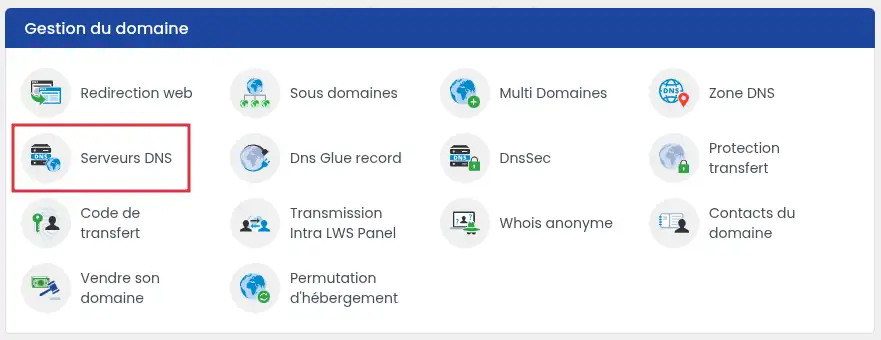
Step 3. Access the DNS server management function.
In the "Domain management" section, click the DNS Servers icon.
Step 4. Choose the configuration mode.
Two cases are possible.
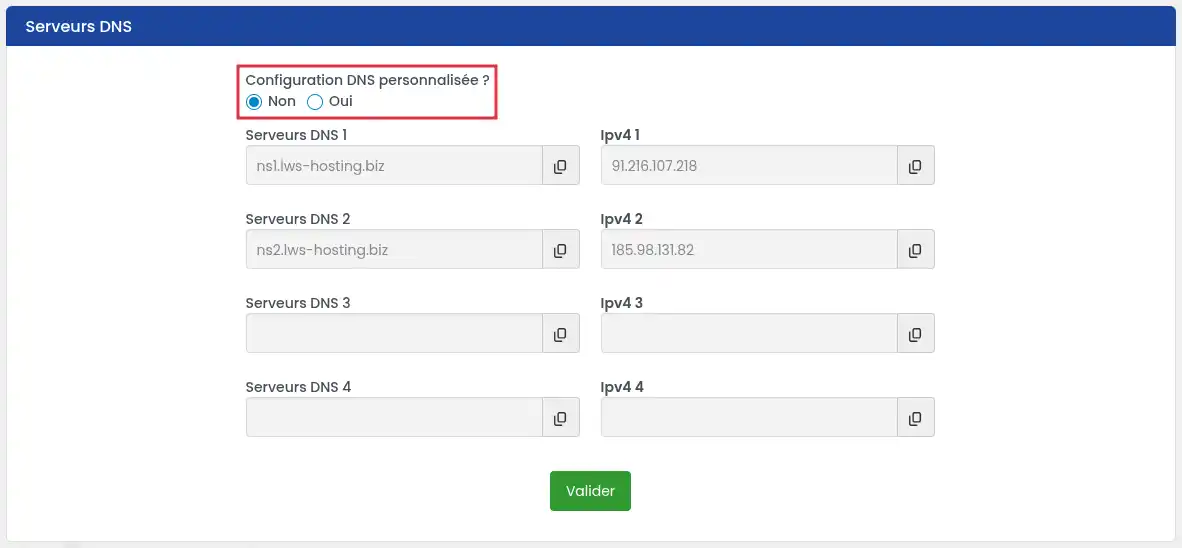
Case 1: use LWS default DNS servers
Choose this option if you want your domain to keep using the DNS zone managed by LWS.
Select "No" for the "Custom DNS configuration?" question
Click the Validate button
The default LWS DNS servers for your plan will be configured automatically; you do not need to do anything else.
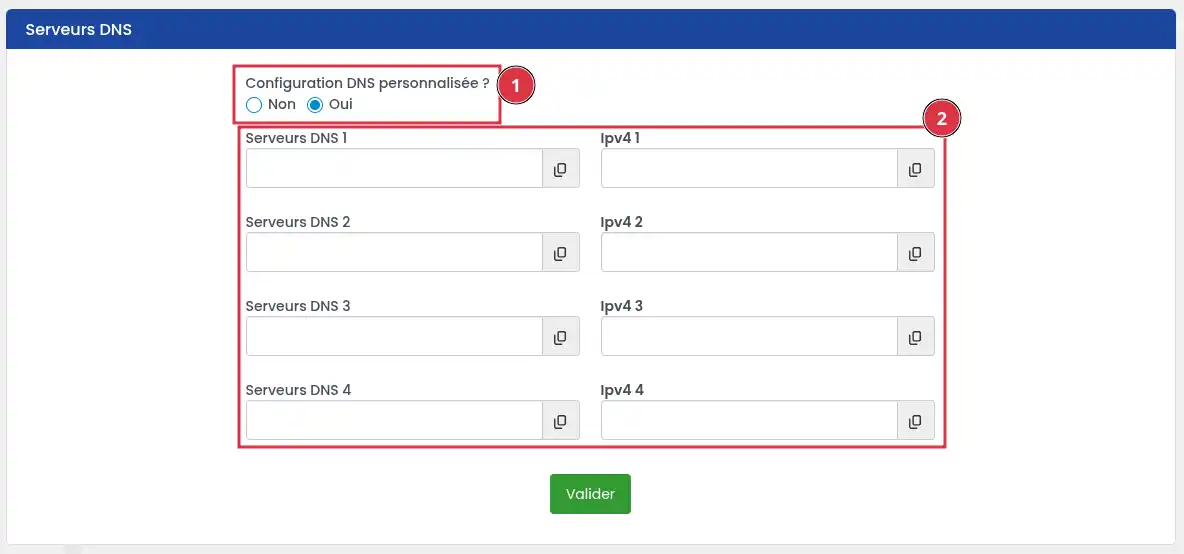
Case 2: use other DNS servers
Choose this option if you want your domain to use another authoritative DNS zone (cPanel, Plesk, VPS, external service).
Select "Yes" for the "Custom DNS configuration?" (1)
Enter the new DNS servers provided by your provider (2). Four slots are available, but only two are mandatory.
Check one last time that the new DNS zone contains all the necessary records.
Click the Validate button
Important: in some cases, the new DNS servers may be refused by the registry if their configuration is not valid. Depending on the domain extension, technical checks may apply, for example on server authority, name/IP consistency, the presence of the domain on the DNS, or other rules specific to the registry. For .lu domains, DNS Luxembourg provides a nameserver test tool.
Expected result
Once the change has propagated:
your domain will use the new DNS servers entered;
The domain’s DNS responses will now depend on the new DNS zone;
The behavior of the website, e-mails and other services will depend on the records present in this new zone.
You should therefore not simply expect “the site to point to the new hosting,” but rather that the domain starts responding according to the new active DNS zone.
Propagation delay
It may take up to 24 hours for a DNS server change to be taken into account, sometimes longer depending on DNS cache contexts.
During this period:
some users may still see the old configuration;
others may already be using the new one;
The behavior may temporarily vary depending on networks or internet service providers.
This delay is normal.
Check that the change has been taken into account
After propagation, check:
that the domain responds with the new DNS servers;
that the website works as expected;
that e-mails still work;
that important subdomains respond correctly;
that the specific records required for your services are active.
The change is successful if the new DNS zone responds correctly and all domain services remain operational.
Common issues
The website or e-mails no longer work after the change
This can happen in two cases:
1. The new DNS zone is not configured correctly
The new DNS servers do respond, but the DNS zone they point to does not contain all the necessary records.
Examples:
missing or incorrect web records;
absent e-mail records;
subdomains not recreated;
technical records forgotten.
2. The services have not been migrated to the new infrastructure
Even if the new DNS zone is correct, the website or e-mail service may not work if the content or services do not yet exist on the new intended servers.
Examples:
the domain points to new hosting, but the site has not yet been installed there;
the DNS zone contains new MX records, but the mailboxes have not been recreated with the new provider;
the website content, databases or e-mail accounts have not yet been migrated.
To check:
the new DNS zone contains all useful records;
the website is properly installed and functional on the intended target;
mailboxes, redirects, aliases or mail services have been recreated if necessary;
content and data have been migrated before the DNS change.
The new DNS servers are refused during registration
In some cases, the new DNS servers cannot be registered or are refused by the registry.
This may happen especially if:
the DNS servers are not properly configured to be authoritative for the domain;
the domain is not declared in the zone served by these DNS servers;
the DNS server name does not correspond to a valid name or points to a CNAME;
the announced IP address does not actually correspond to the DNS server;
the registry applies additional technical rules depending on the domain extension.
If your DNS servers are refused, contact the provider that supplied you with the DNS servers to verify that your domain can function correctly with those servers.
The DNS servers use IP addresses deemed invalid by the registry
Some registries impose specific diversity or technical validity rules for DNS servers.
Depending on the extension involved, a refusal may occur if:
multiple announced DNS servers use the same IP address when the registry expects genuinely distinct servers;
the provided IPs do not respond properly;
the configuration does not meet the registry’s technical checks.
This point depends on the registry and the domain extension. It is therefore important not to generalize the rule to all extensions, but it is important to note that a refusal may come from a registry-specific constraint.
The DNS servers respond, but not for your domain
A DNS server can function technically without being properly configured for your domain.
Example:
the server responds to DNS queries;
but it does not yet host your domain’s authoritative zone;
or it does not return the correct NS records for this domain.
In this case, the DNS change may fail or lead to a service interruption.
To check:
the domain has been created on the new DNS servers;
the domain’s DNS zone has been published;
the NS records returned match the expected delegation.
I only wanted to change the website, not the entire domain configuration
In this case, a full DNS server change may not be the right solution.
Changing DNS servers can switch the entire domain DNS management to another zone, and therefore impact:
the website;
e-mails;
subdomains;
certain technical records.
If your need only concerns an external web service, it is often better to:
keep the current DNS servers;
modify only the necessary records in the current DNS zone.
Example: point the site to a service such as Wix while keeping the existing mail service.
The domain is being transferred
During a domain transfer, it will not be possible to change the DNS servers.
In this case:
you must make the change before starting the transfer;
or wait until the transfer is completed.
Depending on the context, it may still be possible to modify the records of the DNS zone currently in use, without changing the full DNS delegation.
The propagation is not finished
After a DNS change, the domain’s behavior may remain temporarily inconsistent:
some users still see the old configuration;
others are already using the new one;
the site or e-mails may seem to work irregularly depending on the networks.
This does not necessarily mean the configuration is wrong. You should first check whether propagation is complete before concluding that there is an outage.
Good practice before changing DNS
Before making any changes, ask yourself this question:
Do I need to change the domain’s entire DNS delegation, or only one or two records in the current DNS zone?
If your need only concerns:
the website;
a subdomain;
a technical validation;
a specific external service;
then a simple DNS zone modification may be more suitable and less risky than a full DNS server change.
Conclusion
Modifying a domain’s DNS servers does not just change one isolated point: it can switch the entire domain to another DNS zone.
Before carrying out this action, you must therefore check that the new DNS zone is complete, correct, and that it properly supports all the services used, especially web and e-mails.
If your objective is limited to a single service, it may be better to modify only the current DNS zone rather than changing the DNS servers completely.
On 06/09/22 I paid almost €12 to the outsourcing company for the Starter pack to be allocated to one of my sites instead of another. To date, nothing has changed and I haven't received any information emails.
F✓
fabrice-LWS Official answer
7 Sept 2022
Bonjour, l'infogérance ne comprend que la sauvegarde de vos données ainsi que la restauration de cela, une fois la permutation des domaines effectuées par vos soins. Je vous invite à permuter les deux domaines sur votre formule en vous rendant sur votre espace client, cliquez sur "Gérer" se trouvant derrière la formule concernée puis sur "Permuter les domaines". Une fois la permutation effectuée par vos soins, je vous invite à revenir vers nous par le biais du ticket d'infogérance afin de pouvoir restaurer vos données sur le nouveau nom de domaine.
Was this answer helpful?
D
Daudet KAKUM
20 Sept 2022
Bonjour, j ai un serveur web sur lequel nous intervenons via son IP, voici la forme de l'adresse du serveur http://ip:numero port/Répertoir
J ai récemment payé un domaine chez LWS ([domaine masqué])
Ma préoccupation est savoir comment relier les deux
F✓
fabrice-LWS Official answer
23 Sept 2022
Bonjour, vous pouvez pour cela, modifier la Zone DNS de votre nom de domaine par l'ip concernée en vous rendant sur votre espace client, cliquez sur "Gérer" se trouvant derrière le domaine puis sur "Zone DNS". Modifiez la Zone de type A pour la valeur @ par la nouvelle adresse IP.
Was this answer helpful?
C
Cyril Tryhard
19 Oct 2022
Bonjour, quelle est la diff entre les rubriques serveurs DNS et zone DNS ? Dois-je toucher aux serveurs DNS (propre à LWS) si je veux rediriger mon nom de domaine vers mon VPS ? Ou bien ajouter l'IP de mon serveur au niveau du @ de ma zone DNS suffit ?
F✓
fabrice-LWS Official answer
22 Oct 2022
Bonjour, afin de pouvoir associer votre domaine à votre serveur VPS, je vous invite à suivre la procédure suivante: https://aide.lws.fr/a/566
Vous pouvez modifier uniquement la Zone de type A pour la valeur @ par l'ip de votre VPS. Une fois la zone DNS modifiée, il vous faudra attendre quelques heures que la Zone se propage et que votre domaine soit bien lié à votre VPS.
Was this answer helpful?
J
Jacky
28 Oct 2022
Bonsoir,
Malgré que j'ai payé le domaine [domaine masqué]. Je vois sur le site un message qui me demande d'aller sur un mail que j'ai reçu et cliquer sur le lien. Le mail était dans mes spams et je ne l'avais pas vu. Que dois-je faire ?
F✓
fabrice-LWS Official answer
1 Nov 2022
Bonjour, après avoir cliqué sur le lien, le domaine est réactivé dans les quelques heures suivantes. Il s'agit effectivement d'un email envoyé par le registre en charge de l'extension de votre domaine et servant à vérifier vos informations. Actuellement, votre domaine semble bien actif et fonctionnel.
Was this answer helpful?
H
hugor
12 Nov 2022
Bonjour j'ai acheter un DNS à LWS et je n'arrive toujours pas à le pointer chez mon hébergeur
Merci pour votre aide.
F✓
fabrice-LWS Official answer
14 Nov 2022
Bonjour, vous pouvez modifier les serveurs DNS rattachés à votre domaine en vous rendant sur votre espace client LWS, cliquez sur "Gérer" se trouvant derrière le domaine concerné puis sur "Serveurs DNS". Indiquez les deux serveurs DNS de votre prestataire et cliquez sur le bouton "valider". Il vous faudra ensuite patienter 3 à 4 heures que les Serveurs DNS se propagent et que votre domaine soit bien lié à votre prestataire.
Was this answer helpful?
R
Rashit Ajda
23 Nov 2022
Comment transféré mon nom de domaine que j'ai acheté chez vous le 08-11-2022.
Je voudrais l'utiliser et l'héberger chez Hostinger.
Merci de bien vouloir m'aider a effectuer ce transfère au plus vite svp.
J'ai vraiment besoin d'aide pour ce transfert.
F✓
fabrice-LWS Official answer
26 Nov 2022
Bonjour, vous pouvez transférer un nom de domaine en le commandant chez votre nouveau prestataire et en leur fournissant le code de transfert. Vous pouvez demander l'envoi du code de transfert en vous rendant sur votre espace client, cliquez sur "Gérer" se trouvant derrière le nom de domaine concerné puis sur "Code Auth". Il est toutefois à noter qu'il n'est pas possible de transférer un nom de domaine .com, .org ou .net par exemple si ces derniers ont été commandés il y a moins de 60 jours auprès de nos services. En revanche, si vous disposez d'un nom de domaine en .fr, vous pouvez le transférer vers un autre prestataire, le lendemain de l'achat.
Was this answer helpful?
L✓
LWS-527964 LWS team
27 Nov 2022
J'ai transféré mon domaine retromusic106-9.com de wix vers LWS. Jusque là pas de souci mais les 2 boites mail que j'ai créer sur LWS ne fonctionnent pas. J'envoie un mail vers ou depuis ces deux boites mail et rien ne passe!
Pouvez-vous m'aidez svp?
F✓
fabrice-LWS Official answer
1 Dec 2022
Bonjour, je vous invite à vérifier que vous ayez bien les Zones de type A pour Mail et MX redirigé vers nos services auprès de Wix. En effet, la Zone de Type A devrait être de la formule suivante: "mail A ip_LWS" et la Zone MX devraient être "@ MX (10) mail.domaine.com" . Remplacez domaine.com par votre nom de domaine. L'ip de votre service mail est visible en haut de page, en vous rendant sur votre espace client LWS, cliquez sur "Gérer" se trouvant derrière le domaine concerné puis sur "Zone DNS". Une fois les Zones mises en place, il vous sera nécessaire de patienter 3 à 4 heures que les Zones DNS se propagent et que les e-mail soient bien fonctionnels.
Was this answer helpful?
M
msinedi
28 Apr 2023
j'ai ajouté un nouveau nom de demain à mon cpanel L j'ai configuré le DNS puis installé wordpress depuis le cpanel sur le nouveau nom de domaine mais quand j'essai d'accéder au nouveau nom de domaine je reçois une erreur 403 que faire ?
B✓
Benjamin-LWS Official answer
28 Apr 2023
Bonjour,
Merci de votre retour.
Une erreur 403 peut provenir de pleins de problèmes différents et il sera difficile depuis cette plateforme de vous aider à rétablir votre site.
Nous vous invitons à contacter notre service support à travers votre espace client, afin de vous apporter une aide sur ce problème. (Contacter le support LWS)
Cordialement, L'équipe LWS
Was this answer helpful?
E
elkaj
24 Sept 2024
comment modifier le nom du domaine s'il vous plait,
J✓
Jordan-LWS Official answer
26 Sept 2024
Bonjour,
Je vous remercie pour votre message.
Sachez que lorsque vous avez réservé un nom de domaine, il n'est plus possible de modifier son nom, la seule solution et de prendre un nouveau nom de domaine, si toutefois vous souhaitez modifier la zone DNS ou les serveurs DNS, je vous invite à suivre les documentations suivantes :
https://aide.lws.fr/a/54 : Gestion zone DNS avancée
https://aide.lws.fr/a/89 : Changer les serveurs DNS
Je vous remercie pour votre attention et reste à votre disposition pour toute autre question ou complément d'information.
Cordialement, L'équipe LWS.
Was this answer helpful?
G
GREGOR
31 Oct 2025
Bonjour jai une formule LWS Stater auquel jai ajouté un domaine supplementaire celui ci marche tres bien Je ne peut pas créer un sous domaine pour mon domaine supplementaire sauf pour le domaine principal qui possible
J✓
Jordan-LWS Official answer
31 Oct 2025
Bonjour,
Il n’est pas possible de créer un sous-domaine pour un domaine additionnel directement depuis le LWS Panel.
Si vous souhaitez que ce sous-domaine fonctionne, il faudra l’ajouter comme un domaine indépendant dans la section Multi-domaine de votre hébergement.
Si vous rencontrez des difficultés sur les manipulations à réaliser, n'hésitez pas à contacter notre équipe du support technique.
Pour cela, connectez-vous à votre espace client, puis rendez-vous dans la rubrique Assistance > Contacter le support technique.
Je vous remercie pour votre attention et reste à votre disposition pour toute autre question ou complément d'information.
Cordialement, L'équipe LWS
Was this answer helpful?
G
GREGOR
31 Oct 2025
Bonjour, apres avoir ajouté un domaine additionnel a mon hebergement, est ce que creer des adresse email pour ce dernier en utilisant les forfait offerts par mon hebergement ?
J✓
Jordan-LWS Official answer
3 Nov 2025
Bonjour,
Je vous remercie pour votre message.
Cela dépend de l’offre à laquelle vous avez souscrit. Sur certaines formules, comme LWS Starter, il n’est pas possible de créer des adresses e-mail pour un domaine additionnel.
En revanche, si votre hébergement est basé sur cPanel, cette fonctionnalité est disponible — vous pourrez donc créer des comptes e-mail pour le domaine ajouté.
N’hésitez pas à me préciser votre formule afin que je puisse vous confirmer cela plus précisément.
Cordialement, L'équipe LWS
Was this answer helpful?
C
cyril
il y a 8 mois
bonjour, j'ai connecté mon non de domaine vers google workspace pour gmail. je rediriger mon nom de domaine vers mon site wordpress. ça m'ouvre un popup Le domaine n'est pas configuré sur nos serveurs DNS ou la Zone a été modifé. comment dois-je faire
J✓
Jordan-LWS Official answer
il y a 8 mois
Bonjour,
Je vous remercie pour votre message.
Nous ne sommes malheureusement pas en mesure de traiter ce type de demande depuis l’aide en ligne.
Je vous invite à ouvrir un ticket auprès de notre assistance client afin qu’une analyse complète de votre hébergement puisse être effectuée et qu’une intervention soit réalisée si nécessaire.
Cordialement, L'équipe LWS
Was this answer helpful?
A question about this article?
Ask the LWS team and the community. Answers are published after moderation.
Ask the LWS team and its community a question
!
To enable this form, please tick the two consent boxes below.



 Yes
 No
 About
