
Online help
The web host accessible to all
Procédure
The domain plan is the service delivered with a domain name ordered on its own from LWS. It includes a small 1 GB web space for an HTML site, 2 1 GB email addresses, an SSL certificate and full domain management, but neither PHP nor a database. To install WordPress or any PHP site, switch to a hosting plan such as Starter with “Change plan”: you only pay the price difference until your domain renewal date, calculated automatically.
The domain plan is managed in the same LWS Panel as a Starter hosting plan, with fewer tools and smaller quotas.
| Included | Not included |
|---|---|
| 1 GB web space for an HTML site (HTML pages, images, CSS, JavaScript) | PHP and databases: WordPress, PrestaShop, Joomla or any PHP site cannot run |
| An FTP account for uploading site files | File Manager, Folder Protection, Auto-installer, WP Manager, PS Manager, PHP configuration, Terminal and SSH access |
| An SSL certificate (https address) | Multi-domain: it is impossible to attach another domain to the plan |
| Domain management: DNS zone, DNS servers, subdomains, web redirection | Email aliases |
| 2 email addresses of 1 GB each, with webmail | More than 2 email addresses without a paid option |
| An email redirection and catch-all | Hosting performance: bandwidth is optimal up to 3 GB per month, with reduced speed beyond that |
The tools not included appear in grey in the domain dashboard. Clicking on them opens the “Change plan required” window, which offers upgrading to a higher plan.
As long as you have not put a site online, your domain displays an LWS waiting page saying “Congratulations! Your domain has been successfully created at LWS”. To replace it with your own HTML site, upload your files with FTP software such as FileZilla: the credentials are in the “Files” section, “FTP account(s)” tool. The procedure is described in the help article publishing a site via FTP with FileZilla, Cyberduck or WinSCP.
You can create 2 1 GB addresses in “Email addresses”, “Emails” tool. The domain plan does not allow creating aliases. To receive messages sent to an address that does not exist on your domain, activate catch-all: on the address line, open “Actions”, choose “Catch all”, check “Enable” then click “Save”. Details are in the help article activating catch-all on your LWS mail service.
For more space in a mailbox, you need a Mail Pro plan, as on a Starter hosting plan: follow the help article changing the quota of an email address from the LWS Panel.
The Starter plan adds what the domain plan lacks: PHP, 10 MySQL databases, WordPress installation with the Auto-installer and WP Manager, the file manager and 25 email addresses of 2 GB. The quota details are in the help article quotas for shared web hosting plans. The same procedure lets you choose Perso, Standard or Performance.
In your LWS customer area, “Domain(s) & Hosting(s)” list, click “Manage” on your domain’s line. If the “Please wait 6h to 24h” window appears, click “OK”.
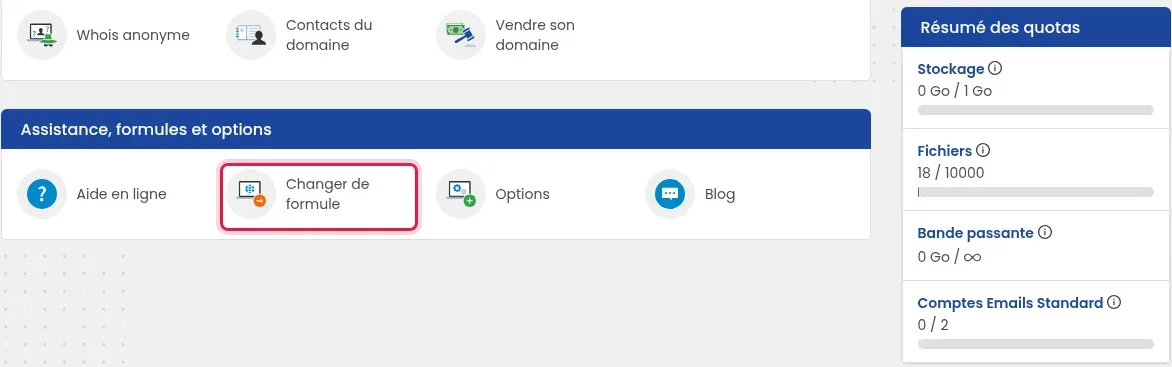
The tool is in the “Support, plans and options” section, at the bottom of the dashboard. The “Change my plan” link in the “Information” block on the right opens the same page.
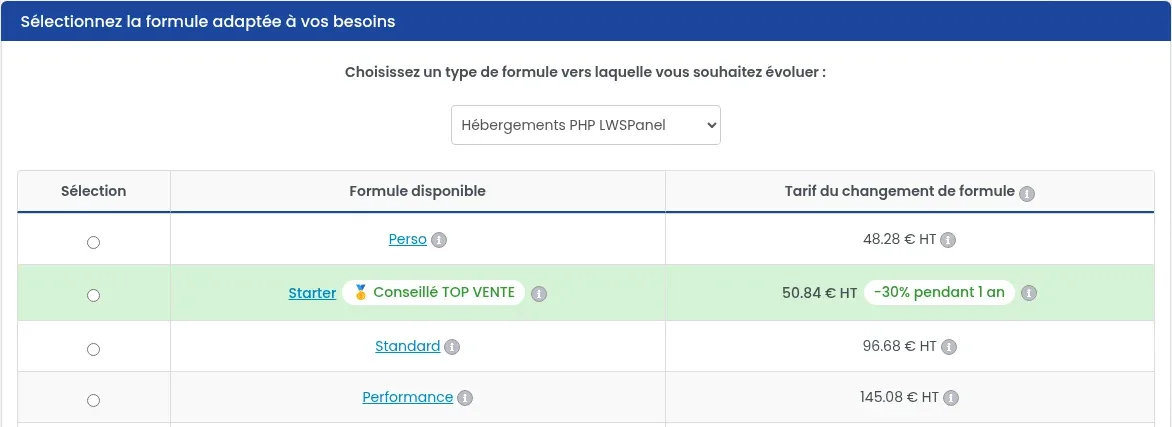
In the “Choose a type of plan you want to upgrade to” list, leave “LWSPanel PHP Hosting” selected by default. This is the range for Starter, Perso and Performance.
Tick the button on the “Starter” line. The “Plan change fee” column shows the amount excluding tax to pay for this change.
If a “Confirm your migration choice” block appears under the table, retype the requested phrases exactly in the input fields (“backups OK”, then “Delete everything”). The “Validate” button remains inactive until they are retyped exactly. Then click “Validate”.
This block is an old warning: it still announces the deletion of all your data, whereas it is kept if your domain uses LWS DNS servers. If your domain uses other DNS servers, make sure you have backed up your files and emails before retyping the phrases.
You arrive on the plan change quote page. Once payment is received, the change is validated within two hours.
The displayed price is calculated based on the monthly price difference between your current plan and the selected plan, and on the time remaining before your domain expires. You pay it in one go: no other fees are due until the renewal date. The next renewal is then billed at the price of the new plan.
Example recorded on 24/10/2026 for a domain expiring on 22/10/2027: Starter at €5.99 excl. tax per month, i.e. €50.84 excl. tax for the plan change. The exact amount for your domain is shown in the “Plan change fee” column, and the “i” next to each price gives the details.
Open your domain management again. The change is complete when:
Your domain has just been delivered. Wait until 4 hours have passed since delivery, then try again.
The phrases in the “Confirm your migration choice” block have not been retyped exactly. Retype “backups OK” and “Delete everything” in their fields, with no extra spaces, respecting uppercase and lowercase letters.
This is an old warning, still displayed by the “Confirm your migration choice” block. If your domain uses LWS DNS servers, your files and emails are migrated to your new hosting and kept. If it uses other DNS servers, preservation is not guaranteed: back up your files and emails before validating.
Make sure you have paid the quote, then wait two hours after payment. You receive a confirmation email when the change is done.
The domain plan only displays HTML pages: a .php file does not run, and a WordPress site cannot function. If your site is in PHP, switch to Starter. If your domain has just been ordered, allow 6 to 24 hours before it becomes visible everywhere.
That is normal: the domain plan does not offer one. Use the included catch-all or email redirection, or switch to Starter, which allows aliases to be created.
No: WordPress needs PHP and a database, both absent from the domain plan. Switch to Starter (or Perso), then install WordPress with the Auto-installer.
No: the “Multi domains” tool does not exist in the domain plan. It is available on an LWS Panel hosting plan, see the help article putting several domains on the same web hosting.
Ask the LWS team and the community. Answers are published after moderation.
 About LWS :
LWS is a 100% French web hosting company that focuses on quality and innovation and offers a responsive and competent technical service at affordable prices.


 Yes
 No