How do I insert a signature in my emails sent with Roundcube?

Procédure

The procedure differs slightly depending on the graphical theme used in Roundcube; this documentation explains both procedures depending on the theme you are using.

Procedure with the Larry theme?

1. Log in to the webmail of the email account for which you want to add a signature

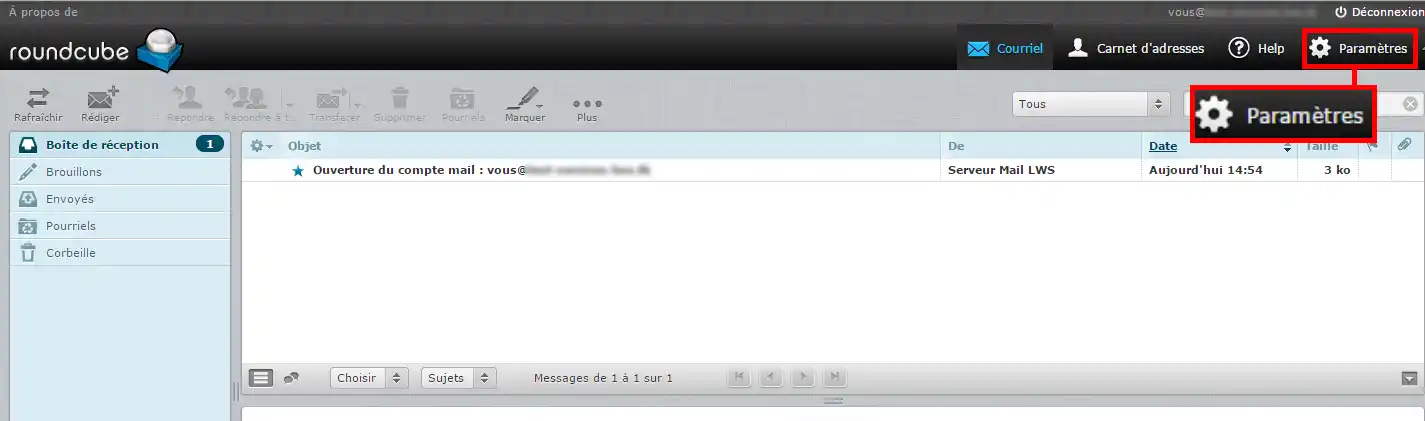
2. Go to the "Settings" section

How do I insert a signature in my emails sent with Roundcube?


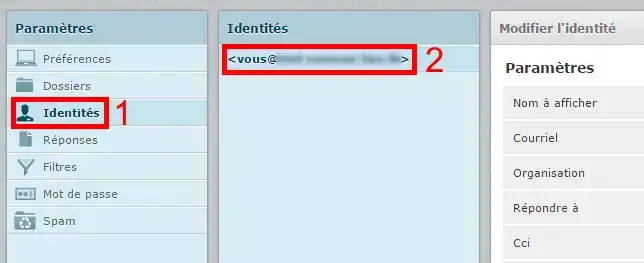
3. Click on the "identities" menu, then select your email address
How do I insert a signature in my emails sent with Roundcube?


Insert a simple signature

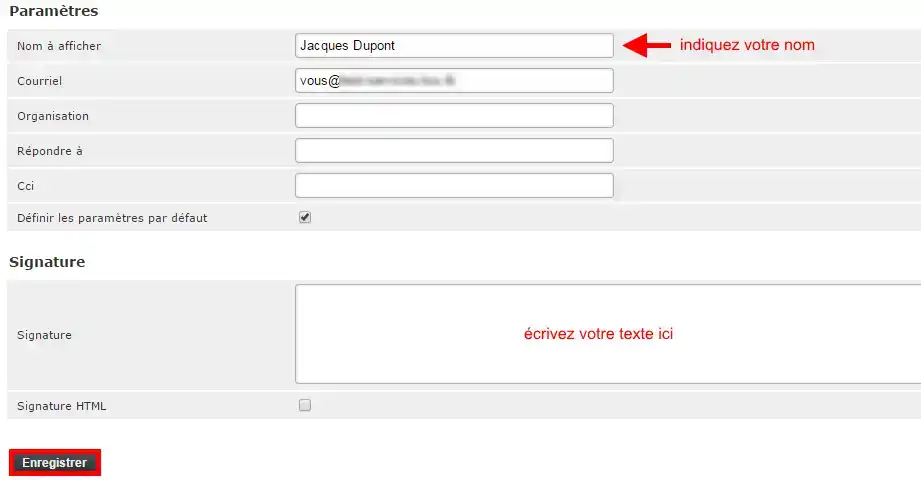
1. Enter your name, write your text, then Save
How do I insert a signature in my emails sent with Roundcube?


Insert an HTML signature

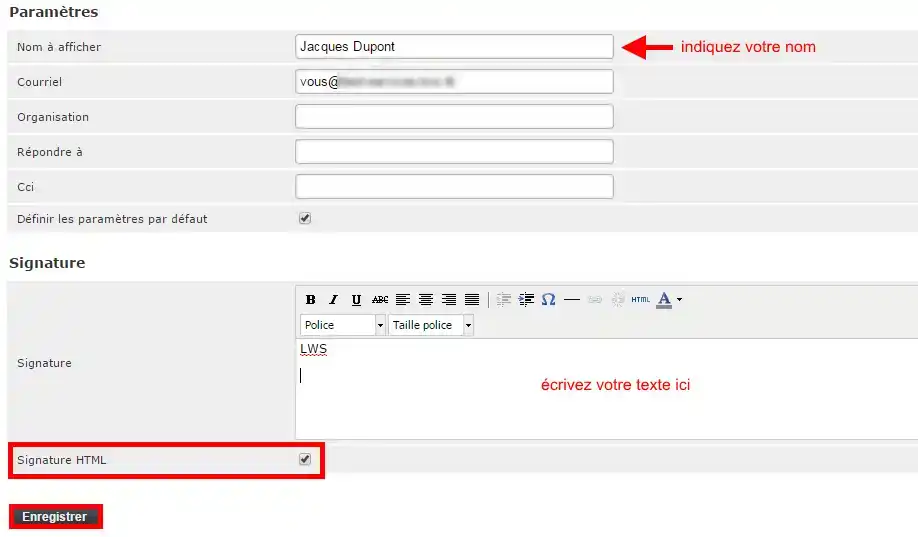
1. Enter your name, check the "HTML signature" box, write your text, then Save
How do I insert a signature in my emails sent with Roundcube?


Insert an image in the signature

1. To insert an image, the image must first be hosted online.

You can, for example, publish it via FTP publishing software on the FTP account provided with all our plans, in order to obtain its online address such as http://www.yourdomain.com/yourimage.png

2. In your webmail, under "Settings", "identities" (see steps 1 to 4 above), check the "HTML signature" box as well as the "HTML" button
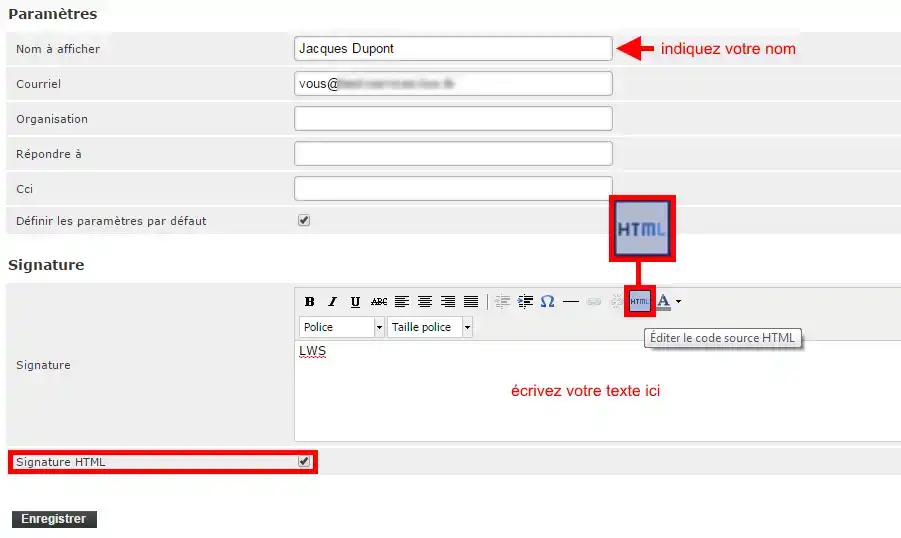
How do I insert a signature in my emails sent with Roundcube?


3. Enter the HTML code used to link your image:
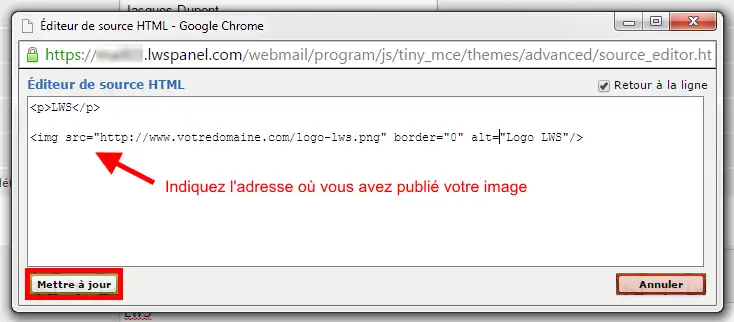
How do I insert a signature in my emails sent with Roundcube?


Click on the "Update" button

You can now see what your signature will look like:
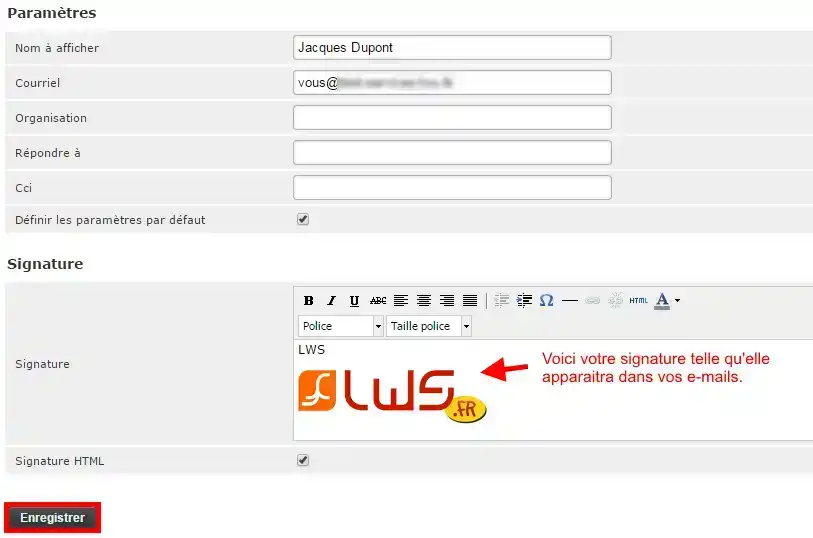
How do I insert a signature in my emails sent with Roundcube?


Click on the "Save" button to apply it.

Procedure with the Elastic theme

1. Log in to the email address on which you want to add your signature.
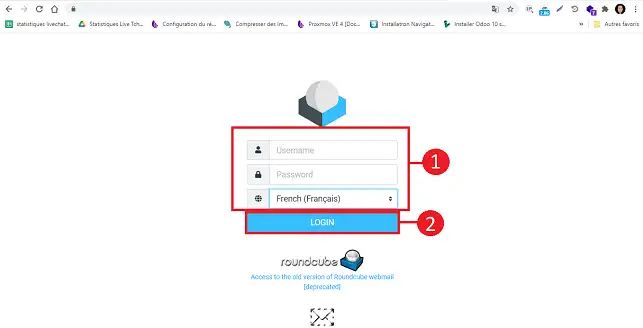
How do I insert a signature in my emails sent with Roundcube?

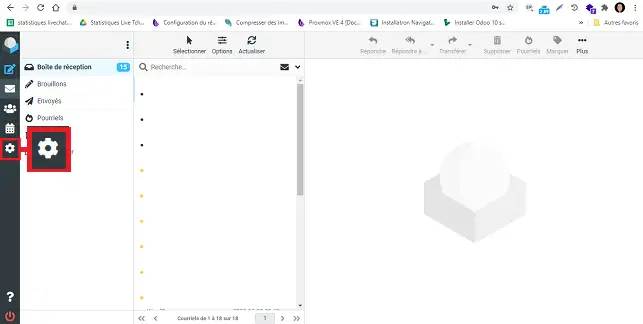
2. Click on the "Settings" button located on the left side of your Roundcube interface.
How do I insert a signature in my emails sent with Roundcube?

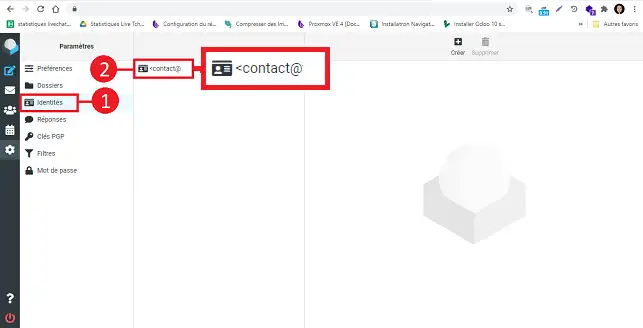
3. Click on "Identity" in the "Settings" menu, then on your email address.
How do I insert a signature in my emails sent with Roundcube?

How do I insert a simple signature? 

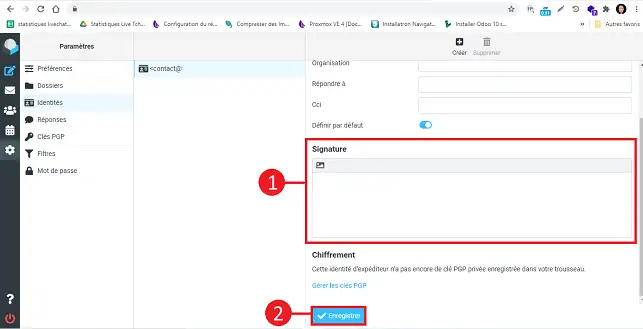
Fill in the fields as follows:

  • Display name: enter your name
  • Email: leave the default email address
  • Signature: Write your text 

Once the fields are filled in, click on the "Save" button to save your signature.
How do I insert a signature in my emails sent with Roundcube?

How do I insert an HTML signature? 

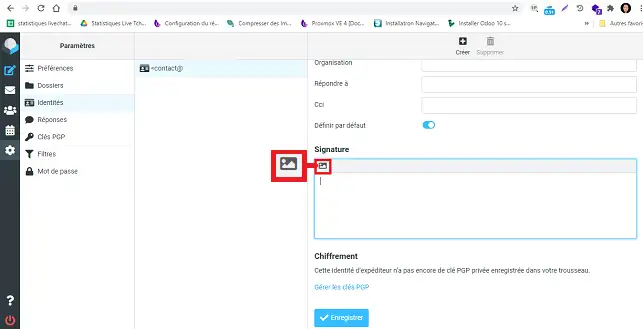
Click on the image icon at the top left of the signature field.
How do I insert a signature in my emails sent with Roundcube?

Click on the "<>" icon found in the tools.
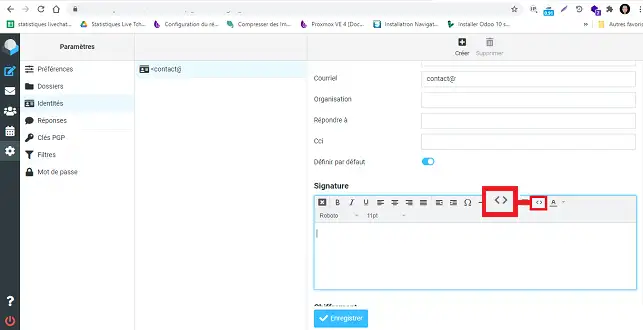
How do I insert a signature in my emails sent with Roundcube?

Insert your signature's HTML code into the new window, then click on "Ok".
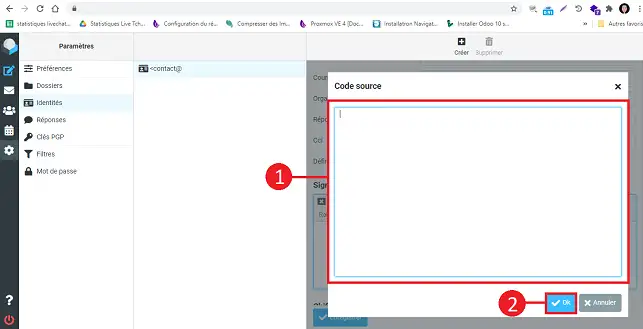
How do I insert a signature in my emails sent with Roundcube?

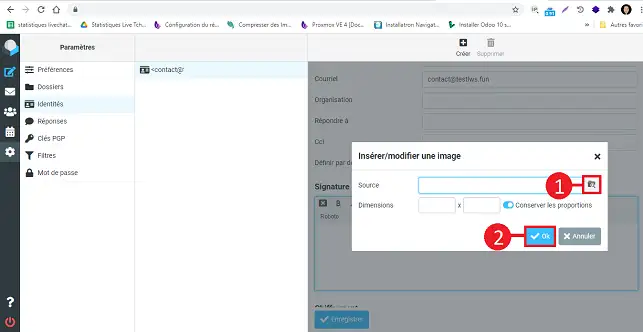
How do I insert an image into the signature? 

1. Click on the image icon at the top left of the signature field.
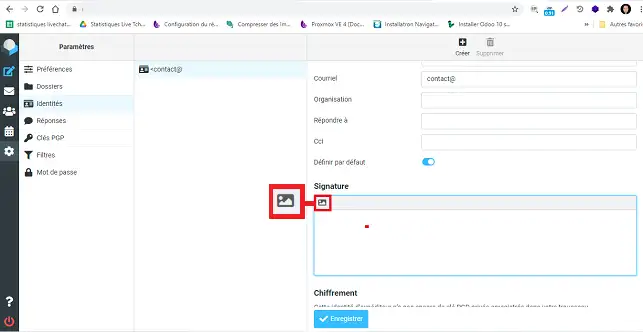
How do I insert a signature in my emails sent with Roundcube?

2. Click on the "images" icon in the toolbar of your signature field.
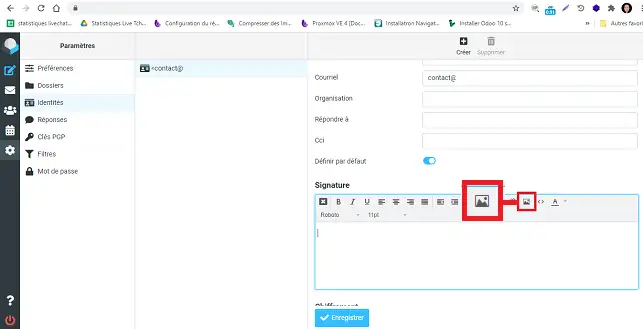
How do I insert a signature in my emails sent with Roundcube?

3. Choose the image source by clicking on the appropriate button.
How do I insert a signature in my emails sent with Roundcube?


Roundcube Tutorial Video: How do I insert a signature in my emails in Roundcube?


Do you need help with using Roundcube?

Check out all our Roundcube training videos

help.lws.net/a/493
Was this article helpful?

Yes

No

Read 255 567 times

Thank you! Feel free to ask questions about our documentation if you would like more information, and help us improve it.

Similar articles

Questions about the article 2

Ask a question
Alain44
14 Jan 2025
Est il possible de creer deux signatures pour une seule adresse email
Jordan-LWS Official answer
15 Jan 2025

Bonjour,

Je vous remercie pour votre message.

Sur Roundcube, il n'est pas possible de créer directement deux signatures pour une seule adresse email via l'interface par défaut. 

Je vous remercie pour votre attention et reste à votre disposition pour toute autre question ou complément d'information.

Vous pouvez nous contacter depuis votre espace client ou sur cette page : https://www.lws.fr/contact. 

Cordialement, L'équipe LWS 

Was this answer helpful?
Sev
il y a 11 mois
Bonjour est il possible d'héberger dans LWS le logo de son entreprise pour insertion dans la signature HTML via le thème Elastic
Jordan-LWS Official answer
il y a 11 mois

Bonjour,
Merci pour votre message.

Oui, il est tout à fait possible d’héberger le logo de votre entreprise sur votre hébergement LWS afin de l’insérer dans votre signature HTML via le thème Elastic.

Pour cela, vous pouvez :

  1. Téléverser l’image (votre logo) dans le gestionnaire de fichiers de votre hébergement ou via FTP ;

  2. Copier l’URL complète du fichier (ex. : https://votredomaine.fr/logo.png) ;

  3. Utiliser cette URL dans le code HTML de votre signature au niveau de la balise <img> :

Cela permettra d’afficher correctement votre logo dans la signature.
N’hésitez pas à vérifier que le lien est bien accessible publiquement avant de l’ajouter.

Je vous remercie pour votre attention et reste à votre disposition pour toute autre question ou complément d'information. Vous pouvez nous contacter depuis votre espace client ou sur cette page : https://www.lws.fr/contact. 

Cordialement, L'équipe LWS 

Was this answer helpful?

A question about this article?

Ask the LWS team and the community. Answers are published after moderation.

Ask the LWS team and its community a question

GDPR: Controller: LWS-Ligne Web Services. Purpose: moderation and public publication of your question, possible notification of an answer. Legal basis: consent (Art. 6(1)(a) GDPR). Email retention: 90 days after notification, 12 months maximum without an answer. To exercise your rights, see the GDPR section of our Terms and Conditions.