Procédure
Objective
This documentation explains how to change the contact email address associated with your LWS customer account from your customer area.
This email address is used to receive important information related to your account, such as certain notifications or security validations.
This procedure does not change the mailboxes of your hosting, your domain name, or your website.
Service concerned
LWS customer account
Panel concerned
LWS customer area / LWS Panel
Before you begin
Before making the change, make sure you have the following:
- you can log in to your LWS customer area ;
- you know the email address currently registered on your account ;
- you have access to your old email address and your new email address ;
- the new email address entered is correct and accessible.
For security reasons, the change of contact email address must be confirmed. A validation email is sent to the old and new email addresses to confirm the change.
In which cases should you use this procedure?
This procedure is useful if you want, for example, to:
- replace an old email address that you no longer use ;
- use a more recent email address to receive LWS notifications ;
- correct an error in the contact email address registered on your account.
Procedure for changing your contact email address
Step 1: log in to your LWS customer area
Go to your LWS customer area / LWS Panel and log in with your credentials.
Step 2: open the section for editing contact details
Once logged in :
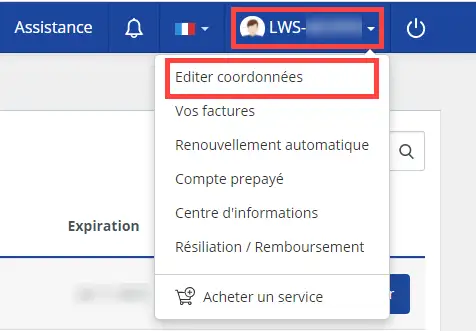
11. Click on your account's LWS identifier in the top right corner of the interface.
22. In the menu that appears, click on the “Edit contact details” option
Step 3: change the contact email address
In the form displayed, look for the field corresponding to your contact email address.
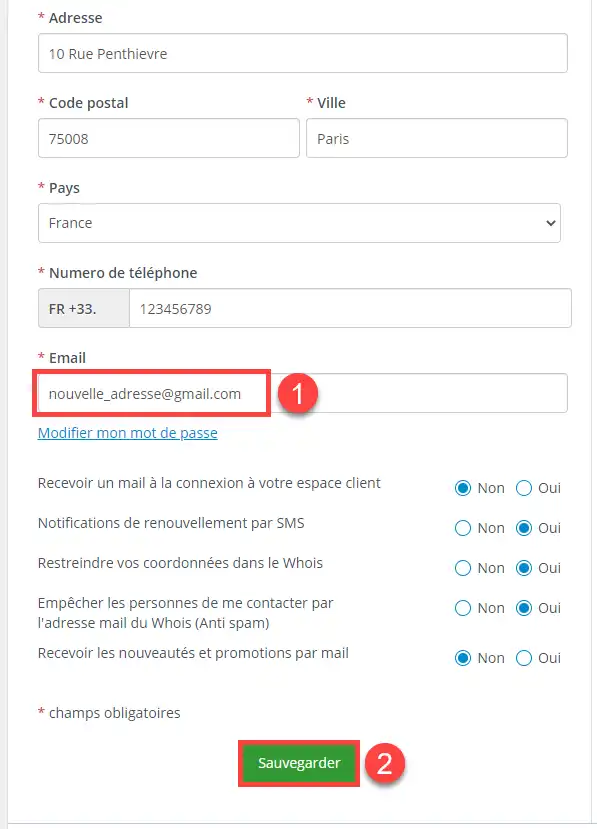
- delete the old address ;
- enter your new email address ;
- carefully check that there are no typing errors ;
- confirm the change.
Tips before confirming
Before confirming the change, take a few seconds to check:
- that the new email address really belongs to you ;
- that you can receive messages at it ;
- that no typing error has slipped into the entered address.
A simple error in the email address can prevent the confirmation message from being received.
Step 4: confirm the change request
After validation, a confirmation email is sent :
- to your old email address ;
- to your new email address.
Open these messages and follow the instructions provided to confirm the change.
Expected result
Once the validation is completed, your new email address becomes the contact address associated with your LWS customer account.
This is the address that will be used for new communications related to your account.
Check that the change has been taken into account
To verify that everything is correct:
- log back in to your LWS customer area ;
- go back to the “Edit contact details” section ;
- check that the new email address appears in the contact field.
Important
As long as the confirmation requested by email has not been completed, the change may not be finalized.
In general, the change is taken into account after validation of the confirmation email.
What this procedure does not change
Changing the contact email address of your LWS customer account does not change :
- the mailboxes created on your hosting ;
- the content of your website ;
- the emails already stored in your mailboxes ;
- the services associated with your account.
Common problems and solutions
I no longer have access to my old email address
If you can no longer access your old email address, you will not be able to follow the standard confirmation procedure.
In this case, use the dedicated procedure provided by LWS to change the contact email address without access to the old address.
I did not receive the confirmation email
Check the following points:
- look in the Junk Mail / Spam folder ;
- check that the new email address entered is correct ;
- wait a few minutes, then check your inbox again.
If no message arrives and the situation persists, restart the procedure with a correctly entered address.
I cannot log in to my customer area
If you cannot log in, you will not be able to change your contact details from your account.
You must first recover access to your customer area before repeating the procedure.
I want to change an email address linked to my hosting
This documentation does not concern email addresses of the professional mailbox type or messaging attached to a domain name.
It concerns only the contact email address of the LWS customer account.
If you want to change a mailbox on your hosting, you must follow documentation specific to email management.
Conclusion
Changing the contact email address of your LWS account is done directly from your LWS customer area / LWS Panel via the “Edit contact details” section. The request must then be confirmed by email to be taken into account.
If you no longer have access to your old email address, a specific procedure is provided by LWS to allow you to make the change despite this blockage.



 Yes
Yes No
No About
About 