Procédure
Service concerned: customer account and LWS services
Panel concerned: none
Level: beginner
LWS may ask you to confirm your identity before carrying out a sensitive operation, delivering a service, or lifting a restriction. The procedure is always the same: you receive an email containing a personal link that allows you to submit the photo required for verification.
In which situations can verification be requested?
Identity verification may be required in particular:
- before the delivery of an order, when the automated control system detects information that must be verified;
- after the delivery of a service, as part of a manual check;
- before lifting a service suspension or returning data following a report;
- for a sensitive administrative operation, for example when the email address and phone number registered on the account are no longer accessible;
- before authorizing access to certain advanced or sensitive features of a service.
This verification helps ensure that the request is indeed made by the holder of the LWS account.
Before you begin
The verification must be completed by the person registered as the holder on the LWS customer record.
Prepare the following items:
- a valid identity document;
- your account identifier in the format
LWS-XXXXXX;
- a sheet of paper with your LWS identifier and today’s date written on it;
- a camera or mobile phone capable of taking a sufficiently clear photo.
The last name, first name, and country visible on your identity document must match the information recorded on your customer record.
The link received by email is personal and remains valid for 48 hours. Once this period has passed, it can no longer be used, even if you have already opened it.
Preparing a compliant photo
Take a single photo showing simultaneously:
- your face;
- your valid identity document;
- the sheet bearing your
LWS-XXXXXX identifier and today’s date.
You may take the photo yourself or ask someone else to photograph you. In both cases, your face and the documents must appear together in the same image.
Make sure the last name, first name, and country shown on the identity document are clearly legible. The photo must also make it possible to verify that the identity document belongs to the person photographed.
A simple scan of the identity document is not sufficient. Composites made from several images, retouched photos, and files that appear to have been artificially generated are not accepted.
Your identity document contains sensitive personal data. Submit the photo only from the personal link sent by LWS. Do not add it to a public comment and do not send it to any address not provided to you by LWS.
Sending the photo
- Open the email sent by LWS regarding identity verification.
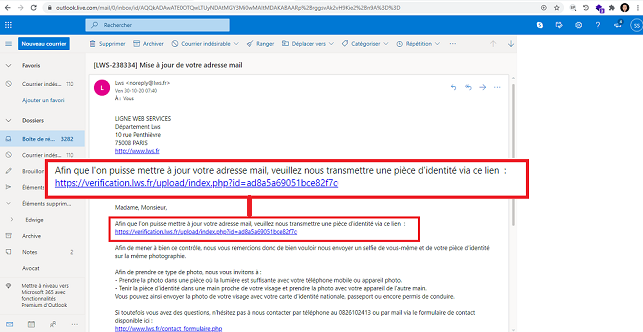
- Click the personal link in the message.
- Read the instructions displayed on the verification page.
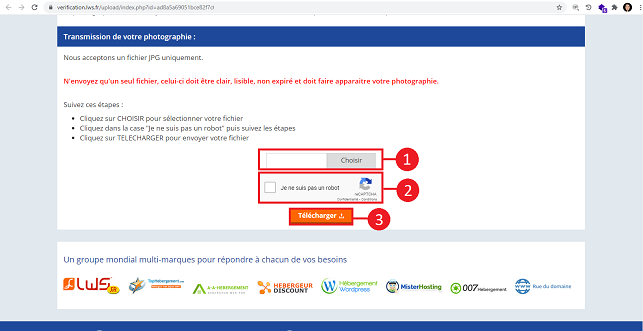
- Select the photo prepared previously.
- Confirm the file upload.
Do not close the page before the message confirming that your document has been successfully submitted appears.
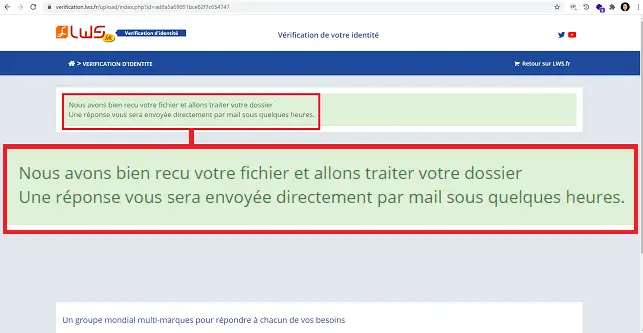
When the confirmation message appears, your file has been sent successfully. Your request will then be reviewed manually by an LWS agent within a maximum of 24 hours.
What happens after verification?
What happens next depends on how the request was triggered.
Request integrated into an automated procedure
This may concern, in particular, an order awaiting validation or an administrative change request made online.
When your identity is validated, the expected action is normally carried out automatically within the following hour.
Request sent by an LWS agent
When an agent has sent you the link as part of an ongoing case, a support ticket is usually already open.
After your identity has been validated, reply to that ticket to inform the agent that the verification has been accepted. They will then be able to carry out the planned operations, for example reviewing a suspension lift or continuing an administrative change.
Common issues
My verification was refused
Verification may be refused in particular in the following situations:
- the file appears to have been edited or artificially generated;
- the identity document does not seem to belong to the person photographed;
- the last name, first name, or country is not legible;
- the face, identity document, or sheet showing the LWS identifier and date is missing;
- only a scan or a photograph of the identity document was sent;
- the photo is a composite of several images;
- the information on the identity document does not match that on the LWS customer record.
Prepare a new photo, correcting the reason for the refusal, before repeating the procedure.
My link has expired or I need to send a new photo
If the request was sent manually by an agent, reply to the support ticket so that a new link can be sent to you.
If the verification was part of an automated procedure, restart that procedure from the beginning to trigger a new request.
If verification was mandatory to validate an order, the order was automatically canceled with the refusal and a refund was initiated.
An old link cannot be reactivated or reused after it expires.
The requested action was not carried out after validation
For an automated procedure, wait up to one hour after your identity has been validated.
For a request handled by an agent, reply to the support ticket to report that the verification has been accepted. Manual intervention may still be required.
I cannot complete the verification
If you cannot provide the requested photo or if the information on your identity document does not match that on the customer record, contact LWS sales and administrative support.
Your situation can be reviewed to determine the possible solutions. However, the verification cannot be validated with the identity document of a relative, colleague, or any other person other than the account holder.



 Yes
Yes No
No About
About 