


How do I connect to the PHPMyAdmin utility from ISP Config?

Procédure

How do I connect to the PHPMyAdmin utility from ISP Config?

1. Connect to your ISPConfig interface by following this documentation: https: //help.lws-hosting.com/en/How-do-I-access-ISPConfig-on-my-dedicated-VPS-server

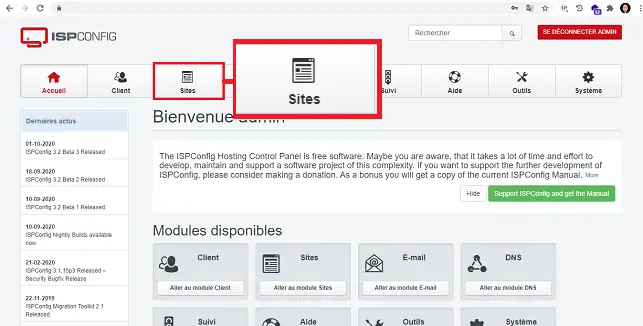
2. Click on"Sites" in the menu at the top of the page.

How do I connect to the PHPMyAdmin utility from ISP Config?

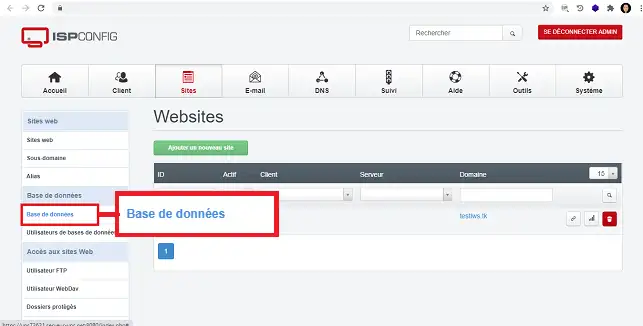
3. Click on"Database" in the right-hand menu, in the"Database" section of your VPS server.

How do I connect to the PHPMyAdmin utility from ISP Config?

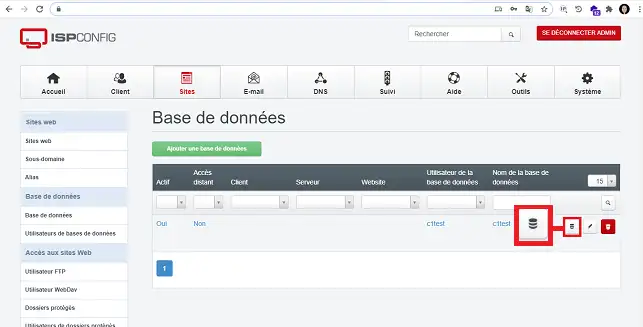
4. Click on the icon at the end of the column (after the database name) to access the PHPMyAdmin interface. You can also access the PHPMyAdmin interface directly using the following URL:

  • Linux Debian Apache server: https://vpsXXXXX.serveur-vps.net:8080/phpmyadmin
  • Linux Debian Nginx server: https://vpsXXXXX.serveur-vps.net:8081/phpmyadmin.

Note: replace XXXXX with the real number of your VPS server.

How do I connect to the PHPMyAdmin utility from ISP Config?

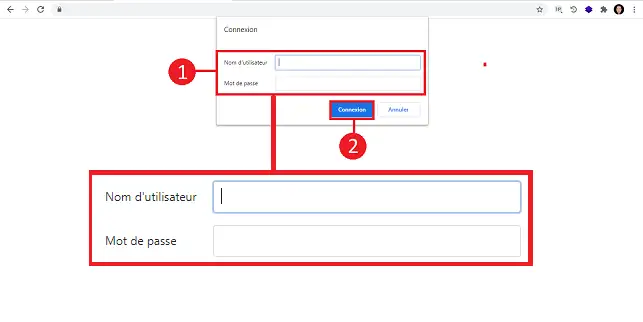
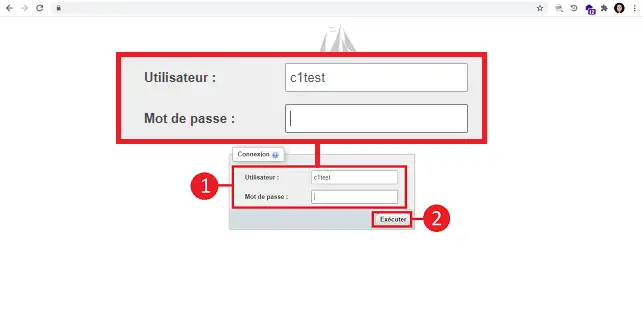
5. When you open the new page, you will be asked for a username and password before you can connect to PHPMyAdmin. Enter the information as follows:

  • Username : root
  • Password : your ISPConfig interface password

How do I connect to the PHPMyAdmin utility from ISP Config?

This step no longer exists on servers installed with the Linux distribution Debian 12 and later. If you have such a distribution on your server, go directly to step 6
.

6. If the login details have been entered correctly, you should be able to access the PHPMyAdmin login interface asking for the database identifier and the password attached to the database identifier. You can find the user name by going to your ISPConfig interface, clicking on"Sites" and then on"Database user". If you can't remember your password, you can change it via your ISPConfig interface. Note that if you change the database user's password, you will also need to make the change to the configuration file attached to your website.

How do I connect to the PHPMyAdmin utility from ISP Config?

Conclusion

You are now able to access the PHPMyAdmin interface on your VPS server with LWS.

Feel free to share your comments and questions in the comments section.

help.lws.net/a/1472
Was this article helpful?

Yes

No

Read 23 191 times

Thank you! Feel free to ask questions about our documentation if you would like more information, and help us improve it.

Similar articles

Questions about the article 1

Ask a question
Le Protagoniste
24 Jan 2023
Je n'arrive pas à me connecter avec le compte root et le mot de passe avec lequel j'ai accès à ISP Config. Je suis en infogérance
Benjamin-LWS Official answer
24 Jan 2023

Bonjour, merci pour votre retour.

Je suis navré que vous rencontriez des problèmes avec votre VPS infogéré.

Il est possible que cela soit dû à plusieurs causes différentes.

Étant donné le peu d'informations dont je dispose pour vous répondre et afin de vous assister au mieux, je vous recommande de créer un ticket au support technique VPS en accédant à votre espace client, en allant dans la rubrique Assistance et en sélectionnant le VPS infogéré que vous utilisez. (https://aide.lws.fr/a/268)

Décrivez votre problème et nos agents répondront rapidement afin de vous aider à récupérer vos accès.


Was this answer helpful?

A question about this article?

Ask the LWS team and the community. Answers are published after moderation.

Ask the LWS team and its community a question

GDPR: Controller: LWS-Ligne Web Services. Purpose: moderation and public publication of your question, possible notification of an answer. Legal basis: consent (Art. 6(1)(a) GDPR). Email retention: 90 days after notification, 12 months maximum without an answer. To exercise your rights, see the GDPR section of our Terms and Conditions.