Procédure
Objective
This article explains how to contact LWS commercial support depending on your situation.
You will find the different solutions available if you are already a customer, if you are not yet a customer, or if you would like to contact a sales advisor by phone.
Who is this documentation for?
This documentation is intended for LWS customers as well as people who want to obtain commercial or administrative information before or after an order.
Commercial or administrative support can be contacted in the following situations:
If your request concerns a technical issue on an active service, you should contact technical support.
Concerned panel
This procedure concerns:
- the LWS customer area / LWS Panel for customers already logged into their account;
- the LWS website and the websites of its secondary brands for people who are not yet customers or who want to use the contact form;
- the commercial hotline for requests handled by phone.
Prerequisites
Before you begin, prepare the following items depending on your situation.
If you are already a customer
- your LWS customer ID in the format LWS-XXXX;
- your password for accessing the customer area, if you still have it;
- the useful information regarding your request.
If you are not yet a customer
- the details of your need;
- a valid email address to receive a reply;
- any useful information about the service you want to order or compare.
If you cannot log in to your customer area
The contact form can also be used by customers who cannot access their LWS customer area.
In this case, if possible, prepare:
- your LWS customer ID;
- the account contact email address;
- any information that helps identify your file and the problem you are experiencing.
If you want to contact commercial support by phone
Commercial phone support is available to both customers and non-customers.
- If you are a non-customer, simply prepare the useful information regarding your request.
- If you are already a customer, the agent may ask you for certain information in order to verify the account, for example:
- your LWS account ID;
- the account contact email address;
- the last name and first name of the account holder.
Preparing this information in advance helps facilitate the exchange and the processing of your request.
The different ways to contact LWS commercial support
Contact commercial support from your LWS customer area
This solution should be preferred if you are already an LWS customer.
It allows you to send a commercial or administrative request directly from your account.
Step 1 : log in to your LWS customer area
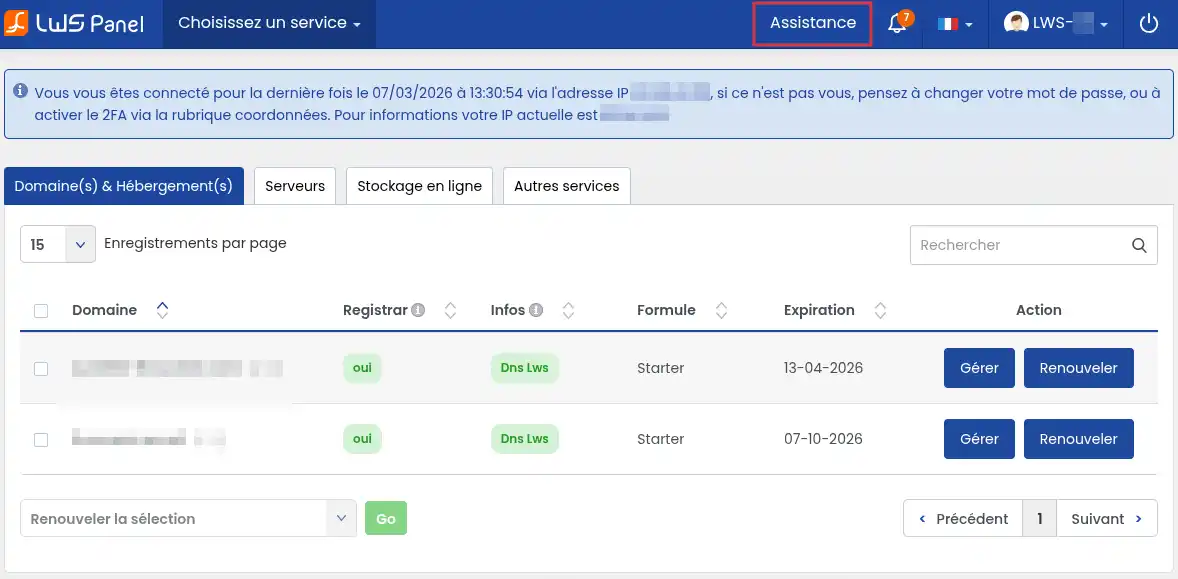
Step 2 : open the “Assistance” section located at the top right of your screen.
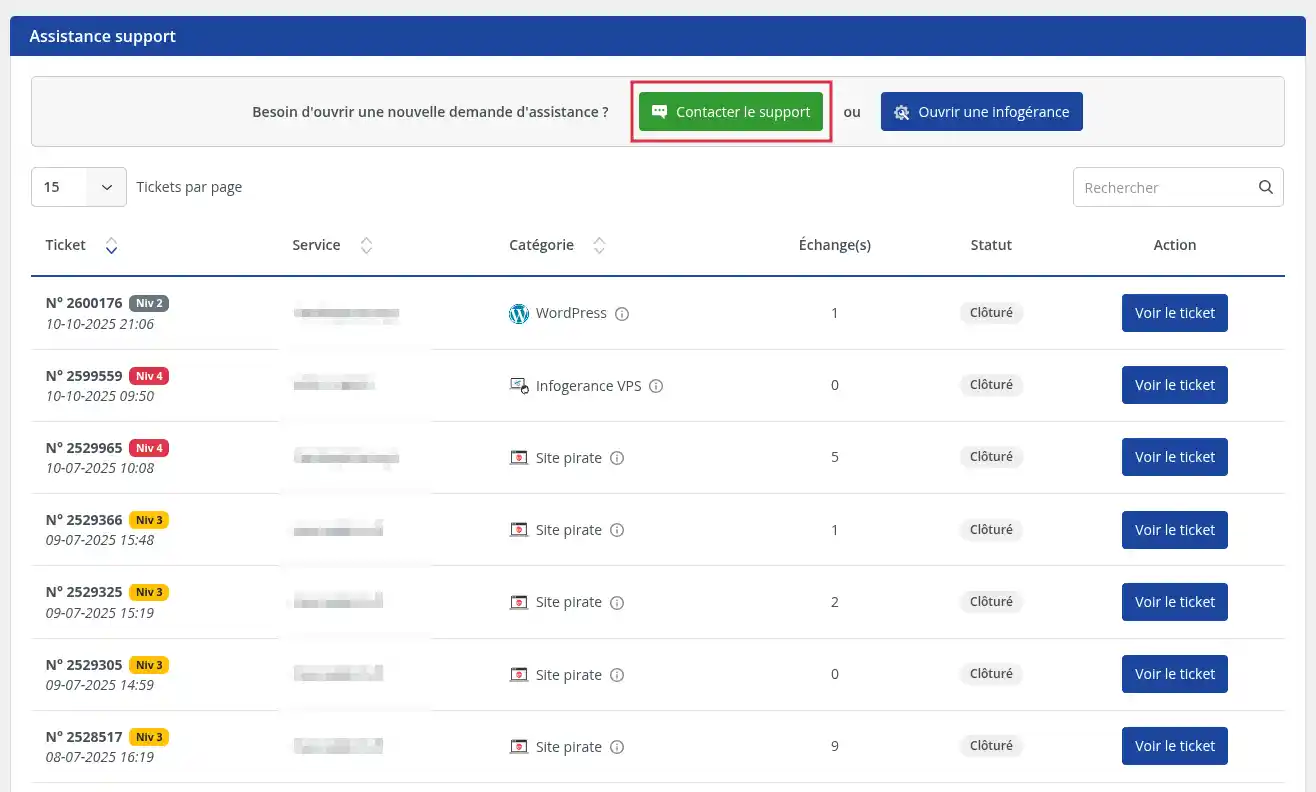
Step 3 : On the assistance page, click the “Contact support” button.
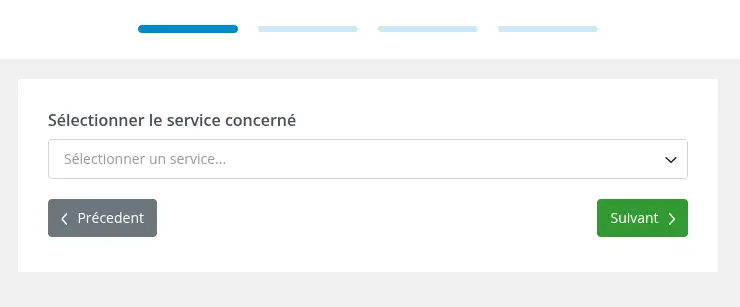
Step 4 : select the service related to your request, then click “Next”.
Examples:
- hosting;
- a domain name;
- a service associated with your account.
Choose the service closest to your request to facilitate processing.
If your request is not related to a specific service (example: change of account details), select any service.
Step 5 : Enter your message by clearly explaining your need, then click “Next”.
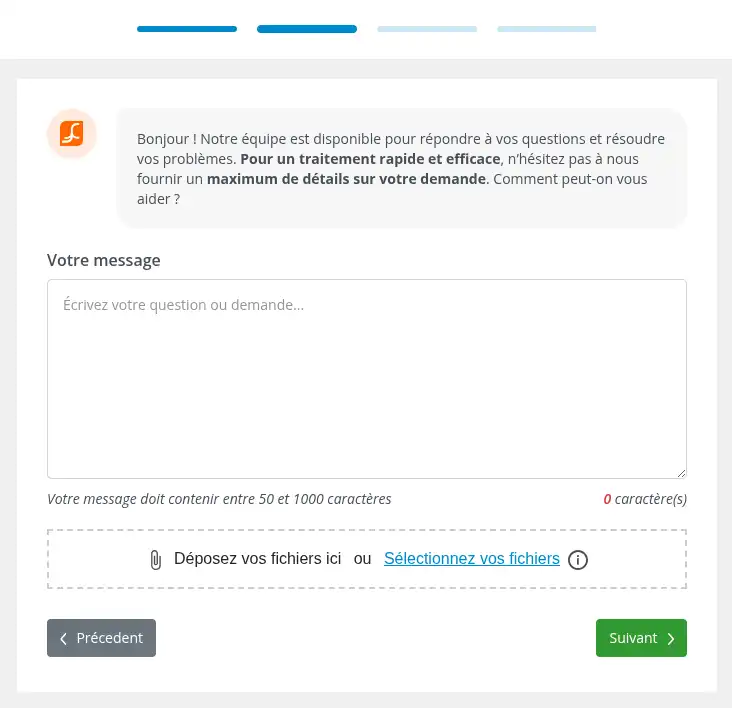
To get a faster and more accurate response, remember to include:
- the subject of your request;
- the service concerned;
- the information useful for understanding it;
- any necessary clarification about your situation.
Step 6: select the category “Commercial / Administrative”, then click “Open ticket”.
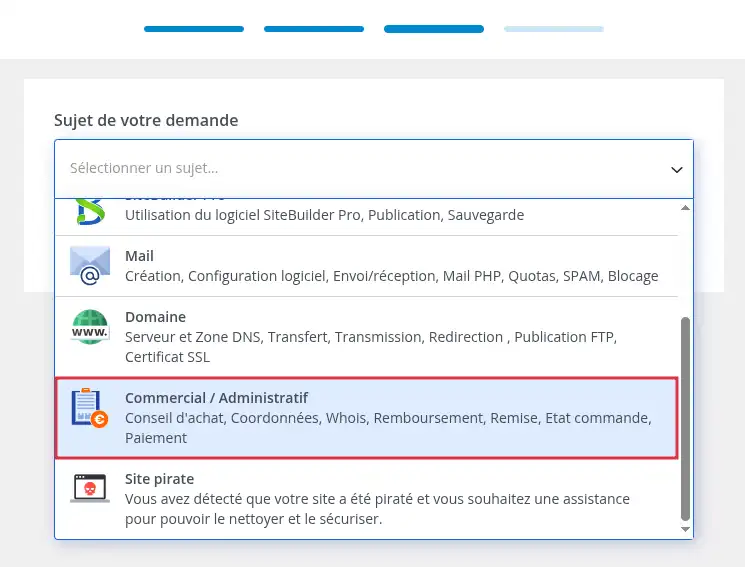
Your request is then sent to the relevant department. Our commercial agents reply 7 days a week from 8 a.m. to 6 p.m.
Contact commercial support via the contact form
If you are not yet a customer, or if you are already a customer but you cannot log in to your LWS customer area, you can contact commercial or administrative support from the LWS website using the contact form.
This solution is particularly useful:
- if you want information before placing an order;
- if you do not yet have a customer account;
- if you have lost access to your customer area;
- if you need commercial or administrative assistance without being able to open a ticket from your account.
Step 1 : open the LWS Contact page.
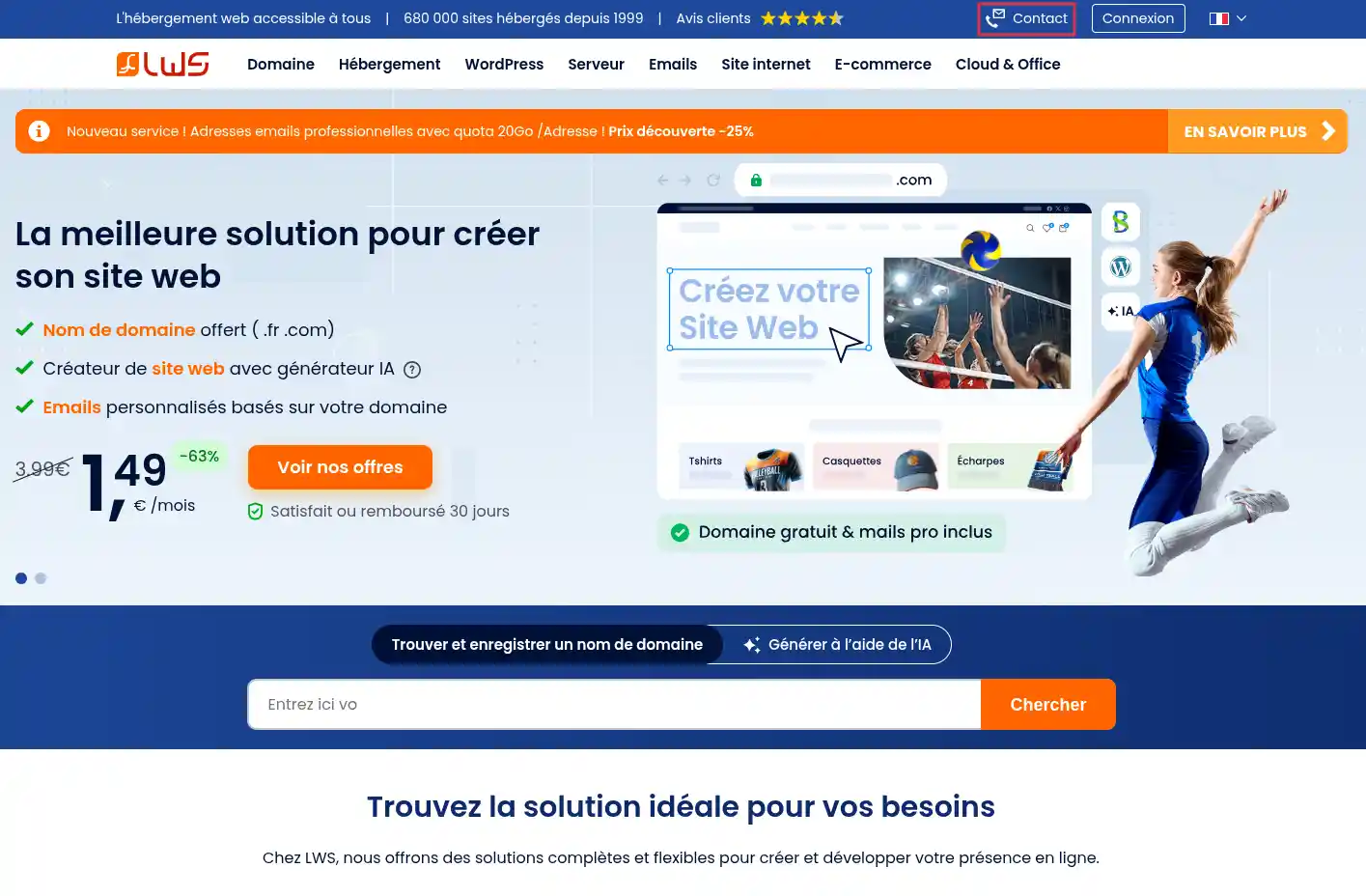
Step 2 : click the “I am not a customer” button.
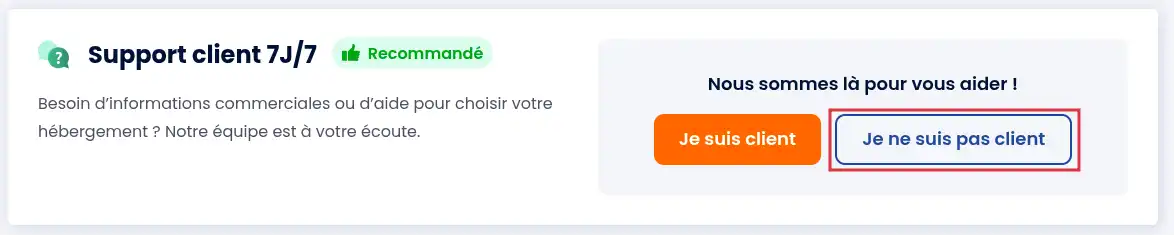
If you are already a customer but cannot log in to your customer area, also use this form to submit your request, clearly specifying that you no longer have access to your customer account.
Step 3: Fill in the requested fields with the information useful for your request, then click “Send”.
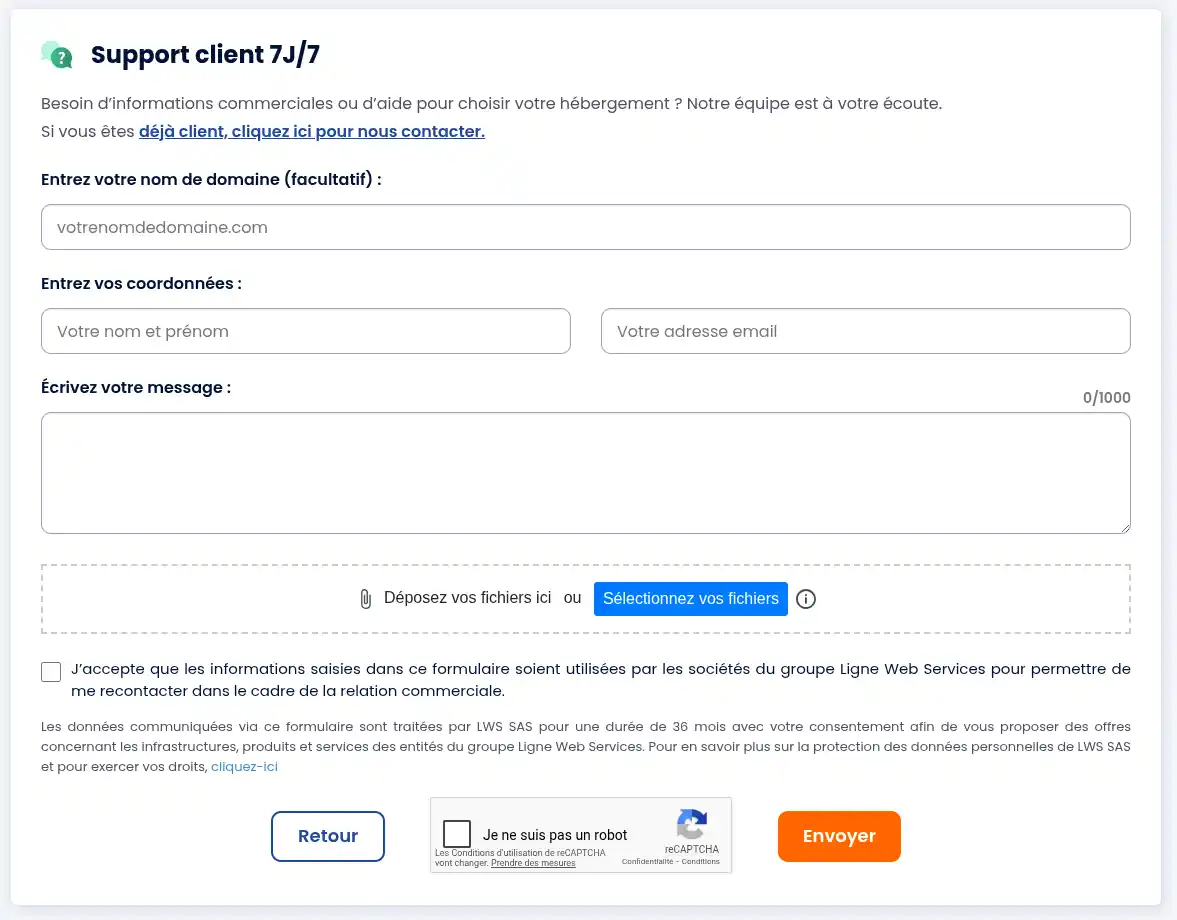
To facilitate the processing of your request, it is advisable to include:
- your name;
- your email address;
- your LWS customer ID if you have one;
- the subject of your request;
- the details of your need or the problem encountered.
To get a faster and more accurate response, remember to include:
- the information useful for understanding it;
- any necessary clarification about your situation.
Our commercial agents reply 7 days a week from 8 a.m. to 6 p.m.
Contact commercial support by phone
If you want to speak directly with an agent, you can reach the LWS commercial hotline by phone.
Commercial phone support is available to:
- customers;
- non-customers.
Commercial support phone numbers
- France number: 01 77 62 3003
- From abroad: +33 1 77 62 3003
Hours
The telephone commercial service is available Monday to Friday from 9 a.m. to 7 p.m..
Information to prepare before the call
If you are a non-customer
Prepare the useful information regarding your request so that the advisor can respond more easily.
If you are already a customer
To confirm the account concerned, the agent may ask you for several pieces of information, including:
- your LWS account ID;
- the account contact email address;
- the last name and first name of the account holder.
It is therefore advisable to prepare these items before the call.
In what cases should you call the hotline?
The phone can be useful if:
- you are unable to open a ticket from your customer area;
- you want to arrange a phone appointment with a commercial agent;
The agents working on our phone hotline are not responsible for directly handling your request. Their main role is to analyze your situation and direct your request to the most appropriate department.
During your call, the hotline agent will take charge of your request and forward it to the relevant department so that it can be handled under the best conditions. Depending on the nature of your request, it may be directed to:
- the commercial department;
- the shared technical support;
- the VPS technical support;
- the Abuse department;
- the GDPR department.
In most cases, your call will result in a ticket being opened with our support team so that your request can be reviewed and handled by the specialized team.
If you are able to open a ticket directly from your LWS customer area, it is recommended to use this method rather than contacting the hotline. This generally allows for faster and more efficient processing of your request.
If the situation requires it, the hotline agent can also provide you with the procedure for scheduling a phone appointment with an LWS commercial advisor, so that you can discuss your request in more detail.
Request a call-back from a commercial advisor
You can request to be called back by a commercial advisor. The call-back takes place during the selected time slot, Monday to Friday.
Step 1 : Go to the phone appointment booking page on LWS.
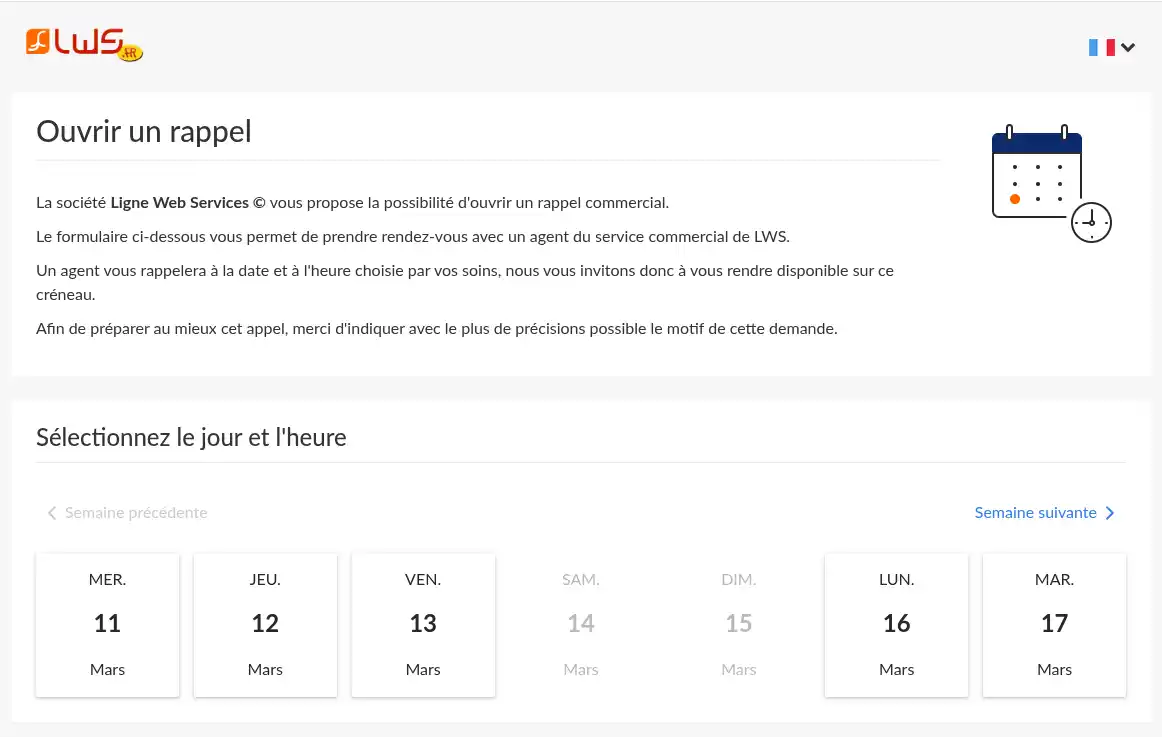
Step 2 : Choose an available date
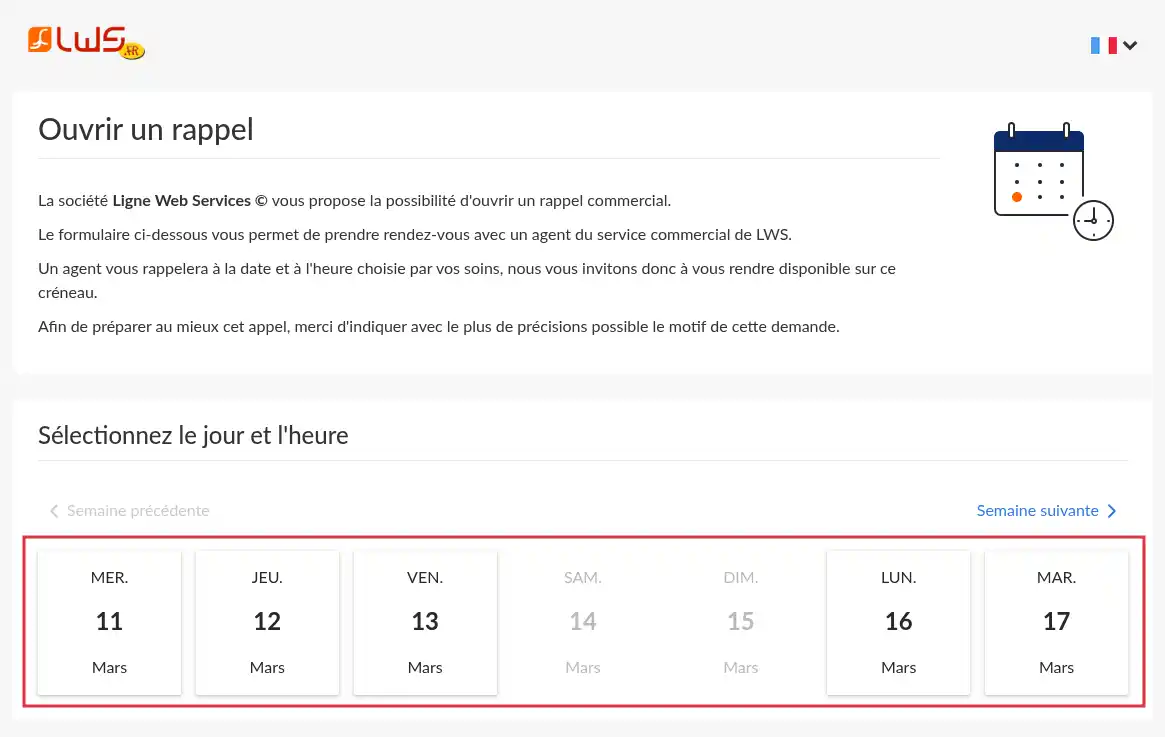
Greyed-out dates indicate dates when the phone appointment service is not open or dates for which all slots are already booked.
Step 3 : Choose the time slot when you are available to be called back
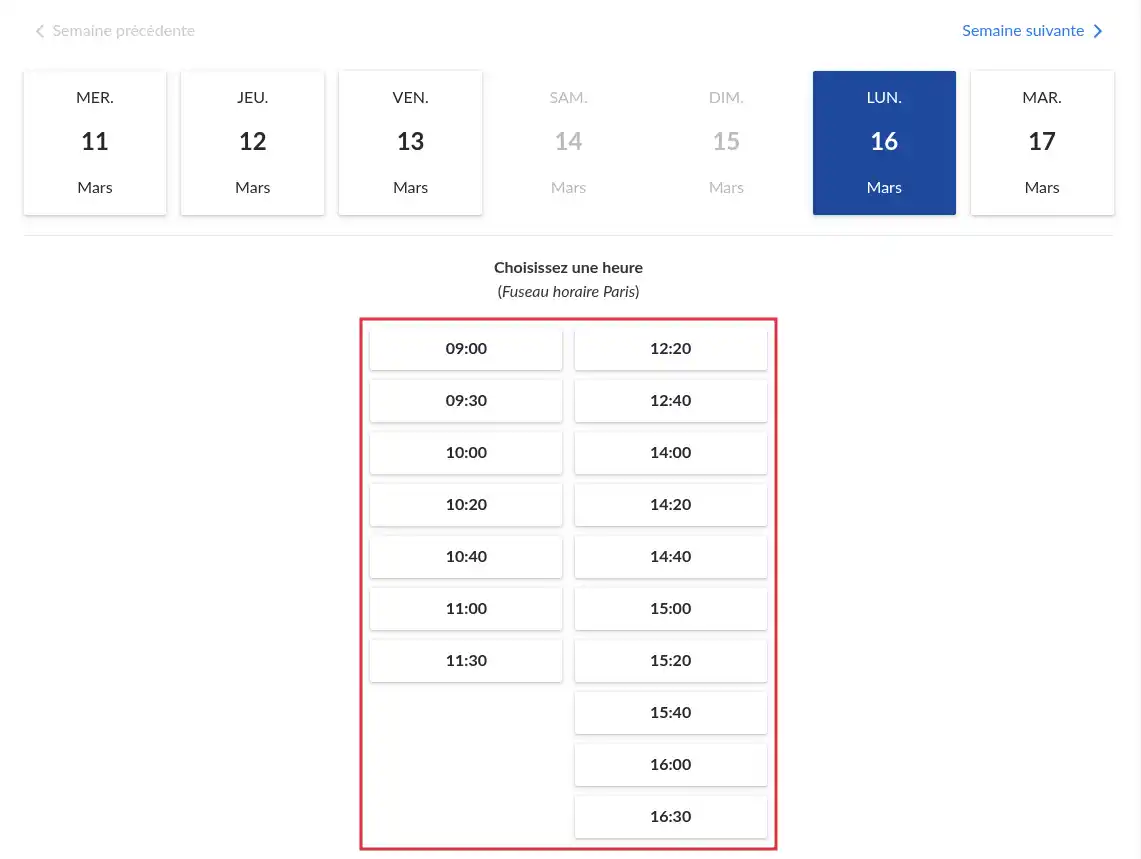
Step 4 : Fill in the request form
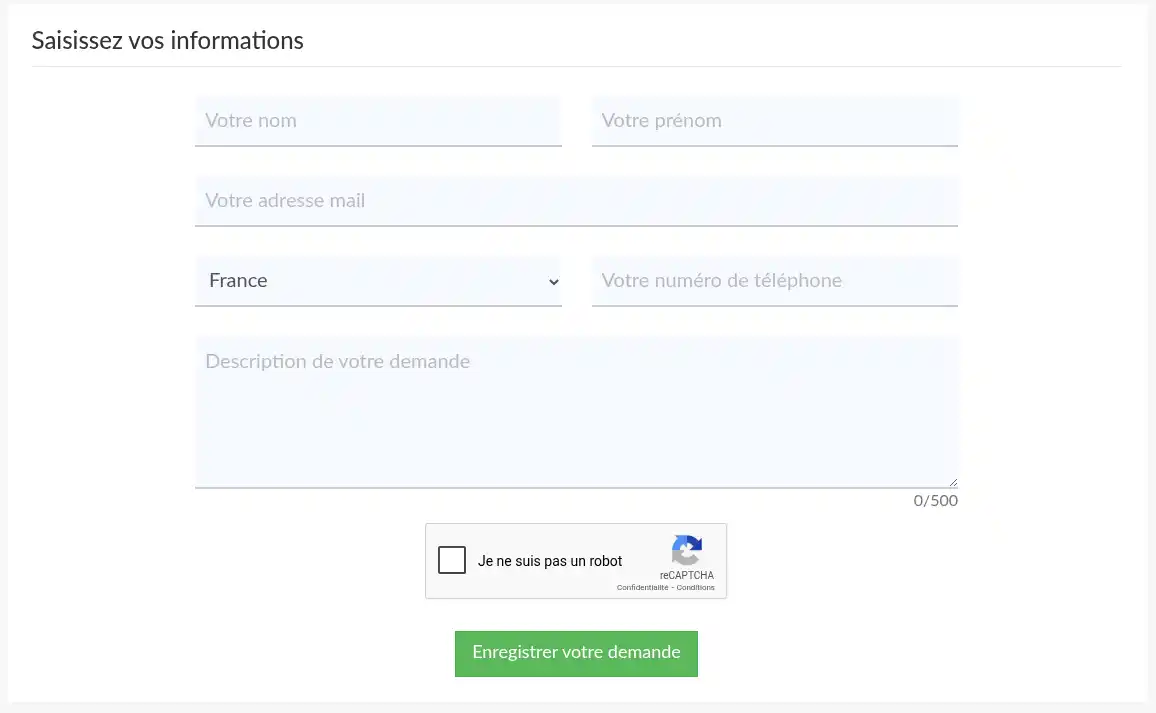
The requested information is as follows:
Your first and last name
Your email address
Your country (and phone number depending on the case)
A description of your request
Be as precise as possible in the description of your request; this will allow the agent to prepare the call as well as possible in order to provide you with relevant answers directly.
Depending on the selected country, you will be called by an agent by phone if your country is eligible. Otherwise, a video-conference link will be offered and sent by email.
Step 5 : wait for the advisor's call
A commercial advisor will call you back during the time slot you selected, Monday to Friday.
If your appointment is by video conference, join using the link as soon as the time slot begins.
This solution is useful if you prefer to be contacted at a specific time.
Check that your request has been received
Depending on the contact method used, several elements can help you verify that your request has been sent.
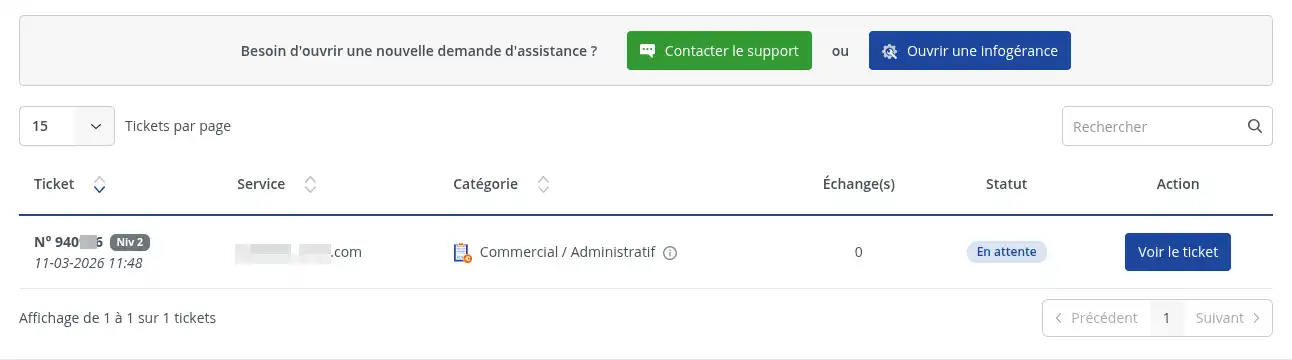
If you went through the customer area
After clicking “Open ticket”, your request should be registered in your customer area. You should be able to find your exchange in the tracking of your support requests.
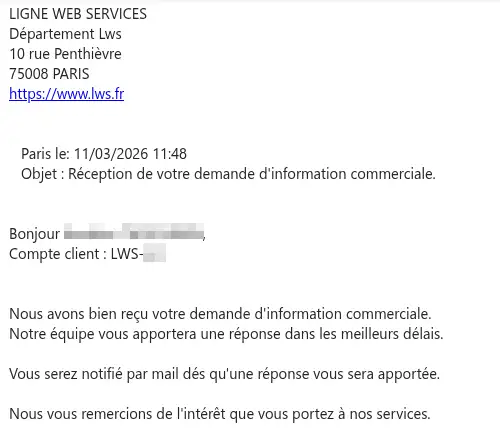
You also received a confirmation email at the account's contact email address.
If you used the contact form
After clicking “Send”, your request should be forwarded to commercial support.
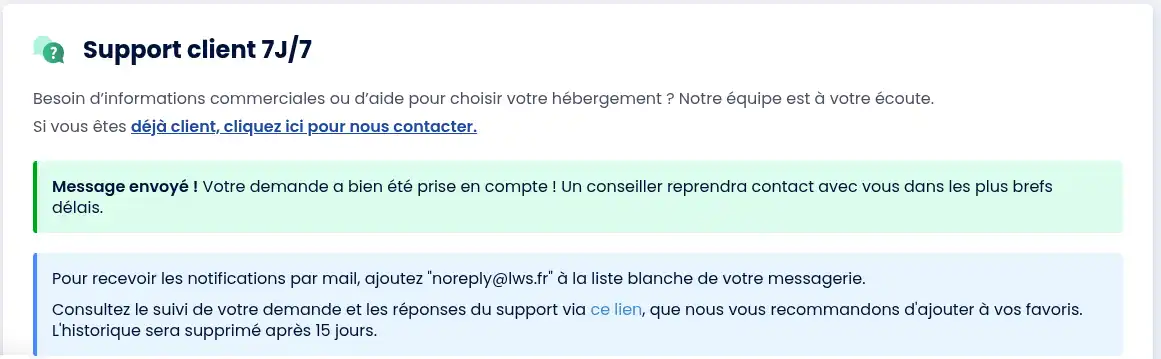
Make sure the form has been validated and monitor the email address indicated in your request.
If you called by phone
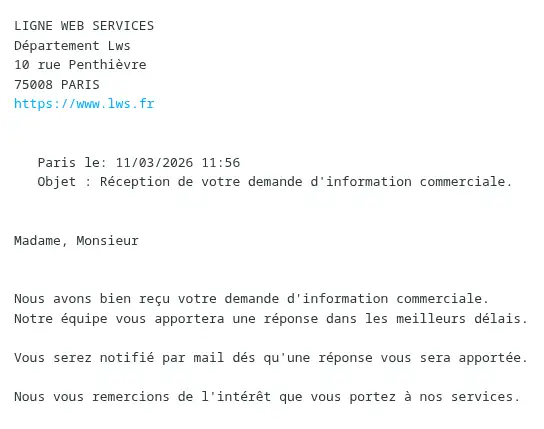
Your request is taken into account directly during the exchange with the commercial advisor. If the agent opens a ticket for you, you will receive confirmation by email directly. If an appointment procedure is sent by email, check your inbox.
If you requested a call-back
Your request is taken into account once the form is validated.
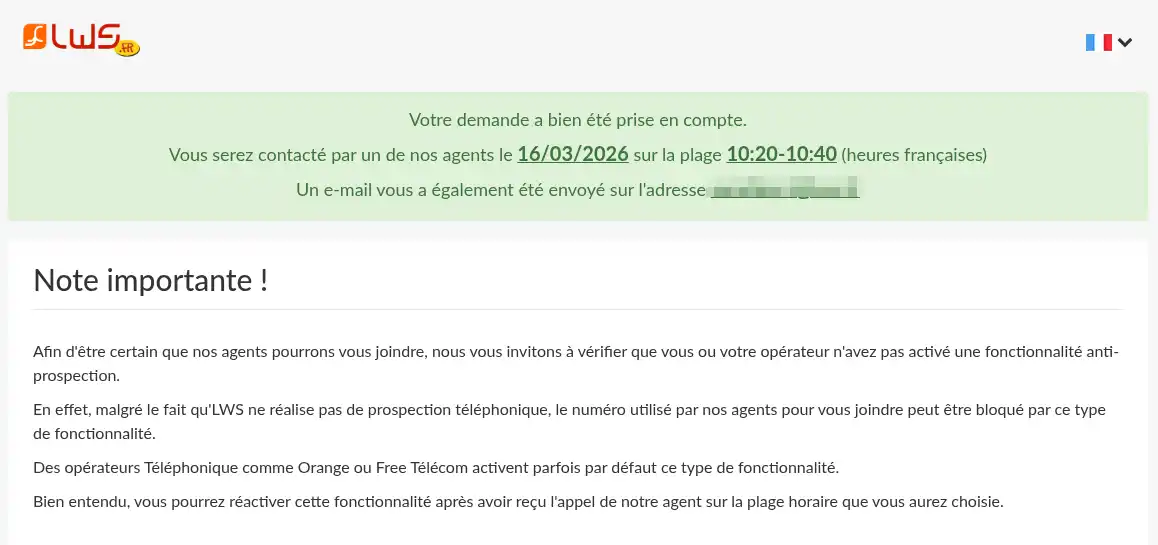
You also receive a confirmation email allowing you to reschedule your appointment for another time slot or cancel your appointment if you no longer need it.
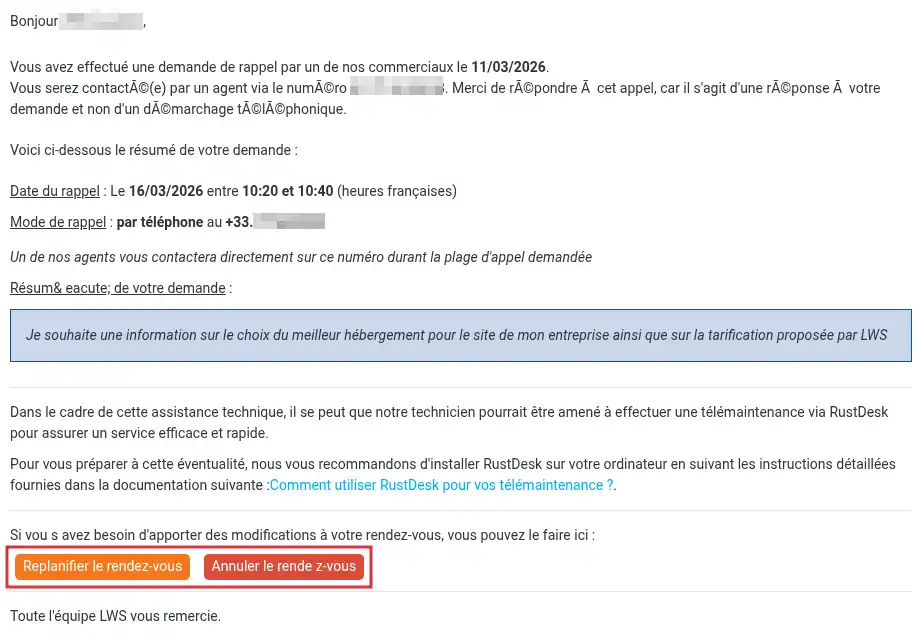
The advisor will then call you back during the selected time slot.
Response time
Commercial contact requests from the customer area generally receive a response within 30 minutes after the request is opened if it is opened Monday to Friday between 8 a.m. and 6 p.m. In the evening and on weekends, the response time may be longer.
If you have not received a response after this time:
- check your customer area if you are already a customer;
- check your email inbox and your spam/junk mail;
- make sure you used the correct contact channel;
- contact commercial support again if necessary.
Common issues
You do not know which category to choose
If your request concerns an offer, an order, an invoice, an administrative question or a pre-purchase need, choose the “Commercial / Administrative” category in the customer area.
You want technical help
If your request concerns a technical malfunction, you must go through technical support.
You have not received a response
Wait for the indicated timeframe, then check:
- your emails;
- your spam/junk mail;
- your customer area if you are already a customer.
If no response is visible, contact commercial support again using the method best suited to your situation.
Conclusion
You now know how to contact LWS commercial support depending on your situation.
If you are already a customer, the easiest way is to go through your LWS customer area.
If you are not yet a customer, you can use the contact form available on the LWS website.
You can also contact a commercial advisor by phone or request a call-back at a suitable time slot.



 Yes
Yes No
No About
About 