Procédure
Purpose of this article
This article explains how to move a service purchased from LWS (e.g.: domain name, LWS hosting, cPanel, VPS, Cloud Drive, etc.) from one LWS client account to another.
Services concerned
Any product or service attached to the client account (Mail Pro, VPS, domain name, LWS shared hosting, cPanel, Cloud cPanel, Windows Plesk)
Not concerned: moving only the option attached to a service to transfer it to another service.
Prerequisites
Before getting started, make sure that:
- You have access to the account holding the service you want to transfer to another account.
- You know the login and email address of the destination account. (it will be possible to create the account during the procedure if it does not already exist)
- The service is active and not in the process of cancellation.
- You have the transfer code (EPP code or Auth code) if you want to transfer ownership of a domain name.
Before getting started
Moving a service means that:
- Service management will be transferred to another account.
- Renewal and billing will be attached to the new account.
- For domain names, it is possible to transfer ownership of a domain only without changing the service’s technical manager.
⚠️ This operation does not delete the service. It only changes its attachment to the client account.
Moving a service is irreversible. To cancel it, a new account-to-account transfer in the opposite direction must be carried out.
Step 1: Access the service transfer page
11. First, you need to log in to your LWS account.
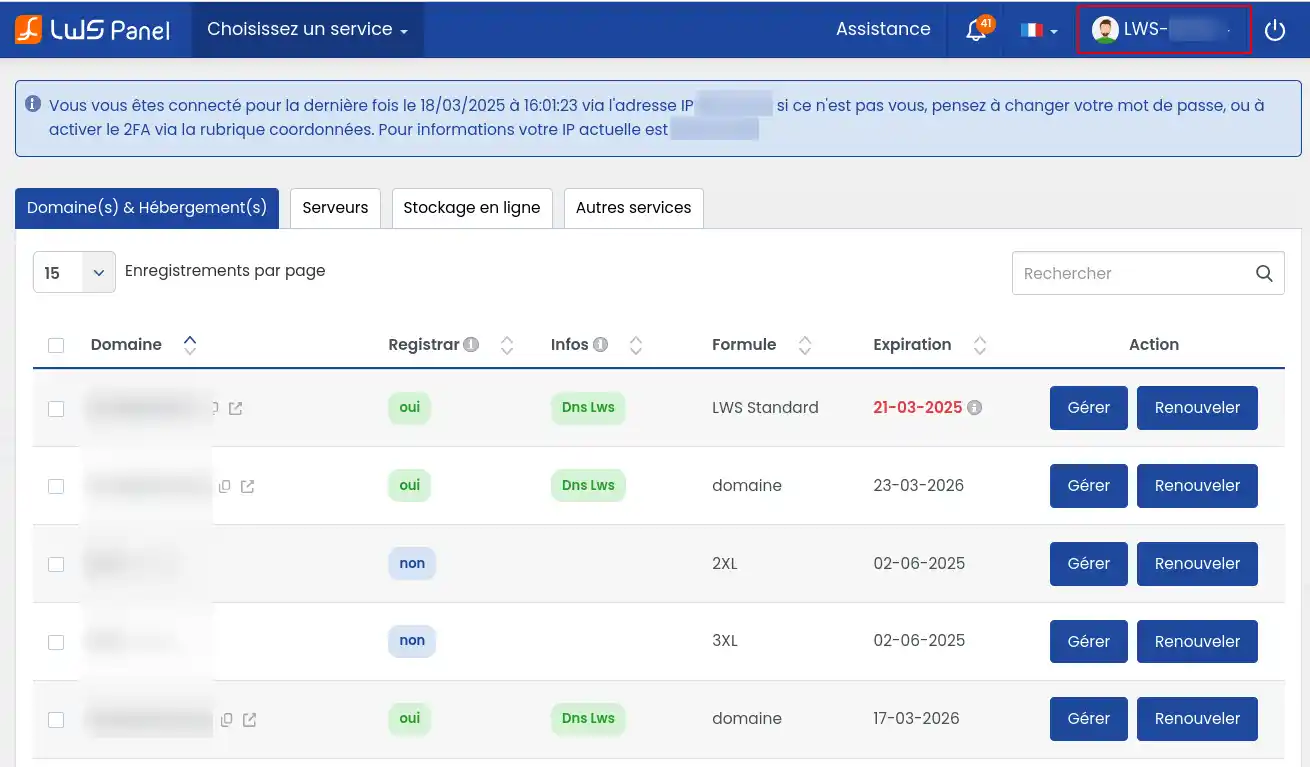
22. Then click on your LWS login at the top right of the page.
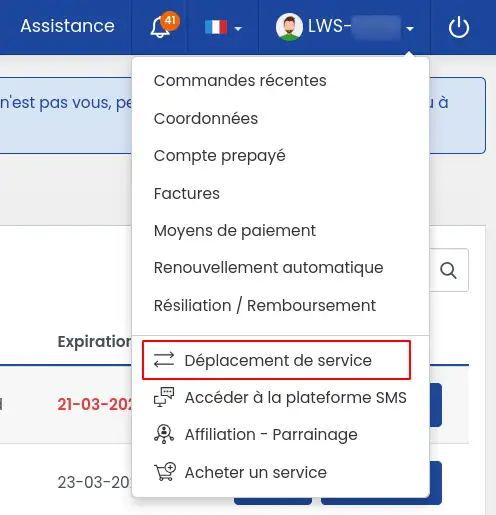
33. In the menu that appears, click on "Service transfer".
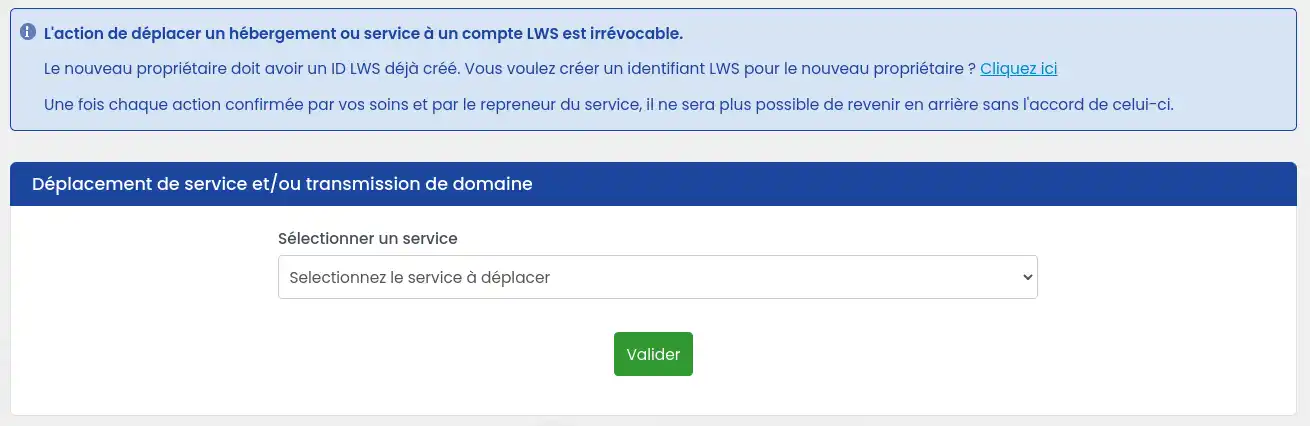
You will then arrive on the page allowing you to transfer an LWS product to another LWS account.
Step 2: Create a new destination LWS account if it does not already exist
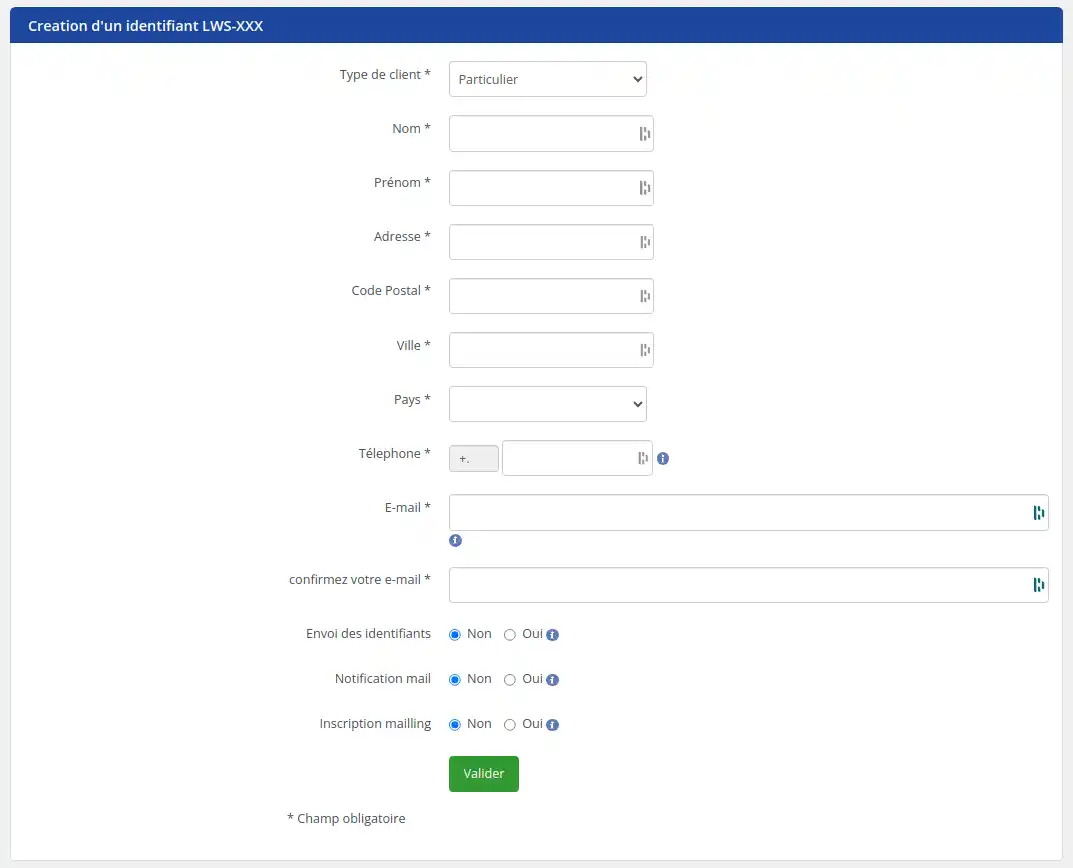
If the new owner or manager of the product does not already have an LWS account, we invite you to create one for them by following the procedure below:
Click on the "Click here" link to create a new LWS account.

Fill in the required fields:
If the new account must receive ownership of a domain name, it is essential to carefully check that the new owner’s information is accurate and up to date. We strongly recommend that you double-check before confirming the changes to ensure their accuracy. Any error in entering the new login information discovered after the domain ownership transfer process will require a new transfer and payment of the associated fees.
Please select "Yes" for "Sending credentials" so that the new owner receives their login details.
You can then click the green "Validate" button.
Once the account has been created, an email will be sent to the email address entered in the new LWS client account creation form. This email contains the new LWS login that you will need for the rest of the procedure.
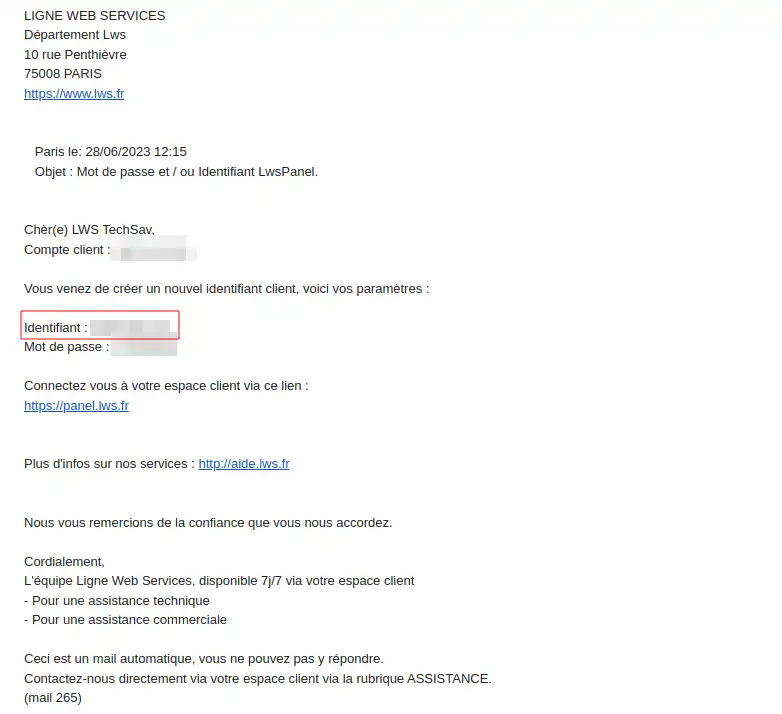
Step 2.1: transfer ownership and/or management of a domain name or a hosting plan with a domain name
Please note that while the transfer of technical management (technical contact) is free, the transfer of ownership (owner contact) is subject to a fee at registry level (€29 excluding VAT) and applies only to certain extensions (.fr, .com, .net, .org, .info, .biz, .eu and .be). Changes cannot be applied to a domain name with another extension.
Follow the steps below to transfer one of your domain names:
On the service transfer page, select the domain name you want to transfer to another account.
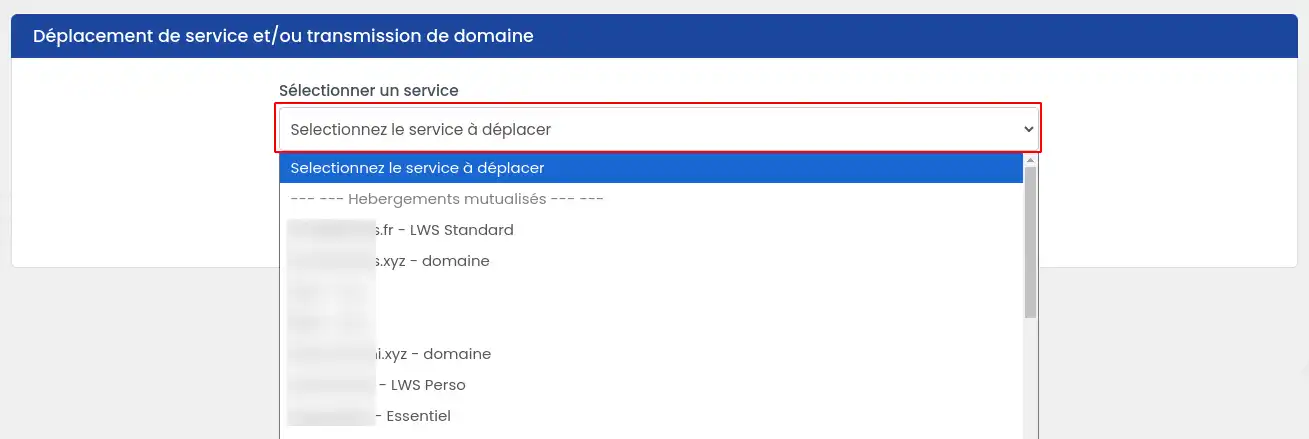
Then, select the desired type of transfer.
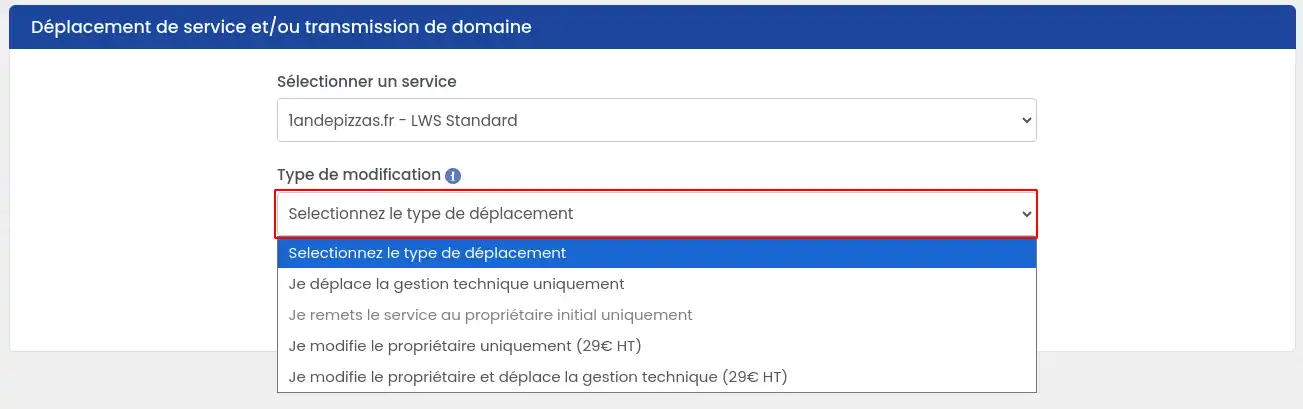
At this stage, several options are available:
- I only transfer technical management: domain management (and the associated hosting) will then be transferred to a new LWS account that will manage it. You will no longer be able to act on it, but you will remain the owner of the domain name.
- I only return the service to the original owner : this option is only offered if you are already only the technical contact. This option allows you to return technical management of the domain (and the associated hosting) to the account that owns the domain.
- I only change the owner: only the ownership of the domain name will then be transferred to another LWS account, but you will remain the technical manager of the domain name, as well as the associated hosting. The change of owner is subject to a fee charged by the registry. This operation is billed at €29 excluding VAT.
- I change the owner and transfer technical management: the domain management (and associated hosting) as well as ownership will then be transferred to a new LWS account that will have full management. The change of owner is subject to a fee charged by the registry. This operation is billed at €29 excluding VAT.
The LWS account of the technical contact is also the account that manages billing, transfer requests and internal transfer requests. In the event of a domain name transfer request by the technical manager, the transfer code is sent to the email address of the owner account.
Once you have made your choice, you must finish filling out the form.
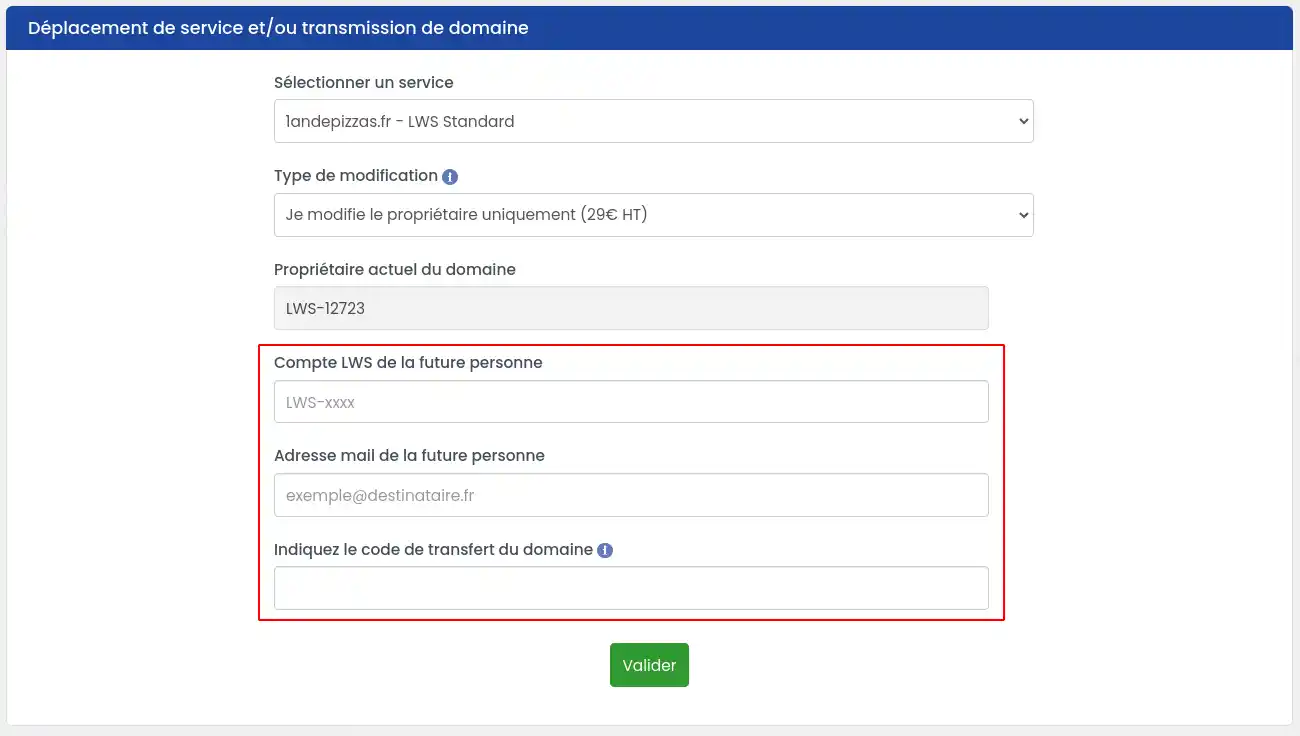
- Enter the client ID of the new account that will receive the management or ownership transfer.
- Enter the email address of the new account that will receive the management or ownership transfer; this step makes it possible to verify that the login and email address match and that there has been no typing error in the new LWS account login.
- If you want to transfer ownership of a domain name, additional information will be requested. Enter the transfer code that you previously requested. Indeed, a change of owner is considered a domain name transfer even if the registrar does not change.
- Then click the "Validate" button to finalize your request.
If you have requested a change of ownership for the domain name, a quote for €29 excluding VAT will be proposed to you. The procedure will only start after payment of the quote.
Step 2.2: Move a service (Mail Pro, VPS, Cloud Drive) or hosting without a domain name
On the service transfer page, select the product you want to transfer to another account.
Once you have made your choice, you must finish filling out the form.
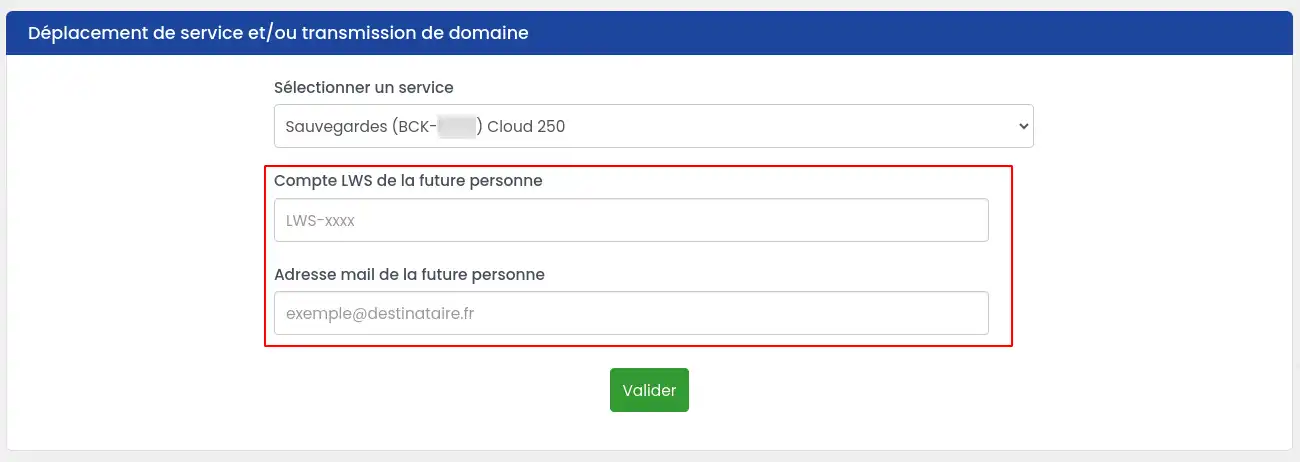
- Enter the client ID of the new account that will receive the management transfer
- Enter the email address of the new account that will receive the management transfer; this step verifies that the login and email address match and that there has been no typing error in the new LWS account login
- Then click the "Validate" button to finalize your request.
Step 3: Confirm the transfer
Two emails containing a transfer confirmation request will be sent, one to the account that made the request and the other to the new account receiving ownership and/or technical management. Each email contains a link to a form allowing you to confirm the transfer.
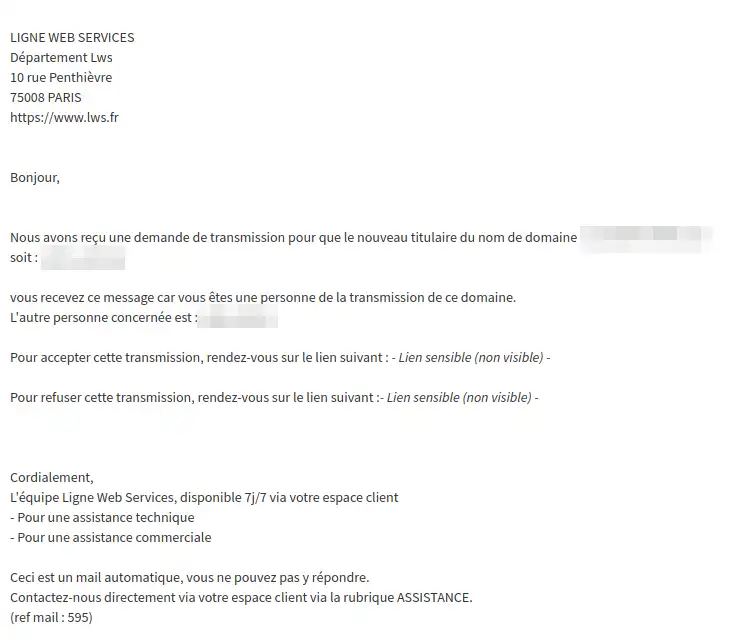
Click the link to accept the transfer and you will be redirected to a new page where you must choose the option "I confirm, I want to transfer my domain/service", then click "Confirm my request". If, however, you wish to cancel your request, you can select the other option "I cancel, I do not want to transfer my domain/service".

The transfer of the domain name or service
will only be finalized if both parties confirm their agreement by email.
The action of moving a domain name, a service or hosting is final; it will no longer be possible to reverse it without the agreement of the person concerned.
If the emails are not validated within 7 days after the request, it will be cancelled.
In the case of transferring technical management AND ownership of a service, 2 validation emails are sent to the transferors and 2 others to the transferees. For each, the transfer of ownership and the transfer of technical management must be validated. All 4 emails must be validated to complete the transfer in its entirety.
Step 4: Check that the transfer worked
Once the links in both emails have been validated, check that the transfer has been completed correctly.
In the destination account:
- Log in to the new account
- Check that the service appears in the list
In the originating account:
- Log in to the new account
- Check that the service no longer appears in the list
Timelines
- The transfer is usually immediate after validation of both emails
- If the service does not appear:
- Log out
- Log back in after 5 to 10 minutes
Common issues
Why is my service not listed in the transfer form?
Several possibilities:
- The service you want to transfer is not eligible (Mail Pro attached to an LWS domain name).
- You are not the owner of the domain name and cannot transfer ownership of it.
- The account is not the manager of the service you want to transfer.
The destination account cannot be found
Possible causes:
- Incorrect client ID
- Incorrect email address
- Non-existent account
Solution:
Ask the owner of the destination account for their exact login and email address.
What should I do if the service was not transferred?
If one of the two accounts has not confirmed the transfer by email within the allotted 7-day period, the account that made the request then receives an email informing them that the transfer could not be completed and has been cancelled.
A link in the email allows them to restart the request. This will send two new emails, both of which will need to be validated even if one of the two accounts had already confirmed the transfer before.
Transfer my Mail Pro service attached to a domain name managed by LWS
If the Mail Pro service is attached to a domain name managed by LWS, you cannot transfer the Mail Pro service alone without the domain.
You must transfer management of the domain to the LWS account that you want to also manage the Mail Pro service. Transferring the domain name will also automatically transfer the Mail Pro service.
You did not receive the confirmation emails
Check your email address and the spam or junk mail folder.
If you still cannot find the email, contact our customer support service.
Conclusion
You can move a service without a domain name to another client account in just a few clicks from your customer area.
The operation is quick, generally immediate, and does not change the technical configuration of the service.



 Yes
Yes No
No About
About 