Procédure
Service concerned : VPS server
Panel concerned : LWS Panel
Level : intermediate
Enabling IPv6 adds a dedicated IPv6 address to your server, in addition to its IPv4 address. You can then use this new address to make a website or another service accessible via IPv6.
Enabling the address does not automatically modify the DNS zone of your domains. This configuration is optional and must be carried out separately.
Before enabling IPv6
Check the security rules applied to your server, especially if you have limited certain accesses to specific IPv4 addresses.
A firewall rule or restriction configured only for IPv4 does not necessarily block IPv6 connections. After activation, adjust your rules so they also protect the server's IPv6 address.
Enable IPv6 on the server
- Log in to your LWS customer area.
- Go to the management of your VPS
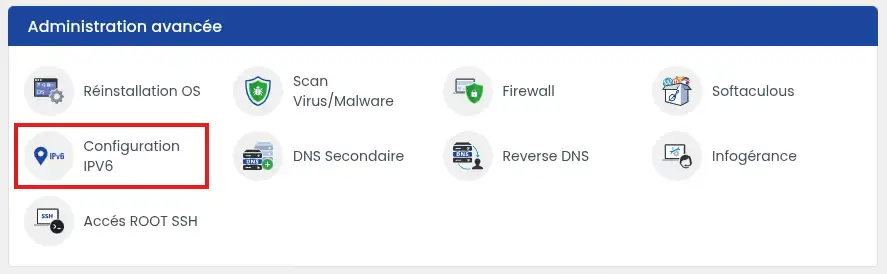
- In the server management, click IPv6 Option in the Advanced configuration section.
- Select Enable, then click Validate.
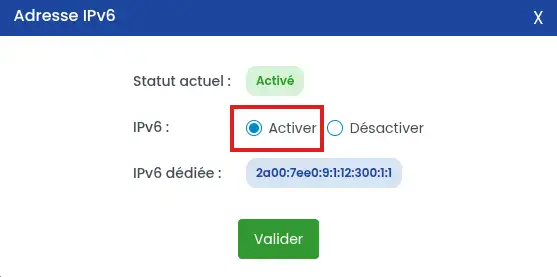
The dedicated IPv6 address is deployed on your server within a few minutes.
Check that the IPv6 address is active
Go back to the IPv6 Option section of your server. The option should appear as active, and the IPv6 address assigned to the VPS should be shown.
Enabling the address does not mean that all server services are immediately accessible via IPv6. The web server, firewall, and other applications used must also accept IPv6 connections.
To make a site accessible with this address, you must then add an IPv6 record in the DNS zone of its domain name.
Point a domain to the IPv6 address
A DNS record of type AAAA allows you to associate a domain or subdomain with an IPv6 address.
You can keep the existing A record. The domain will then be able to use IPv4 and IPv6 depending on the connection available to the visitor.
If the DNS zone is managed at LWS
- Go to its DNS zone.
- Check whether an AAAA record already exists for the domain or subdomain concerned:
- if it exists, modify its value;
- if it does not exist, add a new record.
- Select the AAAA type.
- Enter the main domain or subdomain to configure.
- In the record value, enter the IPv6 address assigned to your VPS.
- Save the change.
If you do not know how to modify your domain's DNS zone, refer to this documentation
To make both the main domain and the address starting with www accessible, make sure each has an appropriate DNS configuration. An AAAA record may be necessary for www if it is not already linked to the main domain by a DNS alias.
If the DNS zone is managed by another provider
Log in to the provider's interface that supplies the DNS servers used by your domain, then create the same AAAA record.
If you do not know how to modify this zone, contact that provider and provide them with:
- the domain or subdomain to configure;
- the record type: AAAA;
- the IPv6 address assigned to your VPS.
This procedure concerns pointing a domain or subdomain to the server.
Configuring an email service in IPv6 requires additional settings. Do not directly replace an MX record with an IPv6 address.
A DNS change may take several hours before it becomes visible everywhere. During this time, some visitors may still use the old configuration.
Common issues
I do not see the IPv6 option
Make sure you are managing the correct server. The option may also not be available on certain plans or configurations. In this case, contact LWS support and indicate the server concerned.
The IPv6 address is active, but my website does not respond
Check the following points:
- an AAAA record is correctly pointing the domain to the right address;
- the web server accepts IPv6 connections;
- the firewall allows the ports used, generally ports 80 and 443 for a website;
- no security rule is blocking IPv6 traffic.
My domain points visitors to another server
Look for the AAAA records already present in the DNS zone. An old record may still send IPv6 connections to another address.
Only modify or delete the record that is no longer needed. Do not delete the A record if you want to keep site access via IPv4.
The DNS change is not yet visible
Wait a few hours, then check the DNS zone again. Also make sure that you modified the zone with the provider whose DNS servers are actually used by the domain.



 Yes
Yes No
No About
About 