Procédure
Objective
This procedure allows you to block certain access methods to an email address.
Concretely, you can prevent the use of your mailbox in software or applications such as Outlook, Thunderbird, or the Mail app on a phone, or alternatively also block access to the Webmail depending on your needs. This article specifically presents this logic for restricting POP, IMAP, SMTP, and Webmail access.
Relevant offers
This documentation is intended for custom email addresses included with a domain name, shared hosting, or an email service compatible with this management in the LWS Panel.
When should this feature be used?
This feature may be useful if you want to:
- strengthen the security of an email address;
- prevent its use in an email client installed on a computer or phone;
- reserve access to a single usage mode, for example only via Webmail;
- prevent sending messages from an external software if you do not want this address to be used elsewhere.
Before you begin
Before applying a restriction, check the following points:
- the email address concerned has already been created;
- you know whether this address is used in Outlook, Thunderbird, Apple Mail, or on a smartphone ;
- you understand that by blocking certain access methods, the devices or software concerned will no longer be able to check or send emails with this address.
Important
If you block:
- POP and IMAP, an email client or application will no longer be able to retrieve your emails;
- SMTP, an email client or application will no longer be able to send emails with this address;
- Webmail, you will no longer be able to access this mailbox from LWS webmail.
Understanding the different access methods simply
Here is what the options in the interface correspond to:
- POP: allows a software to retrieve your emails;
- IMAP: allows a software or application to synchronize your emails;
- SMTP: allows a software or application to send emails;
- Webmail: allows access to your mailbox from the LWS webmail interface.
In practice:
- if you only use your address in Webmail, you can block POP, IMAP, and SMTP;
- if you check your emails on a phone or in an email client, do not block the access methods you still need.
Step 1 – Accessing the restriction settings
11. Log in to your LWS client area
22. Go to the management page for your shared hosting or mail service.
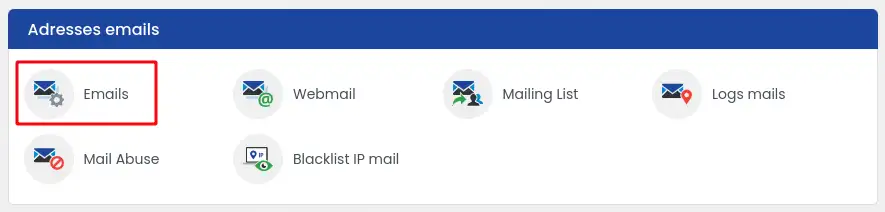
33. Click the "Emails" icon in the "Email addresses" section.
44. Click the "Action" button next to the relevant address
55. Select "Configure restrictions"
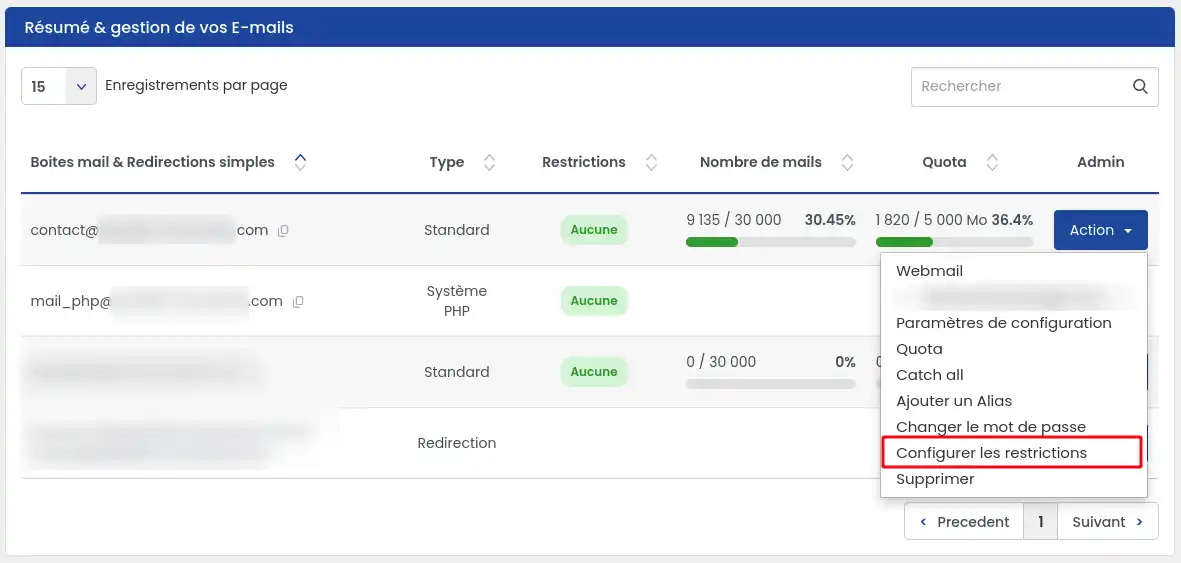
The « Mail access management » window appears with the different available blocking options.
Step 2 – Block the protocols of your choice
In the « Mail access management » window, each access offers two choices, No (default setting) and Yes. Switch to Yes for each access you want to block:
- Block the POP3 protocol: blocks email retrieval from an email client;
- Block the IMAP protocol: blocks email synchronization with a software or application;
- Block the SMTP protocol: blocks sending emails from a software or application;
- Block Webmail access: also blocks access to the mailbox from LWS webmail.
The « Country restriction » link below these choices allows you to block access from certain countries: see the dedicated help at the end of the page.
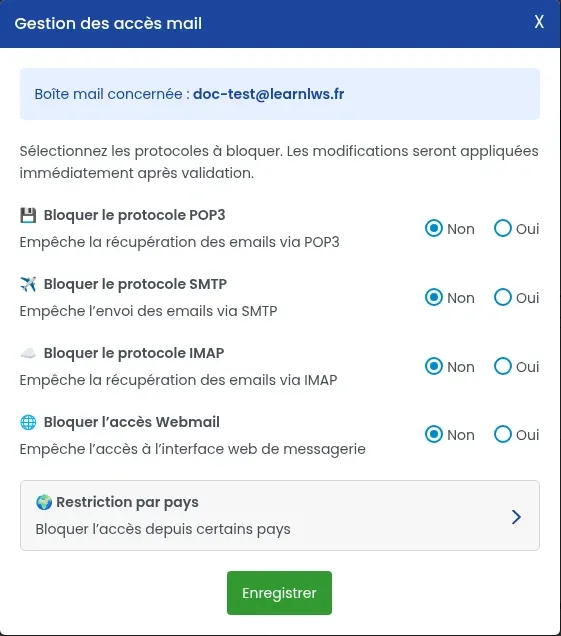
Then click « Save ».
Concrete examples
Case 1: you want to use only Webmail, switch to Yes for: POP3, IMAP, SMTP and leave Webmail on No.
Result: you will no longer be able to use this address in Outlook, Thunderbird, or on a phone, but you will still be able to use it from LWS webmail.
Case 2: you want to prevent any access to the mailbox, switch to Yes for: POP3, IMAP, SMTP, Webmail
Result: all access will be blocked for this address.
Case 3: you only want to prevent sending from a software, switch only to Yes for: SMTP
Result: checking mail may still be possible, but sending from an external software will be blocked.
Check that the restriction is active
After saving:
- an alert icon appears next to the relevant email address in the list;
- this icon indicates that a restriction is active on this mailbox.
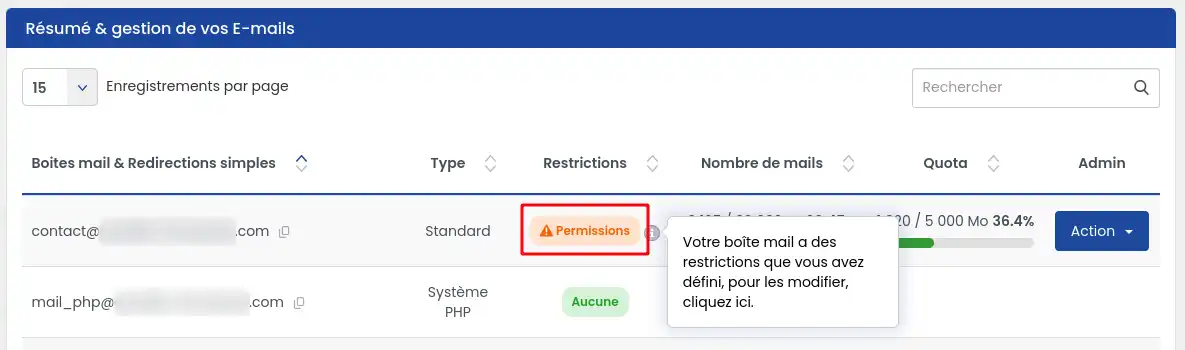
You can return to this configuration at any time to modify it.
Expected result
Depending on the access methods switched to Yes:
- software such as Outlook or Thunderbird may no longer be able to connect;
- a phone may stop retrieving new messages;
- sending emails may be refused if SMTP is blocked;
- access to Webmail may become impossible if Webmail is also restricted.
Application delay
The restriction is applied immediately after saving in the interface.
Common issues
I no longer receive my emails on my phone.
Check whether POP or IMAP has been blocked.
If so, your phone can no longer retrieve or synchronize messages with this address.
I can no longer send emails from Outlook or Thunderbird
Check whether SMTP has been restricted.
If « Block SMTP protocol » is set to Yes, sending from an external software is blocked.
I can no longer access my mailbox on Webmail
Check whether the Block Webmail access option is set to Yes.
If so, access from LWS webmail is intentionally disabled.
I do not know which access methods to block
First ask yourself this simple question:
Where do you use this email address today?
- only in Webmail: you can block POP, IMAP, and SMTP;
- in Outlook, Thunderbird, Apple Mail, or on a phone: do not block the access methods you still use.
I cannot find the “Configure restrictions” menu
Make sure:
- you are in the correct service management area in the LWS Panel (and not cPanel) ;
- you have opened the email addresses section;
- you clicked Action next to the correct address.
Security tips
To further strengthen the security of your email address, it is recommended to combine this feature with other protections: use of Webmail with two-factor authentication and country-based geographic restriction.
Conclusion
You now know how to block POP, IMAP, SMTP, or Webmail access to an email address from the LWS Panel.
This feature is useful for better controlling the access methods to your mailbox and adapting its use to your needs.
Before enabling a restriction, always keep this essential point in mind:
- if you use your address in an email client or on mobile, a poorly chosen restriction may block that use;
- if you only use Webmail, you can limit the other access methods to improve security.


 Yes
 No
 About
