
Online help
The web host accessible to all
Procédure
The HTTPS protocol offers increased security for your Internet site and enables data and transactions on online shops to be encrypted. Your visitors and customers will be reassured when browsing your Joomla site. The SSL certificate also improves your ranking on the main search engines such as Google. You can install Let's Encrypt on your LWS web hosting.
1. Activate the SSL certificate on your Web hosting
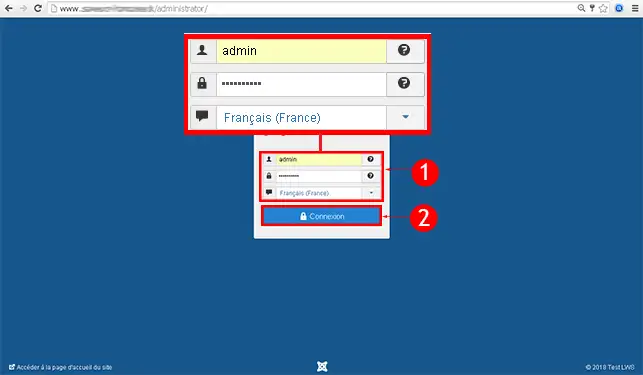
2. Connect to the administration of your Joomla website.
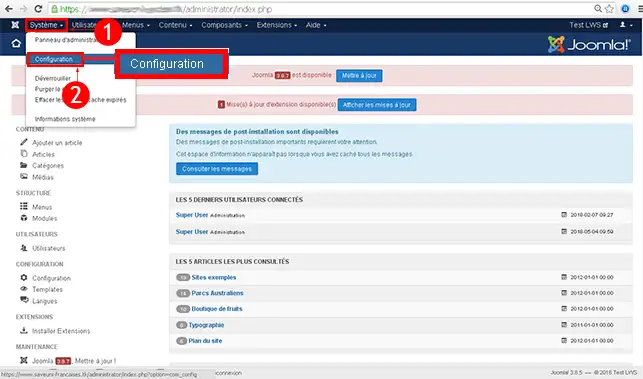
3. In the menu at the top of the page, click on"System" and then on"Configuration".
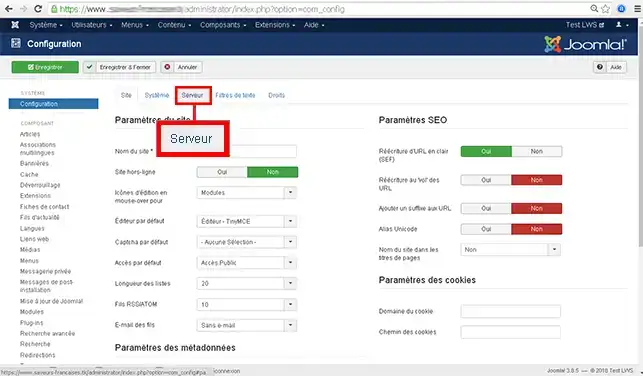
4. Go to"Server".
5. Go to"Force HTTPS" in the"Server settings" section and choose one of the 2 possible options.
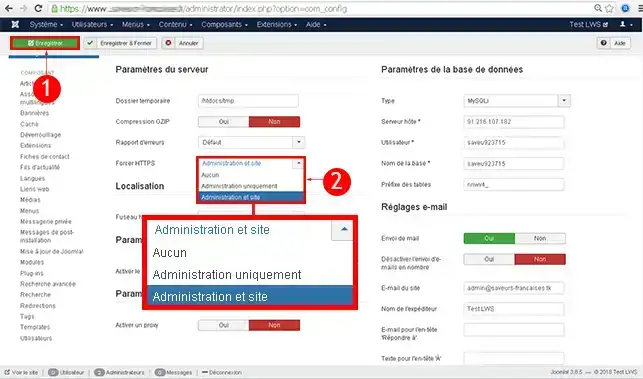
You are now able to force the HTTPS protocol on your Joomla site created with LWS. The HTTPS protocol will allow you to secure your website and will also reassure your visitors.
Don't hesitate to share your comments and questions!
Ask the LWS team and the community. Answers are published after moderation.
 About LWS :
LWS is a 100% French web hosting company that focuses on quality and innovation and offers a responsive and competent technical service at affordable prices.
About LWS :
LWS is a 100% French web hosting company that focuses on quality and innovation and offers a responsive and competent technical service at affordable prices.



 Yes
Yes No
No