
Online help
The web host accessible to all
Procédure
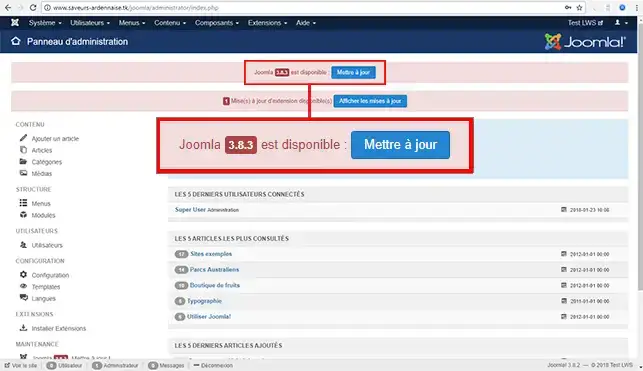
1. To update your Joomla CMS, go to Joomla administration and you will see this type of message, click on the "Update" button:
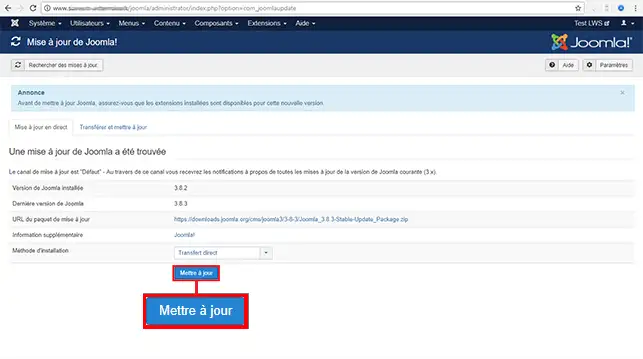
2. Leave the default settings then click on"Update" and wait a few minutes.
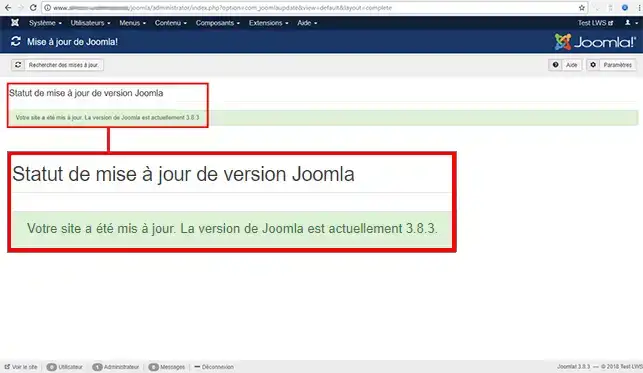
Once the installation is complete, Joomla will display this message:
Ask the LWS team and the community. Answers are published after moderation.
 About LWS :
LWS is a 100% French web hosting company that focuses on quality and innovation and offers a responsive and competent technical service at affordable prices.
About LWS :
LWS is a 100% French web hosting company that focuses on quality and innovation and offers a responsive and competent technical service at affordable prices.



 Yes
Yes No
No