
Online help
The web host accessible to all
Procédure
Welcome to the documentation on how to unblock your IP address on the LWS mail service. Your IP address may be blocked for security or abuse reasons. This documentation aims to provide you with detailed information and step-by-step instructions to unblock your IP address on the LWS mail service.
When your IP address is blocked on the LWS mail service, it may be due to different reasons. The most common include sending excessive emails, the detection of suspicious or spam activity coming from your IP address, or a misconfiguration of your mail server. These security measures help protect LWS servers and users from abuse and potential threats.
Generally, the temporary blocking of an IP on your mail service follows the triggering of one of the following errors:
In the case of your IP being blocked following one of the errors listed above, an email was sent to the contact address of your LWS account to notify you of the block.
Before unblocking your IP address, it is crucial to correct the source of the block to avoid a recurrence. Check whether you have sent bulk emails or whether your website has been compromised. Make sure your scripts and applications are up to date to prevent vulnerabilities. If you suspect a spam problem originating from a user account, ask the user to check their security and change their passwords.
Step 1: First, you must log in to your LWS client area in order to access the management of your hosting or your Pro mail service.
Step 2: Once in your hosting management area, find the "Security" section. Then click on "Web and Mail IP Blacklist".
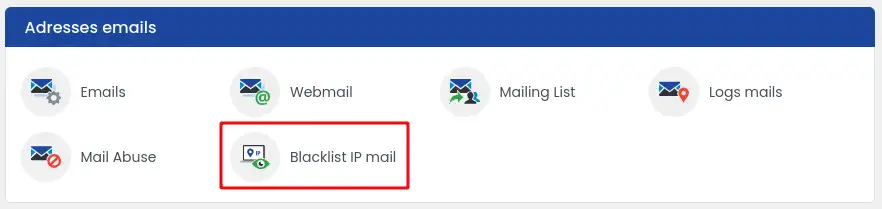
Step 3: Once on the blocked IP management page, click on the "Mail Server" tab (1)
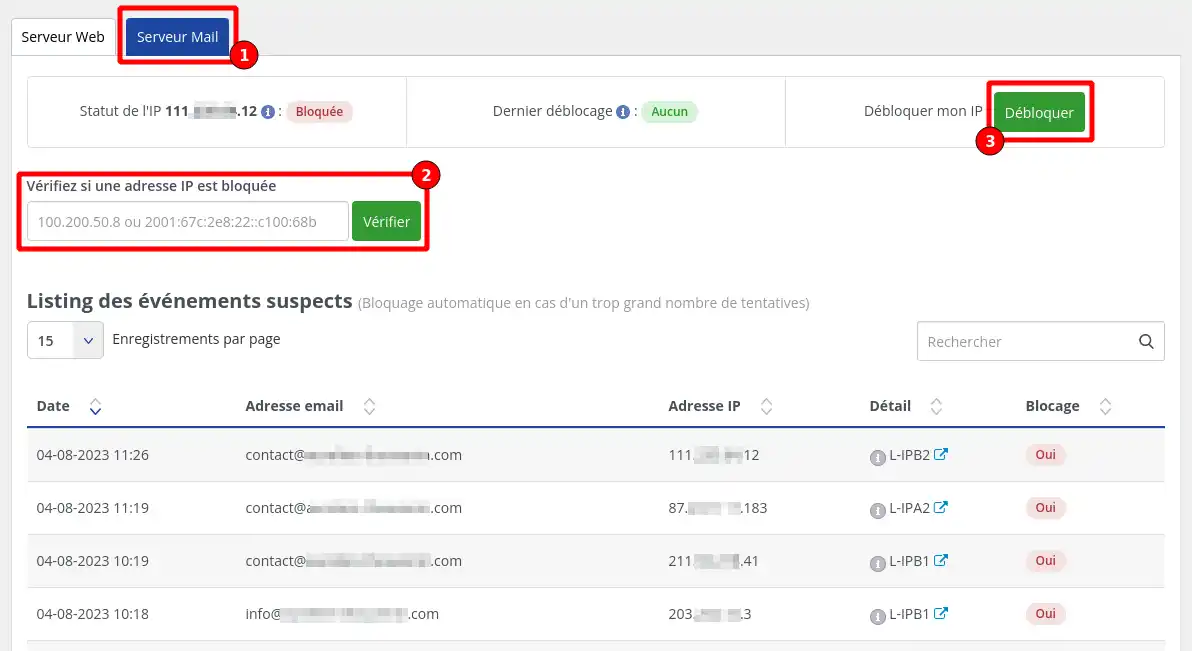
Step 4: Search for your IP by entering your IP address in the dedicated field (2), then click on "Check"
Step 5: Once the check is complete, you will be able to see whether your IP is currently still blocked or not. If it is still blocked, you can request its unblocking by clicking on the "Unblock" button (3)
Unblocking usually takes between 5 and 10 minutes to take effect.
You have the option of making 3 IP unblock requests per week. Therefore, make sure you understand and resolve the reasons that caused the block so that you are not blocked again once the unblocking has been carried out.
You now know how to:
Following these steps is essential to ensure the security and proper functioning of your mail service. 🛡️ With this practical guide, you can now act effectively in the event of a block and prevent future problems. Don’t forget the importance of maintaining good digital hygiene for your online accounts and services! 💻🔒
Thank you for taking the time to read this documentation. Your feedback is valuable to us! Feel free to leave a comment or share your experience regarding the LWS IP unblocking service. Your feedback helps us constantly improve our services. 🌟
Ask the LWS team and the community. Answers are published after moderation.
 About LWS :
LWS is a 100% French web hosting company that focuses on quality and innovation and offers a responsive and competent technical service at affordable prices.
About LWS :
LWS is a 100% French web hosting company that focuses on quality and innovation and offers a responsive and competent technical service at affordable prices.



 Yes
Yes No
No