LWS Linux shared hosting and domain package6 November 2026By Aurélien T. 0 min read
Multi-domain - Put several domains on the same web hosting
Procédure
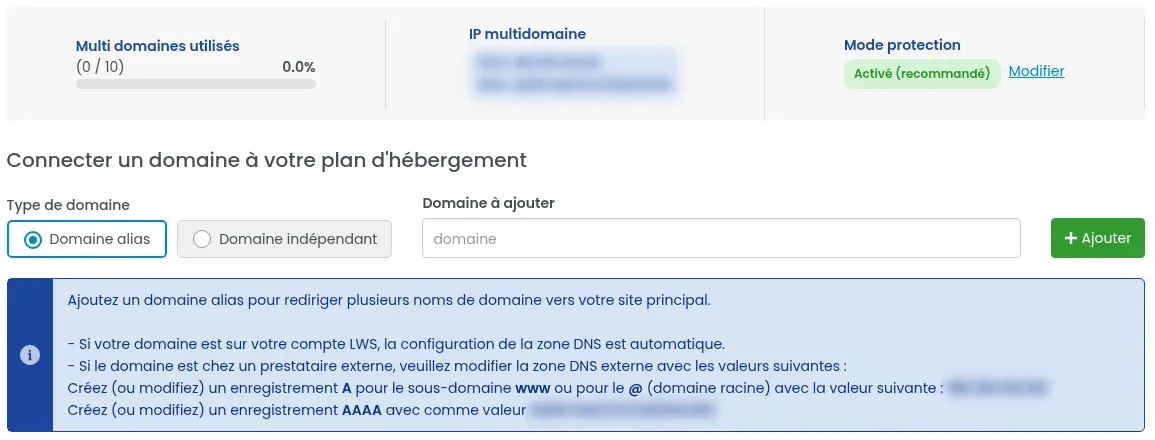
The Multi Domains section of the LWS Panel connects other domain names to your shared hosting. An alias domain displays the site of your main domain; an independent domain gets its own folder and can therefore display a separate site. An alias domain does not display the site of an independent domain: if your alias shows the LWS welcome page, the section “Alias domain: which site is displayed?” explains why.
What is Multi-domain Web Hosting?
Multi-domain web hosting lets you install several independent sites on the same shared hosting plan. Each domain you add falls into one of these two types:
Alias domain: the added domain displays the same site as your main domain (for example monsite.com showing the site of monsite.fr).
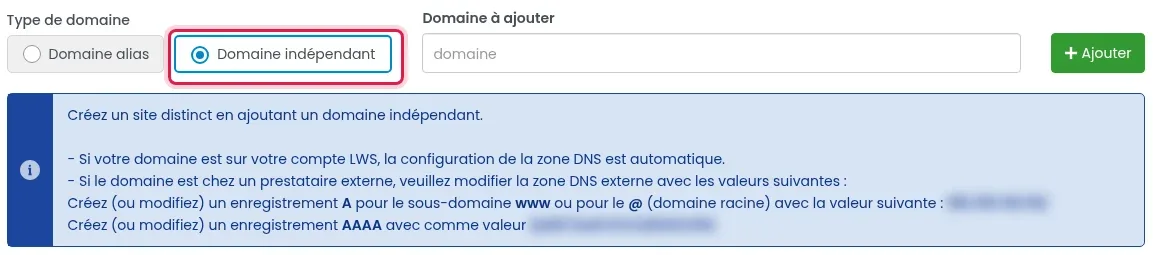
Independent domain: the added domain has its own folder on the hosting account, and therefore its own site.
The “Multi domains used” counter, at the top of the Multi Domains page, shows how many domains you have added and how many your plan allows.
How do I access the multi-domain configuration of my web hosting?
An alias domain displays the site of your main domain. In the “Multi-domain listing” table, its “Directory” column shows “/”: the alias displays what is published at the root of your hosting space.
An independent domain, on the other hand, has its own directory, such as “/domain-name”. The site published there (for example a WordPress installed for that domain) is displayed only under that domain: an alias domain does not display the site of an independent domain.
The table does not let you change the directory of a domain that has already been added: it only offers the red trash icon, which removes the domain from the hosting account.
Specific feature of the independent domain
If you add a domain to your hosting in “Independent domain” mode in order to have a separate site, a folder with exactly the same name as your domain name will automatically be created on your FTP space. It is shown in the “Directory” column of the table.
You then only need to publish your website in that folder, by connecting via FTP to your main account or with the LWS Panel file manager. The auto-installer can also install a CMS directly on a domain added through Multi Domains.
Protection mode
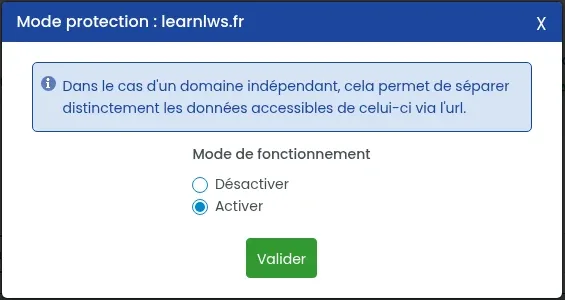
In the Multi Domains section, you can enable the Protection Mode option to allow or prevent access to the data of each added domain through the main domain. According to the panel window, in the case of an independent domain, it allows the accessible data to be clearly separated from it via the URL.
To adjust it, click “Modify” next to “Protection mode”, choose “Disable” or “Enable” under “Operating mode”, then click “Confirm”. The panel recommends enabling it (“Enabled (recommended)”).
Frequently asked questions
My alias domain displays the LWS welcome page instead of my site
The LWS welcome page is displayed when no site is published at the location read by the domain (see My domain name displays my hosting welcome page). An alias reads its “/” directory, the root of your hosting space. Two situations are possible:
The site you want to display belongs to an independent domain on your hosting account (its directory is of the “/domain-name” type): the alias does not display it, and the alias directory cannot be changed from Multi Domains. Do not move or delete any files: open a support request from your client area, indicating the alias domain, the domain whose site you want to display, and its directory (the “Directory” column). Our team will tell you the appropriate steps for your hosting plan.
No site has yet been published for your main domain: publish it, and the alias will display it too. The ways to publish a site are listed in the help on the welcome page mentioned above.
My added domain displays nothing
First wait 15 minutes after adding it. If the domain is with another provider, check that its A and AAAA records really contain the addresses from “Multi-domain IP”. For an independent domain, check that your site files are indeed in the folder indicated in the “Directory” column.
How do I add a second domain to my hosting plan?
Add a free Let's Encrypt certificate to your domains or subdomains
Bonjour.
Je souhaite hébergé plusieurs domaines sur mon espace web, et je ne peux qu'héberger 3 maxi. Comment augmenter ce quota ?
F✓
fabrice-LWS Official answer
29 Jul 2022
Bonjour, cela dépendra de la formule que vous disposez actuellement. La formule cPanel M permet d'héberger qu'un seul nom de domaine supplémentaire (en plus du domaine rattaché à la formule cPanel).
Les formules cPanel L et XL ne disposent pas de quotas au niveau du nombre de nom de domaine qu'il vous sera possible de lier à ces deux formules. Les formules LWS Starter, Standard et Performance vous permettront d'héberger plus de trois noms de domaine sur la même formule. Si besoin, vous avez la possibilité de changer de formule pour une formule plus adaptée en vous rendant sur l'administration de la formule concernée puis sur "Changer de formule".
Was this answer helpful?
R
riton
18 Sept 2022
Bonjour possible d avoir 2 site en e commerceM merci
F✓
fabrice-LWS Official answer
19 Sept 2022
Bonjour, il est possible d'avoir deux noms de domaine rattaché à la formule e-commerce et d'y mettre de ce fait, deux sites e-commerce. Cependant, il vous faudra installer le deuxième site manuellement et non avec l'auto installer.
Was this answer helpful?
D
Doom29
9 Nov 2022
Trop de manipulations fastidieuses pour simplement créer un deuxième site . Est ce que ce n'est pas plus simple en passant par CPanel ? ....des heures de perdues sans résultat. Nous allons publier une vidéo sur la complexité d'utilisation de LWS...
F✓
fabrice-LWS Official answer
12 Nov 2022
Bonjour, vous pouvez tout à fait changer de formule pour passer sur cPanel. La configuration d'un second Domaine sur cPanel s'effectuera en suivant la procédure suivante: https://aide.lws.fr/a/670 . Il vous faudra également modifier les serveurs DNS de votre domaine pour les serveurs DNS du cPanel après avoir ajouté le domaine concerné sur la formule cPanel. Vous pouvez, si vous le désirez, changer de formule pour une formule cPanel en vous rendant sur votre espace client LWS, cliquez sur "Gérer" se trouvant derrière le domaine concerné puis sur "Changer de formule".
Was this answer helpful?
A
André
27 Dec 2022
Bonjour, Je dispose d'une fomule LWS standart avec un nom de domaine et son site web associé et en plus un autre domaine mais indépendant. J'ai créé deux nouveaux noms de domaines. Est ce possible de tout regrouper sous la formule standart?
F✓
fabrice-LWS Official answer
31 Dec 2022
Bonjour, vous pouvez lier les noms de domaine à votre formule LWS Standard en vous rendant sur l'administration de votre formule puis sur "Multidomaien " afin d'ajouter les noms de domaine concerné. Il vosu faudra ensuite modifier la Zone DNS de chacun des noms de domaine par l'IP rattaché à votre formule LWS Standard. Il s'agit de la Zone de type A pour la valeur @ (représentant le nom de domaine). Il est toutefois à noter qu'il ne sera pas posisble de bénéficier du quota emails rattaché à la forule LWS Standard pour des domaines attaché à cette formule. De ce fait, chaque domaine supplémentaire disposera de son propre quota emails, à savoir deux adresses emails. Il vosu sera toutefois possible d'augmenter ce quota pour chacun des domaines en vous rendant sur l'administration des domaines puis sur "Administrations Emails". Cliquez ensuite, colonne de droite , sur "Vous désirez plus d'email".
Was this answer helpful?
L
Ludo
1 Jan 2023
Bonjour, j'ai transféré un domaine (A) indépendant LWS vers un hébergement (B) LWS via Multi-domaine. Si ensuite je renouvelle uniquement le nom de domaine (A), est-ce que je conserve l'Email associé à ce domaine?
F✓
fabrice-LWS Official answer
3 Jan 2023
Bonjour, en effet, le renouvellement de votre domaine A chez votre prestataire actuel aura pour effet, la conservation de l'e-mail associé à ce domaine. Dans tous les cas, il est nécessaire de renouveler tous les domaines rattachés à votre formule en multidomaine afin que ces derniers restent accessibles.
Was this answer helpful?
M
Manu
6 Apr 2023
Bonjour, comme indiqué l'activation des multidomaines sur mon serveur LWS Standard à désactivé mes sous-domaines. Comment faire pour les réactiver ?
B✓
Benjamin-LWS Official answer
13 Apr 2023
Bonjour,
Merci de votre retour.
La fonctionnalité "Multi-Domaines" est activée par défaut sur nos formules LWS Standard et supérieurs.
Elle n'est pas désactivable, et surtout, elle n'empêche pas le bon fonctionnement des sous-domaines.
Je vous remercie de votre attention et reste à votre disposition pour toute autre question ou complément d'information.
Nous vous invitons à contacter notre service support à travers votre espace client, afin de vous apporter une aide si vous rencontrez des difficultés quelconque. (https://aide.lws.fr/a/268)
Cordialement, L'équipe LWS
Was this answer helpful?
S
sc
4 May 2023
Bonjour à vous. Sur la formule Starter. Comment faire pour créer une boite mail sur un domaine indépendant déclaré dans l'onglet multi-domaines. Merci pour votre réponse
B✓
Benjamin-LWS Official answer
5 May 2023
Bonjour.
Merci de votre retour.
Malheureusement, la fonctionnalité multi-domaines disponible dans la formule Starter ne permet pas de créer des boîtes e-mail pour les domaines indépendants déclarés. Elle permet uniquement d'utiliser la fonctionnalité web de l'hébergement auquel le domaine est lié.
Si vous souhaitez créer des boîtes e-mail, vous devrez le faire sur l'espace de ce domaine.
Je vous remercie de votre attention et reste à votre disposition pour toute autre question ou complément d'information.
Nous vous invitons à contacter notre service support à travers votre espace client, afin de vous apporter une aide si vous rencontrez des difficultés quelconque. (Contacter le support LWS)
Cordialement, L'équipe LWS
Was this answer helpful?
L
Levis
21 May 2023
Bonjour, Je dispose d'une formule Cpanel L avec un nom de domaine et son site web associé . Jai ajouter un autre domaine de formule domaine . comment changer la formule de ce domaines pour qu'ils aile la meme formule que le domaine principal
B✓
Benjamin-LWS Official answer
24 May 2023
Bonjour,
Merci de votre retour.
Actuellement, vous avez posé votre question sur l'aide d'ajout de domaine supplémentaire sur nos formules LWS, hors comme vous l'énoncez vous avez un cPanel, alors je vous invite à suivre cette documentation qui explique comment ajouter un domaine à votre formule : Ajouter un domaine compagnon sur cPanel.
Je vous remercie de votre attention et reste à votre disposition pour toute autre question ou complément d'information.
Nous vous invitons à contacter notre service support à travers votre espace client, afin de vous apporter une aide si vous rencontrez des difficultés quelconque. (Contacter le support LWS)
Cordialement, L'équipe LWS
Was this answer helpful?
C
Cerame
10 Jun 2023
je souhaite afficher le contenu de mon domaine independant mais il n'affiche le page d'accueil avec un url different de mon domaine independant
B✓
Benjamin-LWS Official answer
15 Jun 2023
Bonjour,
Merci de votre retour.
Malheureusement, je ne peux constater actuellement le problème que vous rencontrez et donc vous aidez à résoudre celui-ci.
Pourriez-vous passer par notre support client afin que l'on vous aide sur ce problème. (Contacter le support LWS)
Je vous remercie de votre attention et reste à votre disposition pour toute autre question ou complément d'information.
Cordialement, L'équipe LWS
Was this answer helpful?
A
A
21 Jul 2023
Bonjour j'ai une formule WP Business pour 24 mois j'ai déjà crée un premier site je voudrais donc savoir s'il serait possible de crée un second site sans effacer le premier et comment faut il procéder svp
A✓
Aurelien-LWS Official answer
24 Jul 2023
Bonjour,
Nous vous remercions pour votre message.
Il ne vous sera pas possible de déployer un deuxième site sur le même espace de nom (nom de domaine ou sous-domaine) en revanche, avec une formule WP Business, vous pouvez parfaitement déployer un second site sur un second nom de domaine ou un sous-domaine qui n'a pas de site en suivant cette documentation.
j'arrive pas à mettre mon nouveau domaine dans ma formule WP Premium. Comment faire ?
J✓
Jordan-LWS Official answer
9 Feb 2024
Bonjour,
Je suis désolé que vous ne soyez pas en mesure d'effectuer l'ajout d'un domaine supplémentaire sur votre formule WP Premium, si vous le souhaitez notre équipe d'assistance technique est à votre disposition pour vous assister sur cet ajout et nous vous invitons à les contacter en suivant cette documentation.
Je vous remercie pour votre attention et reste à votre disposition pour toute autre question ou complément d'information.
Cordialement, L'équipe LWS.
Was this answer helpful?
G
GaGGy
6 Jul 2025
Bonsoir Je gère un domaine et son hosting LWS Starter Un de mes collègues a acheté un domaine chez un autre registrar Comment dois-je configurer le DNS chez l'autre Registrar afin que les deux sites soient disponibles a partir de leurs URL respectives
J✓
Jordan-LWS Official answer
9 Jul 2025
Bonjour,
Si vous souhaitez utiliser un domaine externe avec votre formule d'hébergement, dans ce cas nous vous recommandons la mise en place d'un multidomaine sur la formule d'hébergement.
Pour réaliser cela, nous vous invitons à suivre la documentation suivante : https://aide.lws.fr/a/334
Je vous remercie pour votre attention et reste à votre disposition pour toute autre question ou complément d'information.
Cordialement, L'équipe LWS
Was this answer helpful?
A question about this article?
Ask the LWS team and the community. Answers are published after moderation.
Ask the LWS team and its community a question
!
To enable this form, please tick the two consent boxes below.



 Yes
 No
 About
