Personalised emails included with NDD & Shared Hosting6 November 2026By Aurelien 1 min read
Why can your LWS email address be suspended for inactivity?
Procédure
Introduction
Email addresses suspended for inactivity can cause problems for LWS users. This documentation aims to explain the reasons behind this suspension, the unlocking procedure, and the best practices to avoid any new blockage. It is crucial to keep an email address active to ensure smooth communication and prevent inactivity-related issues.
A suspended address no longer receives any messages: each sender receives a rejection mentioning a quota exceedance (“over quota”), even if the mailbox is almost empty. Messages already present in the mailbox are kept.
I. Why is your LWS email address suspended?
We consider an address that has had no login during the last 90 days by a user to check its content as a dormant email address.
What matters is checking the mailbox: via webmail, or from an email client (Outlook, Thunderbird, your phone app…) that retrieves the mailbox. Messages received by or forwarded from the address do not count as usage. Likewise, an address used only to send emails from a website with SMTP authentication is not being checked: see part IV to avoid its suspension.
In the vast majority of cases, these addresses were created for testing purposes or for an employee who does not use it or is no longer part of the organization.
An email address that has been created but is unused is consuming resources that could be better utilized. An email address that is not checked may continue to receive or forward emails, which will occupy storage space on the server, on our daily backup system for our customers' data, but also generate bandwidth traffic caused by email reception. In addition, this type of email address, which sometimes receives spam emails, may automatically forward these emails and therefore impact the reputation of LWS server IPs. It is therefore important not to let email addresses operate on their own without anyone taking care of them.
II. How can I check whether my email address is suspended for inactivity?
When an email address is unused, our system detects it and sends an email to the account's contact email address as well as to the affected email address 7 days before suspension so that the user can take the necessary steps before the suspension takes effect.
A second email is sent when the email address is suspended by the system to notify the account owner of this suspension.
If, despite our warnings and notification, the email address is suspended, the user can check the suspension status of an email address by following these steps from their LWS client account:
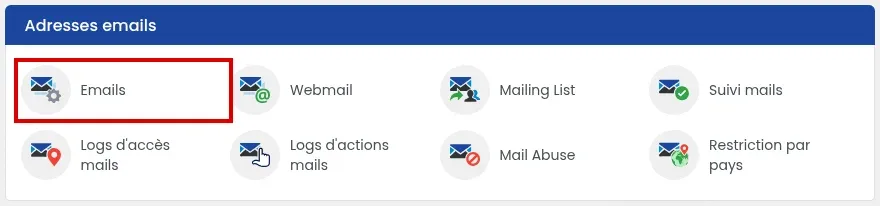
Step 2: once in your hosting management area, find the "Email addresses" section. Then click on "Emails".
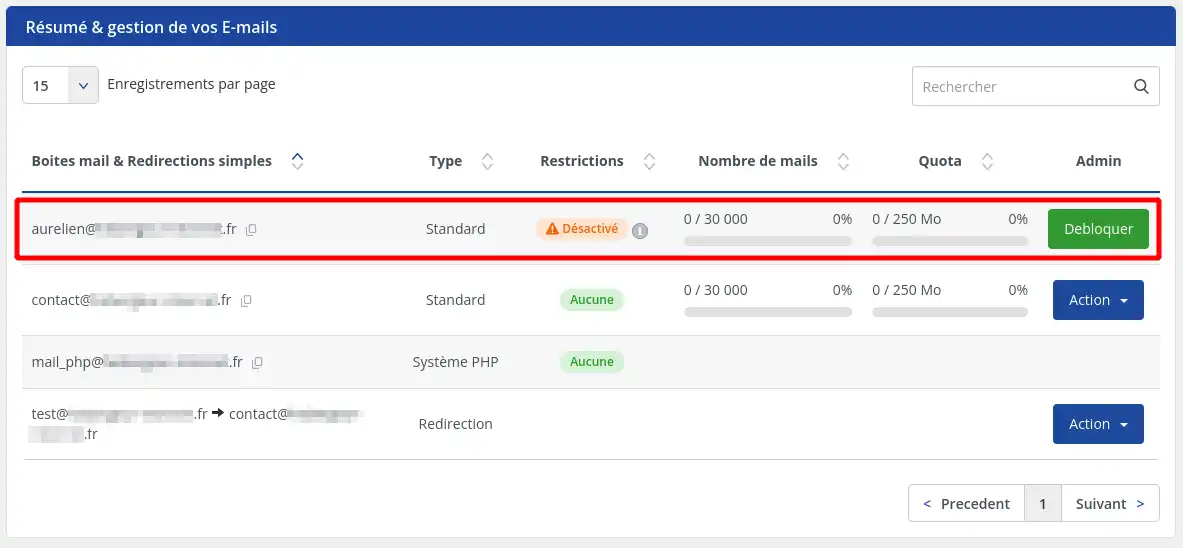
Step 3: View the list of email addresses. The suspended address should have the status "disabled" if it is indeed affected by this suspension procedure.
What happens during suspension
Suspension cuts off receipt of messages on the address. Any message sent to this address is rejected by the server: it does not reach the mailbox, and its sender receives a non-delivery notice containing this text:
554 5.7.1 Recipient address rejected: Sorry, my mailbox is curently over quota. Desole, ma boite mail est actuellement en depassement de quota
This message refers to a full mailbox, but it is also sent when the address is suspended, even if the mailbox is using only a few KB of its space. If a contact sends you this rejection while your mailbox is far from full, first check whether the address is suspended by following the steps above.
III. Procedure for unblocking an inactive LWS email address
To quickly reactivate a suspended email address, you can follow these steps:
Step 2: once in your hosting management area, find the "Email addresses" section. Then click on "Emails".
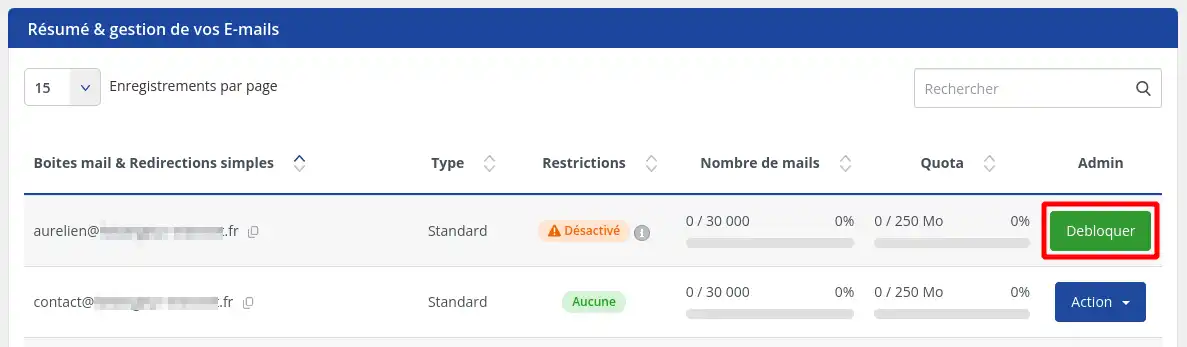
Step 3: View the list of email addresses and click the "Unblock" button for the relevant address.
An alternative solution is simply to log in to the relevant email address to reactivate it for at least 90 days.
Check that the address is receiving again
About 5 minutes after reactivation, send a test message to the address from another address (for example a Gmail address), then check that it arrives in the mailbox. If your contact no longer receives an “over quota” rejection, the address has indeed been reactivated.
IV. Some solutions to avoid any suspension
You are forwarding emails to one or more other email addresses.
If this email address is unused, but its only purpose is to forward emails to another address, then several solutions exist:
If forwarding is done to multiple email addresses, then we recommend using a mailing list.
You have a dedicated email address for sending mail with your website using SMTP authentication
In this case, several tips can help you avoid a suspension problem:
Use the "mail()" function of the PHP programming language to send emails from your website. For CMS such as WordPress or Prestashop, free plugins exist to perform this operation easily.
Authenticate your website via SMTP with an email address that you use daily to communicate with your prospects, customers, communities, etc.
In any case, don't forget that sometimes, recipients of emails from your website may reply to them and that it is useful to check this email address regularly so as not to miss important information.
Frequently asked questions
My contact receives an “over quota” rejection even though my mailbox is almost empty: why?
This rejection is also sent when the address is suspended for inactivity. Check in the “Email addresses”, “Emails” section whether the address has the “Disabled” status, then reactivate it with the “Unblock” button or by logging in to the address.
What happens to messages sent during suspension?
They are rejected by the server and do not reach the mailbox. Each sender receives a non-delivery notice. To receive these messages, ask senders to resend them once the address is reactivated. Messages that were already in the mailbox before suspension are not deleted.
I received the notice even though I use this address: what should I do?
The notice gives the list of unused addresses. First check that the address mentioned is indeed the one you check. If you only receive its messages elsewhere (via forwarding) or send from a website using this address, the mailbox is not being checked: as indicated in the notice, simply check it once from webmail or your email client before the end of the 7 days.
To find out whether your devices are really connecting to this address, open the “Access logs” tab of your mail service and search for the address: each connection appears there with its protocol (webmail, IMAP or POP) and status. The help article How can I view the access and connection logs of my mail service? explains this search. If recent successful connections appear there and you still received the notice, contact LWS support by indicating the relevant address and the date of the notice.
I can't find the “Unblock” button
Use the second solution: log in once to the relevant address, for example from webmail, with the full address and its password. Then wait about 5 minutes, then perform the sending test described above.
Conclusion
By keeping your LWS email address active and following best security practices, you will avoid suspensions for inactivity. Make sure to use your email address regularly and benefit from the security features offered by LWS for a smooth and reliable communication experience. If you encounter any problems, feel free to contact LWS customer support for additional assistance.
j ai creer deux boites mails et ai tenter de me connecter avec thunderbird, je n ai même pas acces au webmail, suis-je bannis
B✓
Benjamin-LWS Official answer
8 Jun 2023
Bonjour,
Merci de votre retour.
N'ayant aucun accès à vos données LWS, je ne peux vous dire précisément d'où vient le problème que vous rencontrez. C'est pour cela que je vous invite à passer par notre service support à travers votre espace client pour régler votre problème au plus vite. (Contacter le support LWS)
Je vous remercie de votre attention et reste à votre disposition pour toute autre question ou complément d'information.
Cordialement, L'équipe LWS
Was this answer helpful?
P
Paul
13 Oct 2023
Je n'arrive pas connecter mon mail lws au webmail de lws. QUE FAIRE?
B✓
Benjamin-LWS Official answer
17 Oct 2023
Bonjour,
Malheureusement, nous ne pouvons pas vous aider via cette plateforme de question sous nos aides, ce qui rend difficile pour nous de fournir une réponse satisfaisante.
Nous vous invitons donc à contacter notre système de support client pour obtenir de l'aide spécifique à votre situation. Nous avons une équipe de professionnels qualifiés prêts à vous aider et à répondre à toutes vos questions avec précision et rapidité. (Contacter le support LWS)
Merci de votre compréhension et nous espérons pouvoir vous aider bientôt.
Cordialement, L'équipe LWS
Was this answer helpful?
M
MIRA
il y a 1 mois
Est ce que après avoir payé le nom de domaine, LWS demande encore les frais de maintenance pour hébergeur?
J✓
Jordan-LWS Official answer
il y a 1 mois
Bonjour,
Après le paiement de votre nom de domaine, aucun frais de maintenance supplémentaire n’est appliqué.
Nous facturons uniquement le renouvellement du nom de domaine. Si aucune autre formule ou prestation d’hébergement n’est associée à celui-ci, aucun frais supplémentaire lié à l’hébergement ou à la maintenance ne vous sera facturé.
En revanche, si une formule d’hébergement ou un autre service est associé au domaine, celui-ci fera l’objet de sa propre facturation lors de son renouvellement.
Je vous remercie de votre attention et reste à votre disposition pour toute autre question ou complément d'information.
Cordialement, L'équipe LWS
Was this answer helpful?
A question about this article?
Ask the LWS team and the community. Answers are published after moderation.
Ask the LWS team and its community a question
!
To enable this form, please tick the two consent boxes below.




 Yes
 No
 About
